
MCP server · Coding
JADX AI MCP server
by zinja-coder
Lets your AI read and explain decompiled Android app code inside JADX while you work.
This is a helper that connects your AI assistant to JADX, a popular free tool for opening up Android app files and reading their code. Once connected, your AI can look at the code you have open and answer questions about it. It is handy for people who poke at Android apps, like security testers and reverse engineers.
What is an MCP server? The 30-second version
On its own, your AI can only chat with you. An MCP server is a small helper program that gives your AI a new skill or a connection to another tool. This one connects your AI to JADX, the app that shows decompiled Android code. So when you ask a question, the AI can actually read the code in JADX and answer based on what is really there.
What this MCP server does
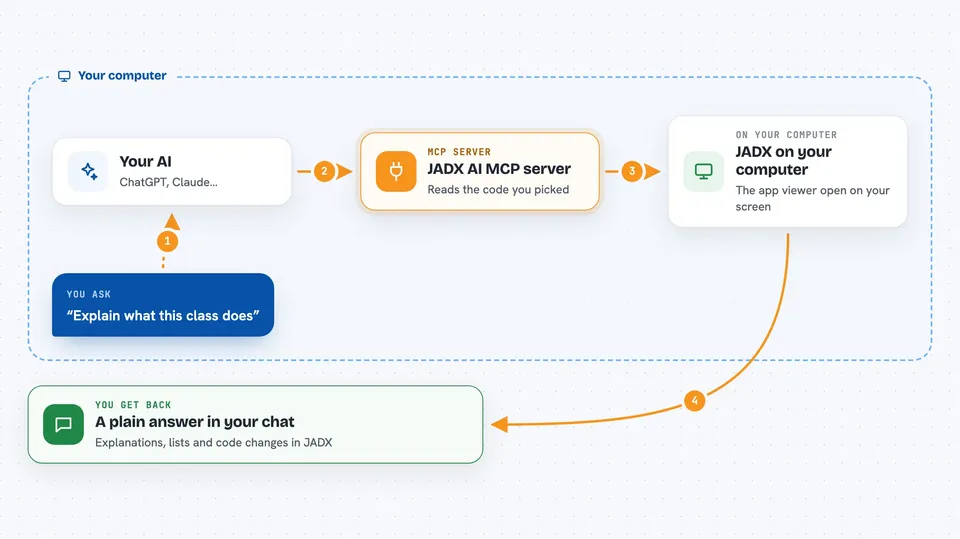
You open an Android app in JADX and pick a class or method. You ask your AI something about it in your chat app. The AI sends the request to this helper, which passes it to the JADX plugin. The plugin reads the code from JADX and sends it back, and the AI explains it or answers your question in the chat.
 Click to zoom
What you can do with it
- Explain what a class or method does
- Search all classes for a keyword like encryption
- List the methods and fields inside a class
- Read the AndroidManifest.xml and strings file
- Find where a class or method is used elsewhere
- Rename classes, methods and fields to readable names
- Add comments to code that show up in JADX
Try asking your AI
- “Explain what this class does in one paragraph”
- “Check this class for hardcoded secrets or credentials”
- “Tell me which classes contain code related to encryption”
- “List all network related API calls in this class”
What it gives back to you
You get answers in your chat: plain explanations, lists of class or method names, and summaries of what the code does. When you ask it to rename something or add a comment, the change happens inside JADX and you can see it there. Search results come back as lists you can read through.
Before you start
What you need
- The JADX decompiler installed on your computer
- The JADX AI MCP plugin installed inside JADX
- The jadx-mcp-server program from the same release page
- uv, a small tool for running Python programs (the README shows a one line install)
Good to know
It can rename classes, methods and fields inside your JADX project, so save a copy or work on a project you can afford to change.
Install it with your AI
Add JADX AI MCP server to your AI, no technical skills needed
You don't install anything by hand. You copy one prompt, paste it into an AI that can work on your computer, and it checks, installs and connects the server for you, asking you when it needs something.
Sign in to get the install prompt
Members get a ready-made prompt that lets the Claude desktop app check JADX AI MCP server, install it and connect it for them, step by step. You don't need any technical skills: you copy, paste and answer a few questions. Your connected AI can also find and install any of the 4,609 MCP servers here for you.
Who it's for
Security testers, malware analysts and anyone who looks inside Android apps and wants a hand understanding the code.




