MCP server · Health and learning
TrainBud MCP server
by Zsadigzade
Lets your AI read your Garmin Connect workouts, sleep, recovery, stress and VO2 max, and compare them to your own recent normal.
TrainBud is a small helper program you run on your own computer that connects your Garmin Connect fitness data to an AI assistant like Claude or Cursor. Once it is set up, you can just ask your AI questions about your training in plain English. It is handy for runners, cyclists, swimmers and anyone who wears a Garmin watch and wants to understand their own numbers without digging through charts.
What is an MCP server? The 30-second version
On its own, your AI can only chat. It cannot see your watch, your sleep, or your workouts. An MCP server is a small helper program that gives your AI a new skill or a connection to an app or service. TrainBud is that helper for Garmin Connect: it sits on your computer, talks to Garmin, and hands the answers to your AI when you ask.
What this MCP server does
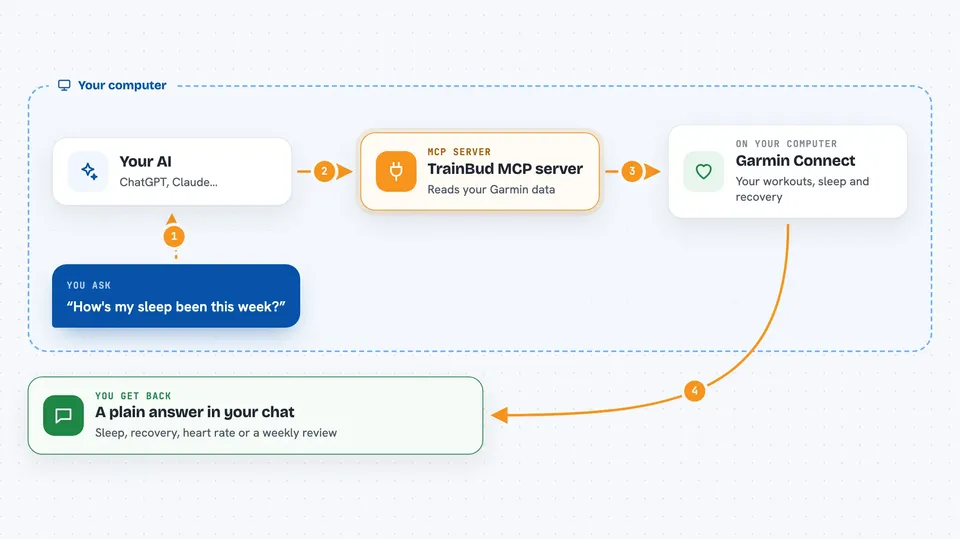
You ask your AI a question, like how your sleep has been this week. The AI passes that question to TrainBud, which is running quietly on your machine. TrainBud logs in to Garmin Connect with your own account, pulls the data you asked about, and stores a copy locally so it does not have to fetch everything again. It then compares what it found to your own recent normal, usually the last 28 days, and sends a short answer back to your AI. You see the answer in the chat, in plain words.
 Click to zoom
What you can do with it
- Ask what you did today and get your latest workout back
- Check your sleep duration, stages and score, and what was unusual about last night
- See if your resting heart rate is trending up or down
- Ask whether you are recovered enough to train hard tomorrow
- Look at weight, body fat and muscle mass trends over time
- Review your week against last week, including sleep debt and training load
- Record a goal, a race date, an injury or a note so your AI remembers it
Try asking your AI
- “What did I do today?”
- “How's my sleep been this week?”
- “Am I recovered enough to train hard tomorrow?”
- “Is my resting heart rate trending down?”
What it gives back to you
You get answers in the chat, in plain sentences, not raw tables. Depending on what you ask, TrainBud can return a list of recent activities, a sleep summary, a recovery score, a heart rate trend, or a weekly review with numbers. It can also tell you what stands out against your own 28-day baseline, and which rule fired. When you ask it to remember something, like a race date, it stores that note and can bring it up later.
Before you start
What you need
- A Garmin Connect account with your email and password
- Node.js version 22.12 or newer installed on your computer
- An AI assistant that supports MCP servers, like Claude Desktop or Cursor
Good to know
TrainBud reads your private Garmin health data and stores a copy on your computer, so keep the .env file and the .trainbud folder to yourself, and remember it is an unofficial community project not made by Garmin.
Install it with your AI
Add TrainBud MCP server to your AI, no technical skills needed
You don't install anything by hand. You copy one prompt, paste it into an AI that can work on your computer, and it checks, installs and connects the server for you, asking you when it needs something.
Sign in to get the install prompt
Members get a ready-made prompt that lets the Claude desktop app check TrainBud MCP server, install it and connect it for them, step by step. You don't need any technical skills: you copy, paste and answer a few questions. Your connected AI can also find and install any of the 4,609 MCP servers here for you.
Who it's for
People who wear a Garmin watch and want to ask their AI about training, sleep and recovery without learning a new app.