
MCP server · Developer tools
VMware AIops MCP server
by zw008
Lets your AI manage VMware virtual machines: power, clone, snapshot, deploy and run commands inside them.
VMware AIops is a helper that connects your AI assistant to your VMware vCenter or ESXi setup. It lets the AI look after virtual machines for you: turning them on and off, making copies, taking snapshots, and running commands inside them. It is handy if you work with VMware and want to do everyday jobs by just asking, instead of clicking through the vSphere screens.
What is an MCP server? The 30-second version
On its own, your AI can only chat. An MCP server is a small helper program that gives your AI a new skill or a connection to an app or service. This one connects your AI to VMware vCenter and ESXi, so the AI can see your virtual machines and do things to them when you ask. Think of it as giving your AI a pair of hands inside your VMware environment, with safety checks along the way.
What this MCP server does
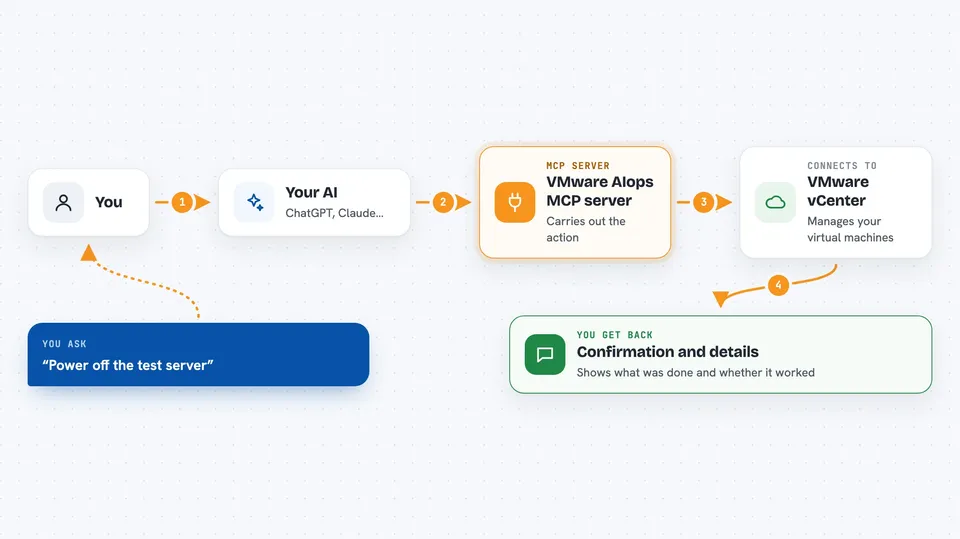
You ask your AI something like "power off the test server" or "make a copy of web-01". The AI passes that request to this helper. The helper talks to your vCenter or ESXi host and carries out the action. For risky steps, it asks you to confirm first, and it can run in a dry-run mode where it only shows what it would do. It also keeps an audit log of what was done.
 Click to zoom
What you can do with it
- Power virtual machines on, off, reset or suspend
- Clone a VM or deploy a new one from a template or OVA file
- Take, list, revert and delete snapshots
- Run commands inside a VM and upload or download files there
- Create and configure clusters, including HA and DRS settings
- Browse datastores and find image files
- Set a time limit so test VMs clean themselves up
Try asking your AI
- “Power on the VM called web-01”
- “Make a clone of db-01 named db-test”
- “Take a snapshot of app-02 called before-upgrade”
- “Show me what needs attention across all my vCenters”
What it gives back to you
You get back clear answers in the chat: for example a list of VMs and their power state, the result of a snapshot, or the output of a command you ran inside a VM. For bigger jobs it can hand back a self-contained HTML report you can open offline. When it changes something, it tells you what it did and whether it worked.
Before you start
What you need
- A VMware vCenter or ESXi host you can reach, with an account that has permission to manage VMs
- Python 3.10 or newer, or uv, to install the tool
- An AI assistant that supports MCP, such as Claude Code, Cursor, Codex or Gemini CLI
Good to know
This tool can change, delete or power off real virtual machines, so always read the plan and confirm before letting it run.
Install it with your AI
Add VMware AIops MCP server to your AI, no technical skills needed
You don't install anything by hand. You copy one prompt, paste it into an AI that can work on your computer, and it checks, installs and connects the server for you, asking you when it needs something.
Sign in to get the install prompt
Members get a ready-made prompt that lets the Claude desktop app check VMware AIops MCP server, install it and connect it for them, step by step. You don't need any technical skills: you copy, paste and answer a few questions. Your connected AI can also find and install any of the 4,609 MCP servers here for you.
Who it's for
VMware administrators and IT operations staff who look after virtual machines and want to do routine jobs by asking their AI instead of clicking through vSphere.



