
MCP server · Security
VMware Harden MCP server
by zw008
Lets your AI check your VMware setup against security baselines and show what is wrong.
This is a helper that connects your AI to VMware vSphere and checks your hosts and virtual machines against well known security rules. It only looks, it never changes anything in your VMware environment. It is handy for people who look after VMware and need to keep it secure and prove it to auditors.
What is an MCP server? The 30-second version
On its own, your AI can only chat. An MCP server is a small helper program that gives your AI a new skill or a connection to an app or service. This one connects your AI to VMware vSphere, so the AI can look up your hosts and virtual machines and run security checks for you when you ask. You stay in charge, and the helper only reads, it does not change your VMware setup.
What this MCP server does
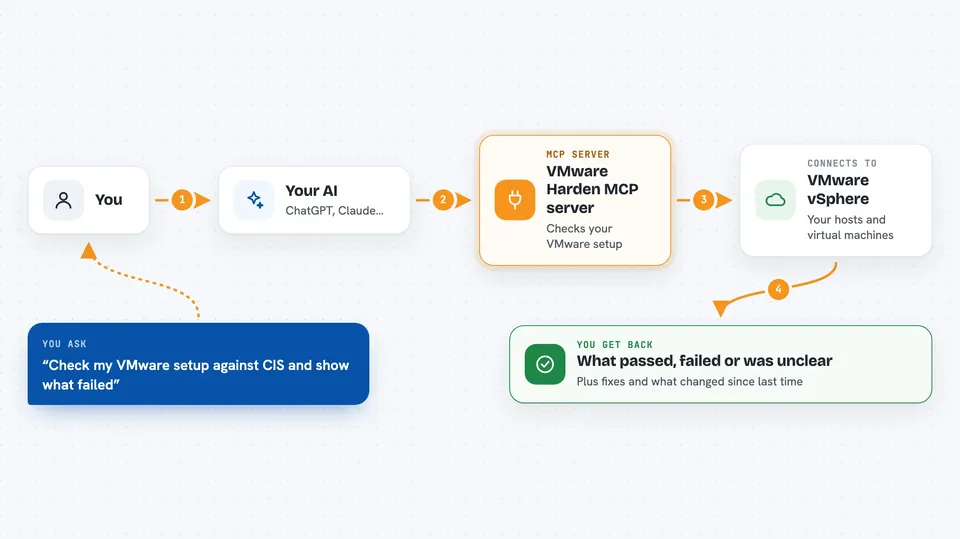
You ask your AI to check your VMware environment against a security standard, like CIS or PCI-DSS. The AI uses this helper to look at your vSphere hosts and virtual machines. The helper compares what it finds with the rules in the standard. Then it tells you which rules passed, which failed, and which ones it could not check because some information was missing. It can also show you what changed since the last check and suggest how to fix the problems.
 Click to zoom
What you can do with it
- List the built-in security baselines you can scan against
- See the exact rules inside a baseline
- Run a compliance scan on a vCenter target
- List the violations found in the latest scan
- Get suggested fixes for critical violations
- See what changed between scans (drift events)
- Check the STIG controls and their content sync status
Try asking your AI
- “Scan my main vCenter against the CIS ESXi 8.0 baseline and tell me what failed”
- “Show me the critical violations from the last scan and how to fix them”
- “What changed in my VMware compliance since yesterday”
- “List the rules in the PCI-DSS baseline and which ones could not be checked”
What it gives back to you
You get back lists of violations, coverage notes, and suggested fixes, all in the chat. For example, it can say which rules failed on which host, and which rules could not be judged because data was missing. It can also show a short summary of drift events, meaning what changed since the last scan. Everything is text you can read and copy.
Before you start
What you need
- A VMware vSphere environment you can reach
- Python and the uv tool installed on your computer
- An Anthropic API key if you want the AI to suggest fixes (optional, it can work without one)
Good to know
This tool only reads your VMware setup, but it does store its findings in a local database file on your computer, so keep that file private.
Install it with your AI
Add VMware Harden MCP server to your AI, no technical skills needed
You don't install anything by hand. You copy one prompt, paste it into an AI that can work on your computer, and it checks, installs and connects the server for you, asking you when it needs something.
Sign in to get the install prompt
Members get a ready-made prompt that lets the Claude desktop app check VMware Harden MCP server, install it and connect it for them, step by step. You don't need any technical skills: you copy, paste and answer a few questions. Your connected AI can also find and install any of the 4,361 MCP servers here for you.
Who it's for
VMware administrators, security and compliance officers, and IT teams who need to check and prove their VMware setup follows security standards.




