
MCP server · Developer tools
VMware Storage MCP server
by zw008
Lets your AI check VMware datastores, iSCSI, vSAN health and Fibre Channel paths for you.
This is a small helper that connects your AI assistant to your VMware vSphere storage. It lets the AI look at datastores, iSCSI adapters and targets, vSAN clusters, and Fibre Channel paths, and it can make a few careful changes like enabling iSCSI or adding a target. It is handy for storage admins and VMware admins who want to ask questions in plain words instead of clicking through vCenter.
What is an MCP server? The 30-second version
On its own, your AI can only chat. An MCP server is a small helper program that gives your AI a new skill or a connection to an app or service. This one connects your AI to VMware vSphere storage, so the AI can look things up there or make small changes for you when you ask. You install it once, point it at your vCenter or ESXi host, and then you just talk to your AI.
What this MCP server does
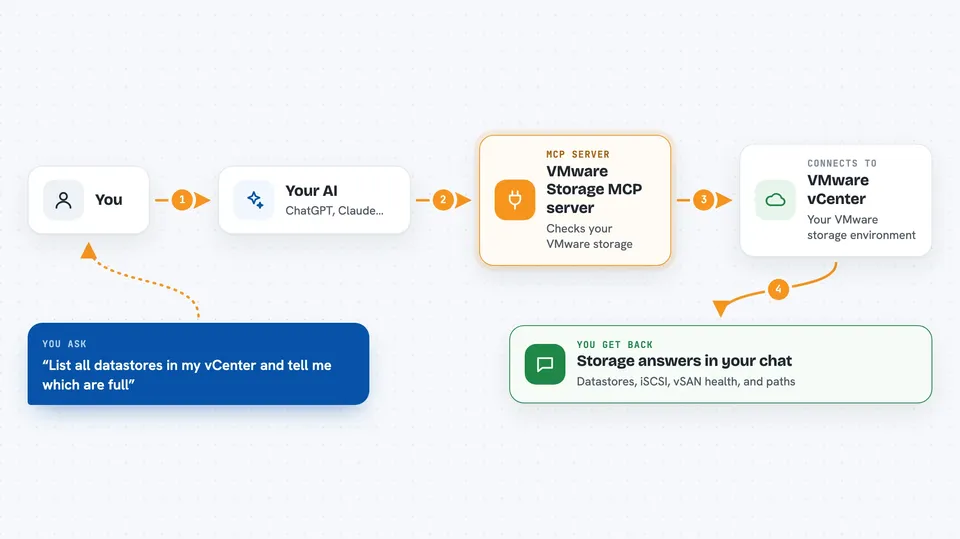
You ask your AI something about your VMware storage. The AI sends that request to this helper. The helper logs in to your vCenter or ESXi host and asks vSphere for the answer. Then it hands the result back to the AI, and the AI explains it to you in the chat. For the few write actions, the helper first shows you what would change and waits for your confirmation before doing anything.
 Click to zoom
What you can do with it
- List all datastores in your environment
- Browse a datastore or scan it for images like ISOs and OVAs
- Check iSCSI adapter status and add or remove iSCSI targets
- Rescan a host so it picks up new storage
- Check vSAN cluster health, capacity and efficiency
- List Fibre Channel adapters and their WWPNs
- Show storage device paths and spot hosts that see fewer paths than their peers
Try asking your AI
- “List all datastores in my vCenter and tell me which ones are getting full”
- “Check the iSCSI status on esxi-01 and show me the configured targets”
- “How is the vSAN health on Cluster-Prod looking today”
- “Show me the Fibre Channel paths for datastore ds-fc-01 and flag any dead paths”
What it gives back to you
You get answers in the chat: lists of datastores with their sizes and free space, iSCSI adapter and target details, vSAN health and capacity numbers, and path or WWPN lists for your SAN team. When you ask for a change, the helper first returns a preview of what would happen, including which host and datastores are affected. After you confirm, it reports back what it changed. Everything is also written to a local audit log on your machine.
Before you start
What you need
- A VMware vCenter or ESXi host you can log in to
- The password for that account, stored in a small local file the tool reads
- Python 3.10 or newer if you install it with pip or uv
- The Claude desktop app or another AI app that supports MCP servers
Good to know
A few tools can change your storage setup, so always read the preview the tool returns before you confirm, and remember it needs your real vCenter password to work.
Install it with your AI
Add VMware Storage MCP server to your AI, no technical skills needed
You don't install anything by hand. You copy one prompt, paste it into an AI that can work on your computer, and it checks, installs and connects the server for you, asking you when it needs something.
Sign in to get the install prompt
Members get a ready-made prompt that lets the Claude desktop app check VMware Storage MCP server, install it and connect it for them, step by step. You don't need any technical skills: you copy, paste and answer a few questions. Your connected AI can also find and install any of the 4,609 MCP servers here for you.
Who it's for
VMware and storage administrators who manage vSphere datastores, iSCSI, vSAN or Fibre Channel and want quick answers without clicking through vCenter.



