AI agent for web designers
Accessibility Remediation Backlog Agent
A ranked, owned backlog where fixes are verified by retesting and the sprint list is realistic
What it does
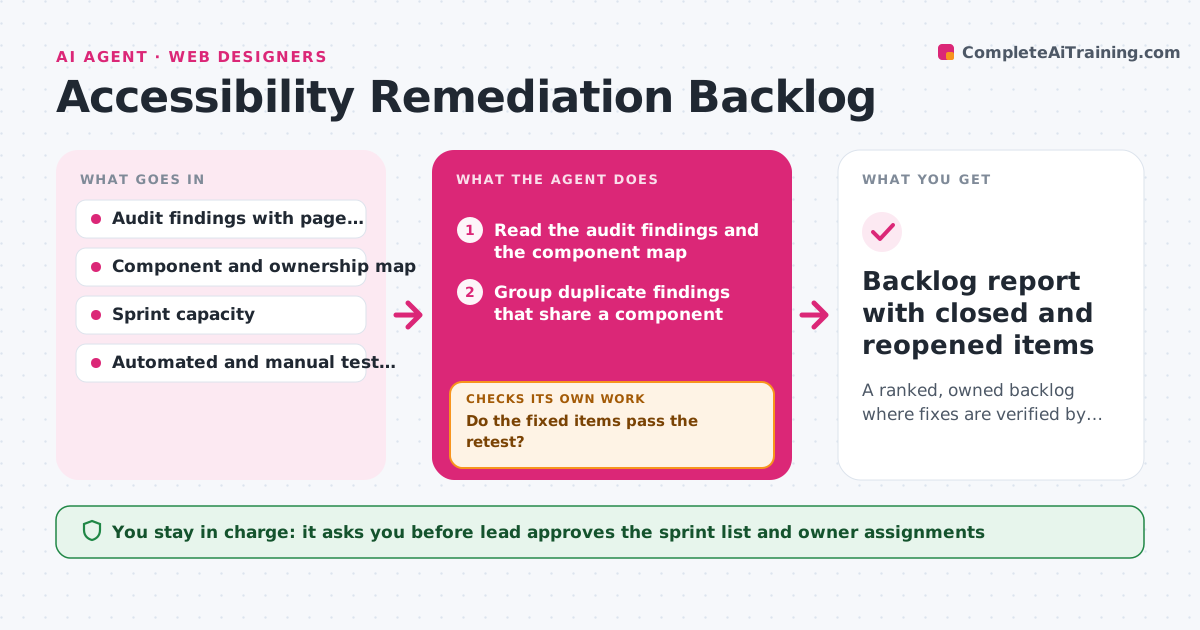
An accessibility audit lists 140 findings, and six months later the team has fixed twelve and nobody knows which matter most. This agent reads the audit findings and ranks them by user impact, such as blocking a key task, and by effort. It assigns owners from the component and team map, builds a sprint list for the lead, and after each release it reruns the checks on the affected pages to confirm that items are actually closed. Fixes that fail the re-test reopen with the new evidence. It also watches for regressions, where a closed item reappears. The lead approves the sprint list. Edge case: a finding that appears on many pages through one shared component is grouped and fixed once.
How it works
Follow the arrows from top to bottom. The orange dashed arrow is the loop: when a check fails, the agent goes back and tries again.
Read the steps as a list
- Audit delivered or sprint planning
- Read the audit findings and the component map
- Group duplicate findings that share a component
- Rank by user impact, pages affected and effort
- Assign owners and build the sprint list within capacity
- Lead approves the sprint listThe agent waits here for your OK.
- After the release, rerun the checks on the affected pages
- Do the fixed items pass the retest?If not: Reopen the items with the retest evidence and add them to the next sprint list. Back to step 6.
- Did any closed item reappear elsewhere?If not: Flag the regression and its component for the owner. Back to step 7.
- Backlog report with closed and reopened items
How it decides
It ranks by user impact on key tasks, then by number of affected pages, then by effort, and treats an item as closed only when a retest passes.
- Rank items blocking a key task such as sign-in or checkout first
- Group findings that share one component
- Close an item only after a passing retest
- Fill no more than 80 percent of sprint capacity
Make it yours
Every agent is a starting point. You choose these settings for your own situation.
- Impact ranking rules
- Sprint capacity use (default 80 percent)
- Test tools and standards
- Team and component map
- Report timing
What keeps you in control
It always asks you first
- Lead approves the sprint list and owner assignments
Hard limits
- Never close an item without a passing retest
- Never reassign work without the lead's approval
It stops when
- Done: Priority items are closed and verified
- Stop: The test environment is unavailable, so the agent lists the items awaiting retest
Set it up
We guide you through the set-up, step by step
Members get the full set-up guide for this agent. No technical skills needed: you copy, paste and upload.
- One set of instructions to paste into your AI, with the clicks for ChatGPT, Claude, Microsoft 365 Copilot, Gemini and Grok
- The agent then walks you through connecting your own data, one source at a time
- A downloadable copy with the flow chart, the rules and the full guide