AI agent for website developers
Build Size and Load Time Budget Agent
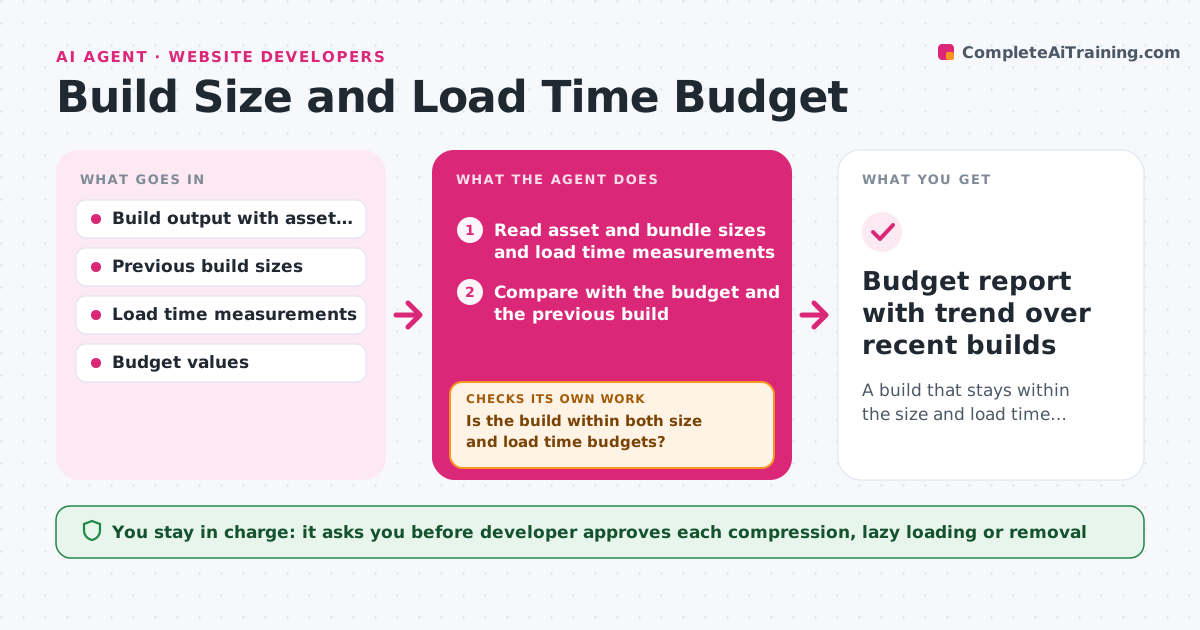
A build that stays within the size and load time budget, with every increase explained
What it does
No single change makes the app heavy, but each release adds a font, an image or a library and the budget is gone without anyone noticing. After each build, this agent reads the asset and bundle sizes and load time measurements, compares them with the budget, and identifies the largest increases since the last build with their source, such as a new texture pack or a dependency update. It proposes compression, lazy loading or removal, with an estimate of the saving for each, rebuilds, and measures again. It repeats until the budget holds or no safe saving remains, then reports the result with a chart over the last releases. The developer approves what is removed or changed. Edge case: a font file that added 400 KB but is only used on one page is suggested for lazy loading before removal.
How it works
Follow the arrows from top to bottom. The orange dashed arrow is the loop: when a check fails, the agent goes back and tries again.
Read the steps as a list
- Build completes
- Read asset and bundle sizes and load time measurements
- Compare with the budget and the previous build
- Is the build within both size and load time budgets?If not: Identify the largest increases and propose savings, then measure again. Back to step 2.
- Rank the increases by size and find what caused each
- Estimate savings for compression, lazy loading and removal
- Developer approves which changes to makeThe agent waits here for your OK.
- Rebuild with the approved changes and measure
- Did the rebuild meet the budget and keep the features working?If not: Revert the change that broke a feature and pick the next saving. Back to step 5.
- Budget report with trend over recent builds
How it decides
It ranks changes by size added, proposes the safest saving first, such as compression, then lazy loading, then removal, and judges success by remeasured size and load time.
- Flag any build more than 2 percent larger than the previous one
- Try compression first, then lazy loading, then removal
- Do not remove an asset still referenced by the build
- Budget fails if load time rises more than 100 ms
Make it yours
Every agent is a starting point. You choose these settings for your own situation.
- Size and load time budgets
- Percent increase that triggers a flag (default 2 percent)
- Order of savings to try
- Load test device and network
- Build pipeline hook
What keeps you in control
It always asks you first
- Developer approves each compression, lazy loading or removal
Hard limits
- Never delete assets without approval
- Never merge or publish a build
It stops when
- Done: The build meets the budget
- Stop: No safe saving remains and the build is still over, so the agent asks for a budget or feature decision
Set it up
We guide you through the set-up, step by step
Members get the full set-up guide for this agent. No technical skills needed: you copy, paste and upload.
- One set of instructions to paste into your AI, with the clicks for ChatGPT, Claude, Microsoft 365 Copilot, Gemini and Grok
- The agent then walks you through connecting your own data, one source at a time
- A downloadable copy with the flow chart, the rules and the full guide