AI agent for administrative assistants
Calendar Conflict and Meeting Prep Chain Agent
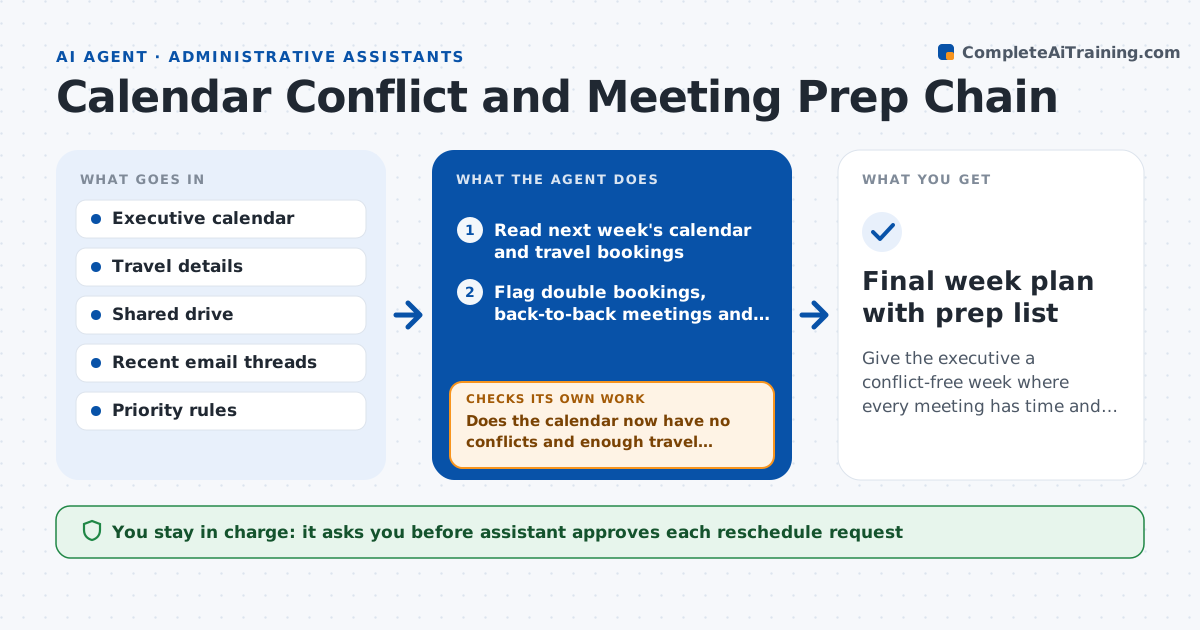
Give the executive a conflict-free week where every meeting has time and materials for prep.
What it does
An executive's week fills with meetings that sit back to back, in different places, with no time to read the documents. This agent reads next week's calendar and flags back-to-back meetings, missing travel time and double bookings. For each meeting it finds the documents needed, such as the last meeting notes, the deck and the open email thread, and builds a prep list. It rechecks the calendar every few hours, because meetings move, and updates the list. When a conflict needs a change, it drafts a reschedule request with two alternative times. Edge case: it will not touch meetings marked private. The assistant approves every reschedule request before it is sent.
How it works
Follow the arrows from top to bottom. The orange dashed arrow is the loop: when a check fails, the agent goes back and tries again.
Read the steps as a list
- Friday run or calendar change
- Read next week's calendar and travel bookings
- Flag double bookings, back-to-back meetings and missing travel time
- Find the documents and threads linked to each meeting
- Build a prep list per meeting
- Draft reschedule requests with two alternative times
- Assistant approves requests before they are sentThe agent waits here for your OK.
- Does the calendar now have no conflicts and enough travel time?If not: propose new moves for the remaining conflicts. Back to step 3.
- Recheck later in the week for moved meetings
- Final week plan with prep list
How it decides
It ranks meetings by priority rules, keeps the higher one in a conflict and drafts moves for the lower one.
- Require 15 minutes between meetings, and 45 minutes when travel is needed
- Keep the meeting with the higher priority in a conflict
- Never move meetings marked private or with the board
- Include only documents the executive can already open
Make it yours
Every agent is a starting point. You choose these settings for your own situation.
- Buffer minutes between meetings (default 15)
- Travel buffer (default 45)
- Priority rules by meeting type
- Days and hours the executive works
What keeps you in control
It always asks you first
- Assistant approves each reschedule request
- Executive approves moving a priority meeting
Hard limits
- Never accepts, declines or moves meetings on its own
- Does not read private event details
It stops when
- Done: week has no unresolved conflicts and prep lists are ready
- Stop: conflict between two top priority meetings, ask the executive
Set it up
We guide you through the set-up, step by step
Members get the full set-up guide for this agent. No technical skills needed: you copy, paste and upload.
- One set of instructions to paste into your AI, with the clicks for ChatGPT, Claude, Microsoft 365 Copilot, Gemini and Grok
- The agent then walks you through connecting your own data, one source at a time
- A downloadable copy with the flow chart, the rules and the full guide