AI agent for animators
Client Review Feedback Round Agent
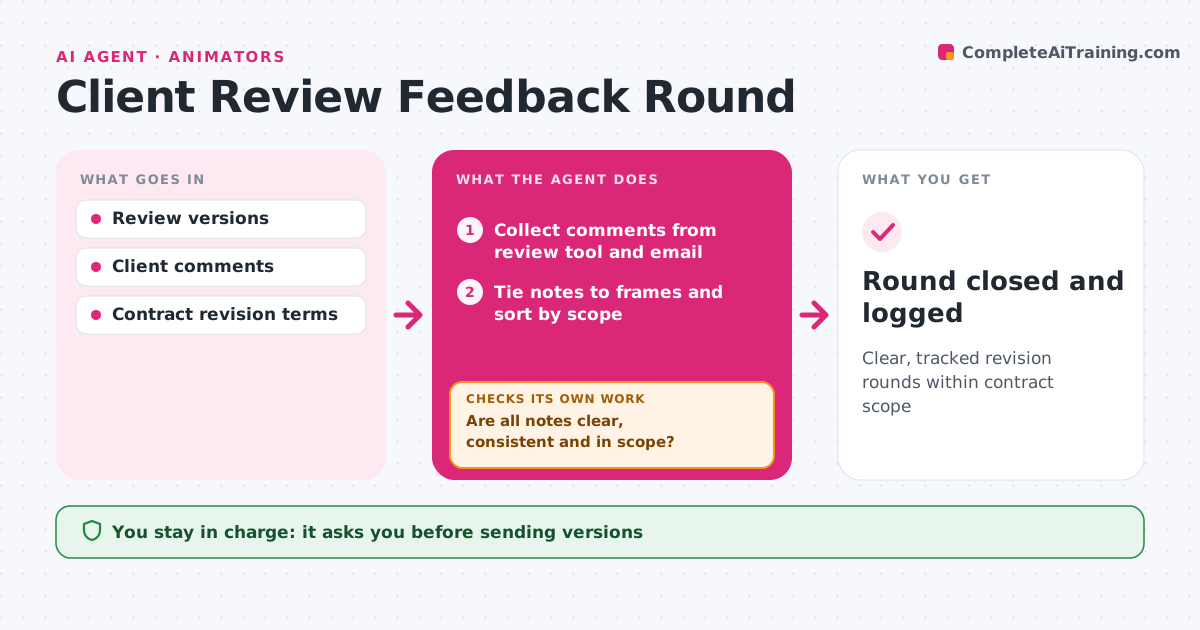
Clear, tracked revision rounds within contract scope
What it does
Client review rounds drift when notes are vague, scattered or quietly add new work. When the artist sends a review version, this agent posts it to the review tool with a version number and a note on what changed. It collects client comments from the review tool and email, ties each to a frame or timecode, and turns vague notes into specific questions. It sorts notes into in-scope changes and new requests, and checks the round count against the contract. If notes are unclear or out of scope, it drafts a question or a change-order note. After the artist revises, it checks every note was addressed before the next send. The artist approves all client messages. Edge case: conflicting notes from two client contacts are sent back for one decision.
How it works
Follow the arrows from top to bottom. The orange dashed arrow is the loop: when a check fails, the agent goes back and tries again.
Read the steps as a list
- Review version ready
- Artist approves the version note and sendThe agent waits here for your OK.
- Collect comments from review tool and email
- Tie notes to frames and sort by scope
- Are all notes clear, consistent and in scope?If not: draft clarifying questions or a change-order note. Back to step 3.
- Track artist fixes for each note
- Is every note addressed before the next send?If not: list missing fixes for the artist. Back to step 6.
- Round closed and logged
How it decides
It maps each note to a frame and to contract scope, and asks when notes are vague or conflict.
- Rounds beyond contract need a change order
- Conflicting contacts must agree on one answer
- Vague notes get a specific question
Make it yours
Every agent is a starting point. You choose these settings for your own situation.
- Rounds included in contract
- Review tool
- Question tone
- Change order template
What keeps you in control
It always asks you first
- Sending versions
- Change orders
Hard limits
- Never sends work or invoices without approval
- Never agrees extra rounds
It stops when
- Done: final approval received
- Stop: client pauses project
Set it up
We guide you through the set-up, step by step
Members get the full set-up guide for this agent. No technical skills needed: you copy, paste and upload.
- One set of instructions to paste into your AI, with the clicks for ChatGPT, Claude, Microsoft 365 Copilot, Gemini and Grok
- The agent then walks you through connecting your own data, one source at a time
- A downloadable copy with the flow chart, the rules and the full guide