AI agent for website developers
Core Web Vitals Improvement Agent
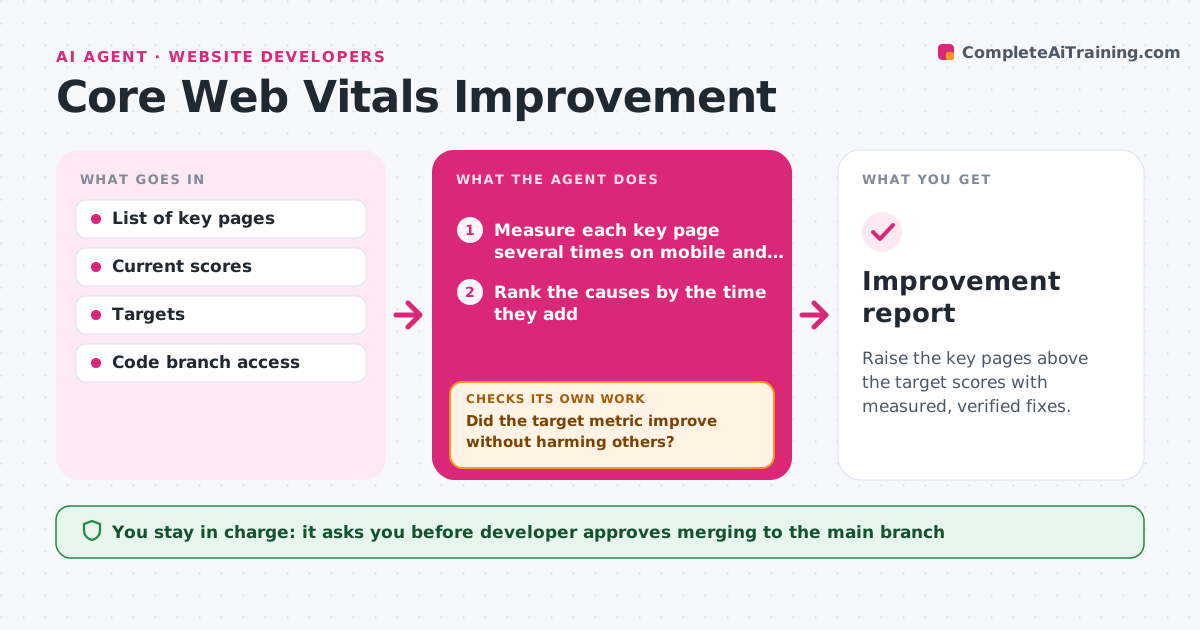
Raise the key pages above the target scores with measured, verified fixes.
What it does
The site feels slow, so someone compresses a few images and nobody checks whether it helped. This agent measures your key pages for largest paint, layout shift and responsiveness, on mobile and desktop, several times to get a stable number. It identifies the biggest causes, such as oversized images, blocking scripts, fonts or third-party tags. It applies one fix at a time in a separate branch, then measures again. A fix stays only if the number improves and nothing else gets worse. Otherwise it reverts that fix and tries the next cause. It records every change with its before and after values. The developer approves merging. Edge case: a script that speeds up the page also breaks the cookie banner, so the agent reverts it.
How it works
Follow the arrows from top to bottom. The orange dashed arrow is the loop: when a check fails, the agent goes back and tries again.
Read the steps as a list
- Monthly check or score drops
- Measure each key page several times on mobile and desktop
- Rank the causes by the time they add
- Create a branch and apply the top fix
- Measure the changed pages again
- Did the target metric improve without harming others?If not: revert this fix and apply the next ranked cause. Back to step 4.
- Run the form, menu and cookie banner tests
- Does the page still work as before?If not: revert the fix and try a safer alternative. Back to step 4.
- Record every kept fix with before and after numbers
- Developer approves the mergeThe agent waits here for your OK.
- Improvement report
How it decides
It ranks causes by how much time they add. A fix stays if the target metric improves by at least 5% and no other metric gets worse by more than 3%.
- Take the median of five runs as the page score
- Keep a fix only if it improves the target metric by 5% or more
- Revert any fix that worsens another metric by more than 3%
- Test the biggest images and scripts before small ones
Make it yours
Every agent is a starting point. You choose these settings for your own situation.
- Pages and devices to measure
- Target scores (default 2.5 seconds largest paint)
- Number of measurement runs (default 5)
- Minimum improvement to keep a fix
- Tests that must pass
What keeps you in control
It always asks you first
- Developer approves merging to the main branch
Hard limits
- Never change the live site directly
- Never keep a fix without a new measurement
It stops when
- Done: targets are met or all ranked causes are tried
- Stop: the remaining cause is a third-party script the team cannot change
Set it up
We guide you through the set-up, step by step
Members get the full set-up guide for this agent. No technical skills needed: you copy, paste and upload.
- One set of instructions to paste into your AI, with the clicks for ChatGPT, Claude, Microsoft 365 Copilot, Gemini and Grok
- The agent then walks you through connecting your own data, one source at a time
- A downloadable copy with the flow chart, the rules and the full guide