AI agent for curriculum developers
Curriculum Revision Feedback Agent
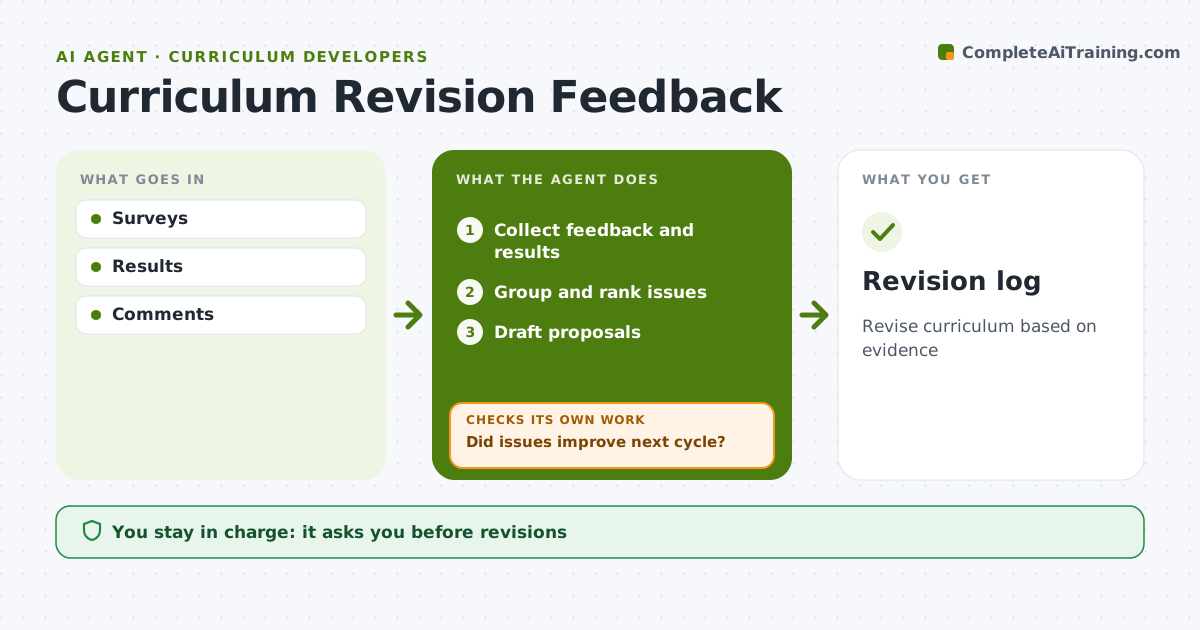
Revise curriculum based on evidence
What it does
Feedback on a curriculum arrives as teacher surveys, student assessment results and scattered comments in email and meetings, and it rarely gets pulled together. At the end of each term this agent collects it all and groups it by unit and issue type, such as pacing, unclear materials or missing resources. It links each issue to that unit's assessment results. It ranks issues by how often they appear and how much results suffer, and drafts revision proposals for the top ones. The curriculum lead approves every change. After the next cycle, it checks whether the revised units improved in feedback and results. If not, it reopens the proposal and suggests a different fix. Edge case: a single comment is logged but not treated as a pattern.
How it works
Follow the arrows from top to bottom. The orange dashed arrow is the loop: when a check fails, the agent goes back and tries again.
Read the steps as a list
- Term ends
- Collect feedback and results
- Group and rank issues
- Draft proposals
- Lead approves revisionsThe agent waits here for your OK.
- Did issues improve next cycle?If not: rethink proposals. Back to step 3.
- Revision log
How it decides
Issues ranked by frequency and impact.
- Three or more reports is a pattern
- Low results plus complaints first
- Single comments logged
Make it yours
Every agent is a starting point. You choose these settings for your own situation.
- Pattern threshold
- Sources
- Cycle
- Format
What keeps you in control
It always asks you first
- Revisions
Hard limits
- Anonymize feedback
It stops when
- Done: log updated
- Stop: course retired
Set it up
We guide you through the set-up, step by step
Members get the full set-up guide for this agent. No technical skills needed: you copy, paste and upload.
- One set of instructions to paste into your AI, with the clicks for ChatGPT, Claude, Microsoft 365 Copilot, Gemini and Grok
- The agent then walks you through connecting your own data, one source at a time
- A downloadable copy with the flow chart, the rules and the full guide