AI agent for systems analysts
Data Dictionary Conflict Agent
One agreed definition and tested value mapping for each conflicting field
What it does
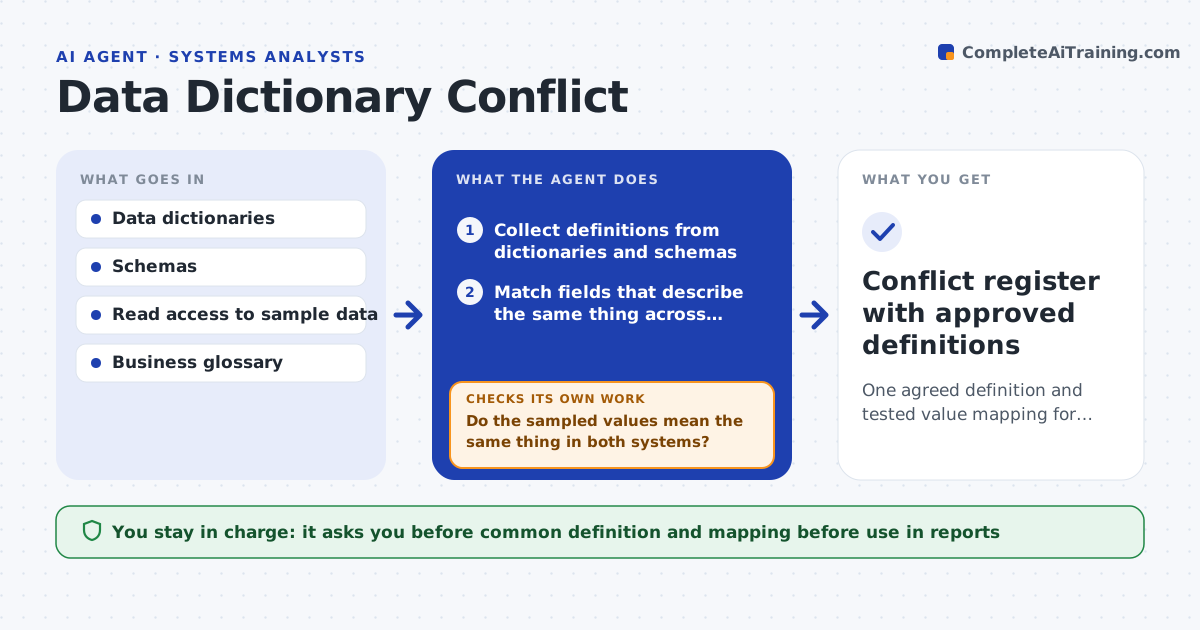
One system stores customer status as active or closed, another uses a number code, and a third counts paused accounts as active. Reports then disagree and nobody knows why. This agent collects field definitions from data dictionaries, schemas and documents across systems. It matches fields that appear to describe the same thing, compares names, types, allowed values and formats, and flags conflicts. For each conflict it samples real data from both systems to see what the values actually mean in practice. It drafts a common definition with a mapping between the old values and the new one. It then tests the mapping on sample data and checks that no record ends up unmapped or in the wrong group. If it does, it revises the mapping. The analyst approves the definition. Edge case: a code 3 means pending in one system and suspended in another.
How it works
Follow the arrows from top to bottom. The orange dashed arrow is the loop: when a check fails, the agent goes back and tries again.
Read the steps as a list
- Analyst names systems to compare
- Collect definitions from dictionaries and schemas
- Match fields that describe the same thing across systems
- Compare names, types, allowed values and formats
- Sample real data from each system for each conflict
- Do the sampled values mean the same thing in both systems?If not: record the difference in meaning and sample more rows to confirm. Back to step 4.
- Draft a common definition and a value mapping
- Test the mapping on a larger sample
- Does every sampled record map cleanly with no loss?If not: revise the mapping for the unmapped or misgrouped records. Back to step 7.
- Analyst approves the definition and mappingThe agent waits here for your OK.
- Conflict register with approved definitions
How it decides
Fields are matched on meaning from sampled data, not names alone. A mapping is accepted only if every sampled record maps cleanly.
- Match fields by meaning in sampled data, not by name
- Flag any code that has different meanings per system
- Reject a mapping that leaves more than 0.5 percent of records unmapped
- Keep the original values beside the new ones
Make it yours
Every agent is a starting point. You choose these settings for your own situation.
- Systems in scope
- Sample size (default 500 rows)
- Acceptable unmapped rate
- Where the glossary lives
What keeps you in control
It always asks you first
- Common definition and mapping before use in reports
Hard limits
- Never writes to source systems
- Never exposes personal data in samples
It stops when
- Done: all conflicts have an approved definition and tested mapping
- Stop: no read access to sample data
Set it up
We guide you through the set-up, step by step
Members get the full set-up guide for this agent. No technical skills needed: you copy, paste and upload.
- One set of instructions to paste into your AI, with the clicks for ChatGPT, Claude, Microsoft 365 Copilot, Gemini and Grok
- The agent then walks you through connecting your own data, one source at a time
- A downloadable copy with the flow chart, the rules and the full guide