AI agent for mechanical engineers
Design Review Package Agent
Complete, consistent review packages and tracked actions
What it does
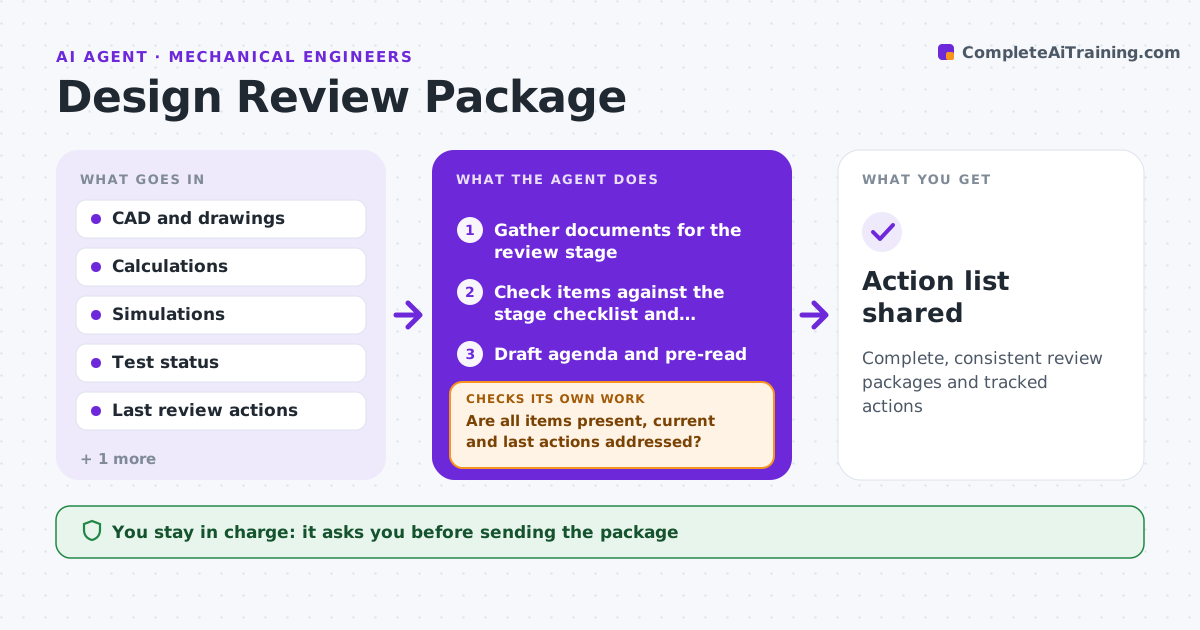
Design reviews lose time when the package mixes revisions or old actions are still open. Before a review, this agent gathers the CAD revision, drawings, calculations, simulation results, test status, risk analysis, cost estimate and open actions from the last review. It checks each item against the review checklist for that stage, verifies they are all at the same revision, and confirms last review's actions are closed or have a plan. Missing or mismatched items go back to their owners and are rechecked when updated. It drafts the review agenda and pre-read. After the review, it records new actions with owners and dates. The engineer approves the package before it goes out. Edge case: a calculation done on an older geometry is flagged as needing an update.
How it works
Follow the arrows from top to bottom. The orange dashed arrow is the loop: when a check fails, the agent goes back and tries again.
Read the steps as a list
- Review two weeks away
- Gather documents for the review stage
- Check items against the stage checklist and revision
- Are all items present, current and last actions addressed?If not: ask owners for missing or updated items. Back to step 2.
- Draft agenda and pre-read
- Engineer approves sending the packageThe agent waits here for your OK.
- Record new actions after the review
- Action list shared
How it decides
The package is ready only when every checklist item is present at the current revision.
- Calculations on old geometry must be updated
- Open actions need a plan
- Pre-read goes out one week before
Make it yours
Every agent is a starting point. You choose these settings for your own situation.
- Checklist per review stage
- Pre-read lead time
- Reviewer list
- Action tracking tool
What keeps you in control
It always asks you first
- Sending the package
Hard limits
- Never approves designs
- Shares documents only with listed reviewers
It stops when
- Done: review held and actions recorded
- Stop: review postponed
Set it up
We guide you through the set-up, step by step
Members get the full set-up guide for this agent. No technical skills needed: you copy, paste and upload.
- One set of instructions to paste into your AI, with the clicks for ChatGPT, Claude, Microsoft 365 Copilot, Gemini and Grok
- The agent then walks you through connecting your own data, one source at a time
- A downloadable copy with the flow chart, the rules and the full guide