AI agent for video editors
Edit Review Feedback Round Agent
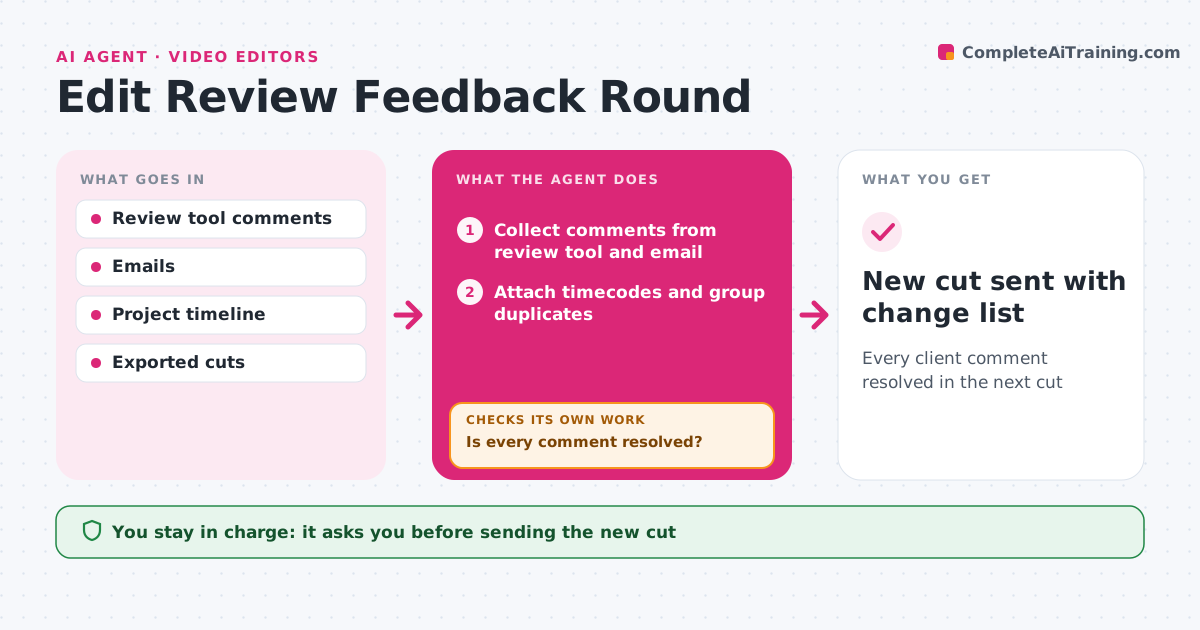
Every client comment resolved in the next cut
What it does
Clients leave feedback on video cuts in review tools, emails and calls, and a missed note means another round. When feedback arrives, this agent collects every comment, attaches each one to a timecode and groups duplicates. It separates quick fixes, such as typos in lower thirds, from creative calls that need the editor's judgment. It also counts review rounds against what the agreement allows. After the editor makes changes, the agent compares the new export with the comment list and checks each item is done. If anything is missing, it lists it for the editor and checks again after the next export. It then drafts a reply listing what changed. The editor approves the reply and the new cut before anything is sent. Edge case: when a client asks to change the music in one comment and keep it in another, the agent flags the conflict first.
How it works
Follow the arrows from top to bottom. The orange dashed arrow is the loop: when a check fails, the agent goes back and tries again.
Read the steps as a list
- Feedback arrives
- Collect comments from review tool and email
- Attach timecodes and group duplicates
- Separate quick fixes from creative calls
- Compare new export with comment list
- Is every comment resolved?If not: list open comments for the editor. Back to step 5.
- Editor approves reply and new cutThe agent waits here for your OK.
- New cut sent with change list
How it decides
It groups comments by timecode and flags conflicts. A comment is resolved when the new export shows the change or the editor records a reason.
- Flag conflicting comments
- Treat text fixes as quick
- Count rounds against the agreement
Make it yours
Every agent is a starting point. You choose these settings for your own situation.
- Review tools
- Included rounds (default 2)
- Reply format
- Quick-fix rules
What keeps you in control
It always asks you first
- Sending the new cut
- Billing extra rounds
Hard limits
- Never sends without approval
It stops when
- Done: cut sent
- Stop: round limit reached; ask about billing
Set it up
We guide you through the set-up, step by step
Members get the full set-up guide for this agent. No technical skills needed: you copy, paste and upload.
- One set of instructions to paste into your AI, with the clicks for ChatGPT, Claude, Microsoft 365 Copilot, Gemini and Grok
- The agent then walks you through connecting your own data, one source at a time
- A downloadable copy with the flow chart, the rules and the full guide