AI agent for copywriters
Email Campaign Copy QA Agent
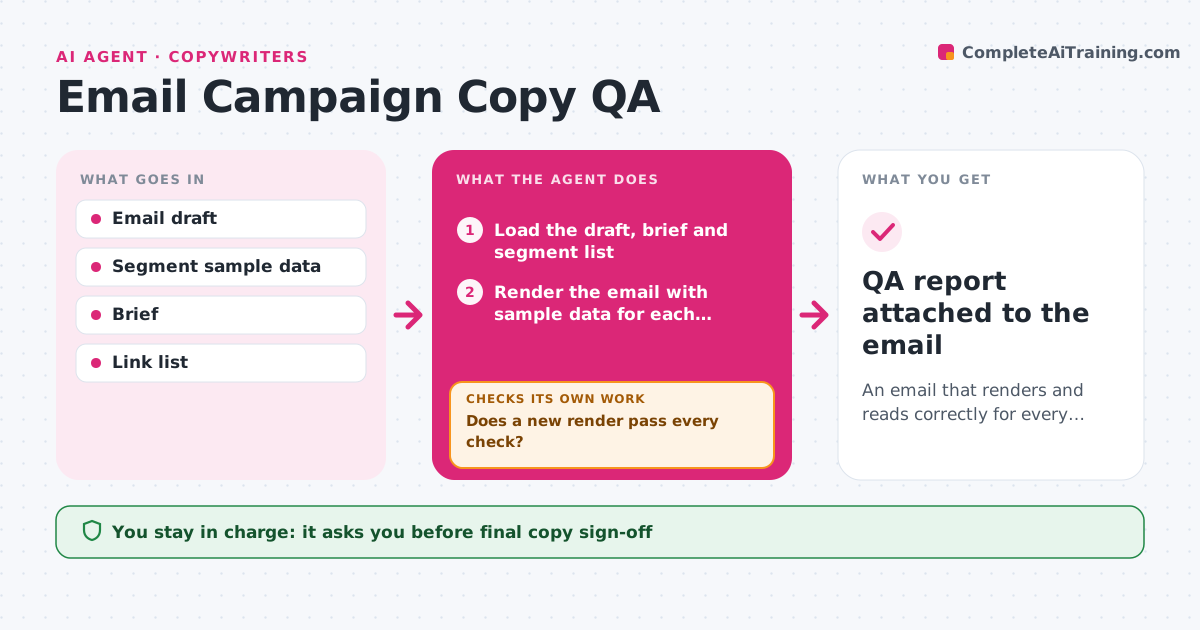
An email that renders and reads correctly for every segment
What it does
A broken merge tag or a link to last month's sale can embarrass a brand in front of thousands of readers. Before an email is handed off for sending, this agent loads the draft and renders it with sample data for each segment. It checks that merge tags fill correctly, every link goes to the right page and carries tracking, the offer and dates match the brief, the subject line and preview text fit the inbox, and a plain-text version exists. It fixes technical errors in the draft and renders again until every check passes. Wording changes are suggested, never made. A second check compares the final draft with the brief once more. The copywriter approves the final version. Edge case: a first-name tag with a blank value would show Hi with a stray comma, so it checks the fallback text.
How it works
Follow the arrows from top to bottom. The orange dashed arrow is the loop: when a check fails, the agent goes back and tries again.
Read the steps as a list
- Draft marked ready for QA
- Load the draft, brief and segment list
- Render the email with sample data for each segment
- Check merge tags, links, tracking, dates and preview text
- Fix technical errors and list wording issues
- Does a new render pass every check?If not: fix the remaining errors and render again. Back to step 3.
- Do offer, dates and audience still match the brief?If not: note the mismatch and correct it in the draft. Back to step 5.
- Copywriter approves the final emailThe agent waits here for your OK.
- QA report attached to the email
How it decides
It fixes technical errors and flags wording that disagrees with the brief for the copywriter to decide.
- Blank merge fields must have a fallback
- Every link must match the brief's destination
- Offer dates must match the brief
Make it yours
Every agent is a starting point. You choose these settings for your own situation.
- Segments to render
- Required checks
- Subject line length limit
- Tracking parameters
What keeps you in control
It always asks you first
- Final copy sign-off
Hard limits
- Never schedules or sends emails
- Never edits subscriber data
It stops when
- Done: QA passed
- Stop: brief missing
Set it up
We guide you through the set-up, step by step
Members get the full set-up guide for this agent. No technical skills needed: you copy, paste and upload.
- One set of instructions to paste into your AI, with the clicks for ChatGPT, Claude, Microsoft 365 Copilot, Gemini and Grok
- The agent then walks you through connecting your own data, one source at a time
- A downloadable copy with the flow chart, the rules and the full guide