AI agent for software architects
End-of-Life Dependency Radar Agent
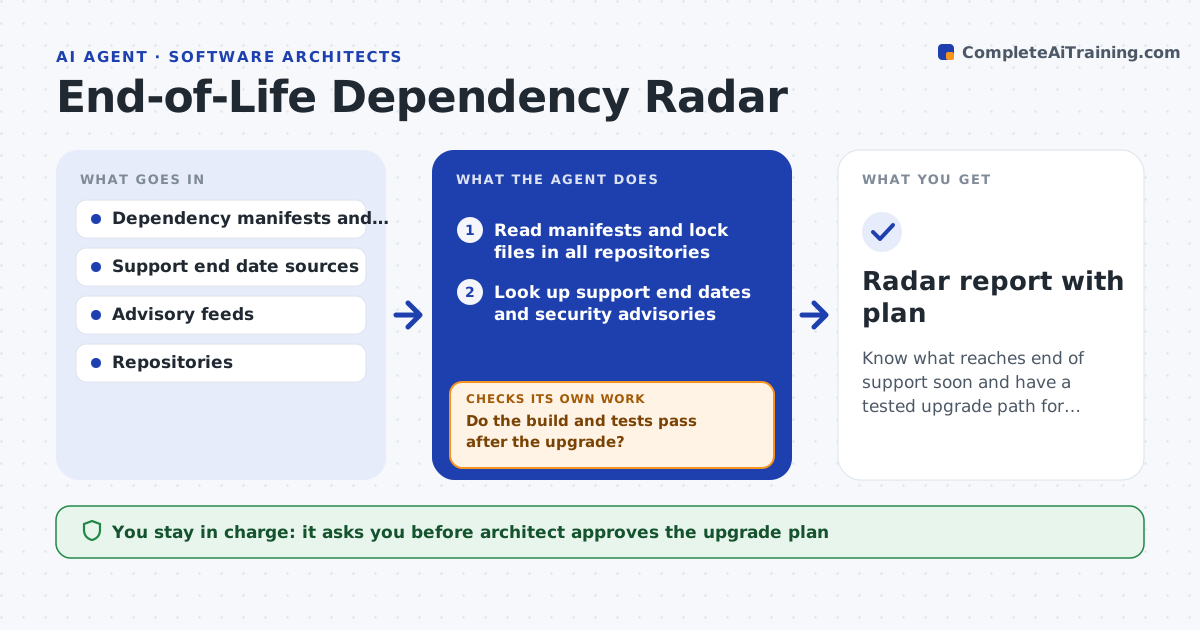
Know what reaches end of support soon and have a tested upgrade path for each
What it does
A runtime version loses security support on a date nobody tracked, and a library with a known vulnerability sits in 14 services. This agent reads dependency manifests across repositories and looks up support end dates and security advisories for each. It builds a list of risks by system, ranked by how soon support ends and how severe the open advisories are. For each one it proposes upgrade steps, such as the next supported version and known breaking changes. It then tests the upgrade by building the project and running its tests in a branch. The architect approves the plan and the dates. Edge case: the upgrade builds but a test fails because of a changed default, so the agent notes the change and proposes a fix.
How it works
Follow the arrows from top to bottom. The orange dashed arrow is the loop: when a check fails, the agent goes back and tries again.
Read the steps as a list
- Monthly scan
- Read manifests and lock files in all repositories
- Look up support end dates and security advisories
- Rank risks by system, date and severity
- Draft upgrade steps with known breaking changes
- Try the upgrade in a branch: build and run the tests
- Do the build and tests pass after the upgrade?If not: identify the failing change, adjust the steps, and retry. Back to step 4.
- Estimate effort and propose a schedule before each end date
- Architect approves the plan and datesThe agent waits here for your OK.
- Radar report with plan
How it decides
It ranks risk by days to end of support and advisory severity, and treats an upgrade as viable when the project builds and its tests pass.
- Flag anything reaching end of support within 12 months
- Treat advisories of high or critical severity as urgent
- Prefer the lowest supported upgrade without major jumps
- Test every upgrade before proposing a date
Make it yours
Every agent is a starting point. You choose these settings for your own situation.
- Warning window (default 12 months)
- Repositories in scope
- Advisory severity threshold
- Scan schedule
- Where plans are posted
What keeps you in control
It always asks you first
- Architect approves the upgrade plan
- Service owner approves each upgrade date
Hard limits
- Never merge or deploy upgrades
- Work only in branches
It stops when
- Done: every flagged item has a tested path and a date
- Stop: no supported upgrade exists and a replacement is needed
Set it up
We guide you through the set-up, step by step
Members get the full set-up guide for this agent. No technical skills needed: you copy, paste and upload.
- One set of instructions to paste into your AI, with the clicks for ChatGPT, Claude, Microsoft 365 Copilot, Gemini and Grok
- The agent then walks you through connecting your own data, one source at a time
- A downloadable copy with the flow chart, the rules and the full guide