AI agent for professors
Graduate Student Milestone Tracking Agent
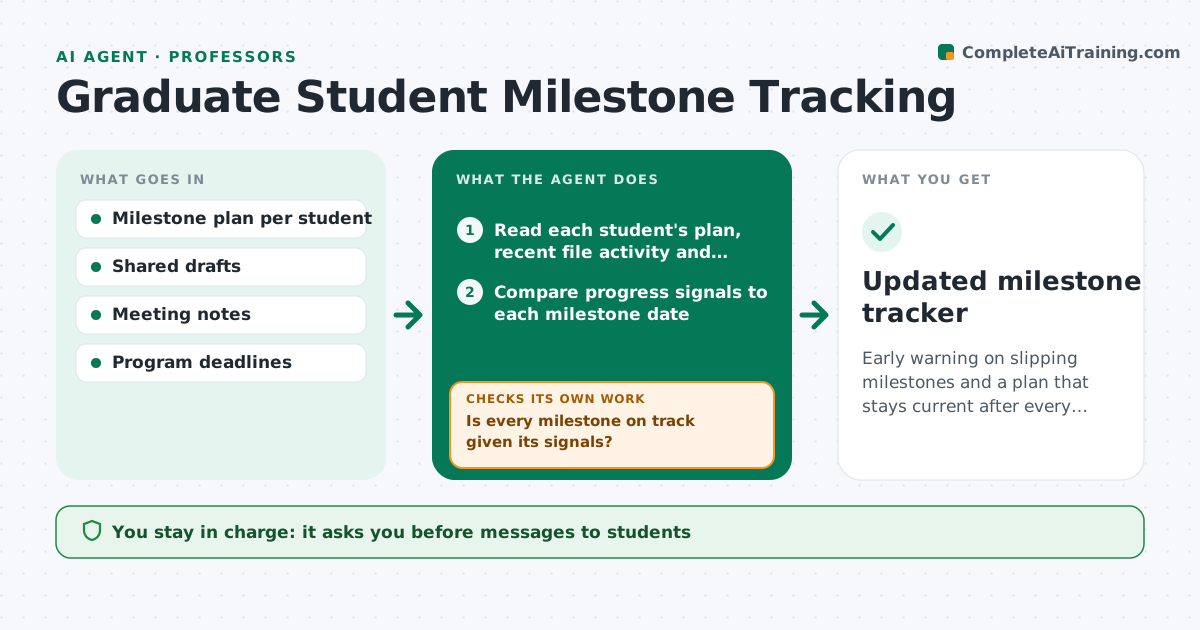
Early warning on slipping milestones and a plan that stays current after every meeting.
What it does
A student's proposal, qualifying exam or chapter draft is due, and the advisor only learns it is late at the committee meeting. This agent compares each student's milestones to the agreed plan. It checks recent drafts, shared folders and meeting notes for signs of progress, and flags those who are falling behind. For each flagged student it drafts a check-in agenda with the specific question to ask, such as a missing data set or a chapter that has not moved in a month. After each meeting it updates the plan with new dates and checks the next progress signal. You approve anything sent to the student or committee. Edge case: a student on approved leave has dates paused, not flagged.
How it works
Follow the arrows from top to bottom. The orange dashed arrow is the loop: when a check fails, the agent goes back and tries again.
Read the steps as a list
- Weekly review
- Read each student's plan, recent file activity and meeting notes
- Compare progress signals to each milestone date
- Is every milestone on track given its signals?If not: mark it at risk and find the likely blocker in the notes. Back to step 3.
- Draft a check-in agenda with specific questions for each at-risk student
- Advisor approves the agenda and any message to the studentThe agent waits here for your OK.
- After the meeting, read the notes and update dates
- Do the new dates fit program rules and committee schedules?If not: propose an alternative date and check the committee calendar. Back to step 7.
- Draft the summary for the committee if needed
- Advisor approves anything sent to the committeeThe agent waits here for your OK.
- Updated milestone tracker
How it decides
A milestone is at risk when its due date is near and no progress signal such as a new draft, data or analysis appears in the set period.
- No activity on a draft in 4 weeks and due date within 8 weeks: at risk
- Student on approved leave: pause the dates
- Same blocker in two meetings: suggest a resource or a second advisor conversation
- Milestone date not allowed by program rules: propose the nearest valid date
Make it yours
Every agent is a starting point. You choose these settings for your own situation.
- Milestone types and dates
- Inactivity limit in weeks (default 4)
- Review day
- Meeting note format
- Leave handling
What keeps you in control
It always asks you first
- Messages to students
- Anything sent to the committee
Hard limits
- Never send messages to students or committees without approval
- Never share one student's status with another
It stops when
- Done: tracker updated and agendas ready
- Stop: student leaves the program
Set it up
We guide you through the set-up, step by step
Members get the full set-up guide for this agent. No technical skills needed: you copy, paste and upload.
- One set of instructions to paste into your AI, with the clicks for ChatGPT, Claude, Microsoft 365 Copilot, Gemini and Grok
- The agent then walks you through connecting your own data, one source at a time
- A downloadable copy with the flow chart, the rules and the full guide