AI agent for professors
Grant Proposal Compliance Agent
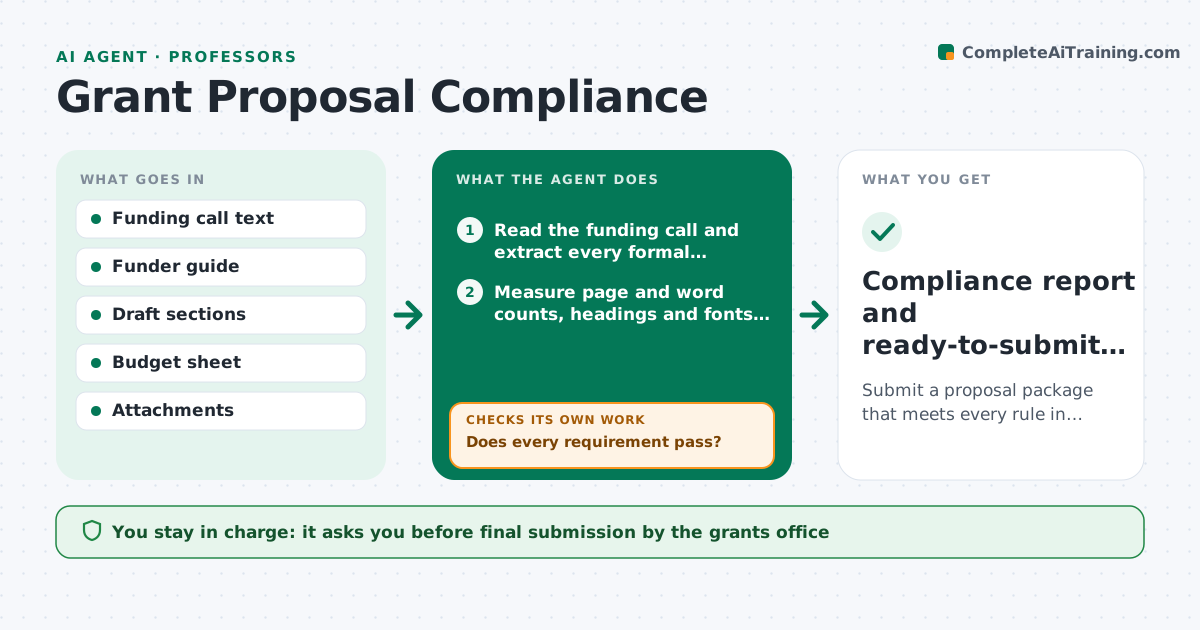
Submit a proposal package that meets every rule in the funding call
What it does
Funders publish long calls with page limits, required sections, budget caps and attachment rules, and one miss can sink months of work. This agent reads the funding call and builds a checklist of every formal requirement. It then measures each draft section, the budget sheet and the attachments against that list: page and word counts, required headings, fonts, eligible costs, biosketch format and letters of support. Rejection-level failures, such as a page limit or a missing section, are listed first. Each failure is marked with its exact place and a suggested fix, and it measures again after the researcher edits. It never changes the science. If the call and the funder's general guide disagree, it flags the conflict to the grants office. The lead researcher signs off and the grants office submits. Edge case: conflicting rules are flagged, not guessed.
How it works
Follow the arrows from top to bottom. The orange dashed arrow is the loop: when a check fails, the agent goes back and tries again.
Read the steps as a list
- Draft proposal uploaded
- Read the funding call and extract every formal requirement
- Measure page and word counts, headings and fonts in each section
- Compare budget lines with eligible cost rules and caps
- Does every requirement pass?If not: list each failure with location and fix, wait for edits, then re-measure. Back to step 3.
- Assemble attachment list in the order the funder asks
- Lead researcher signs off the packageThe agent waits here for your OK.
- Compliance report and ready-to-submit package
How it decides
Each requirement in the call becomes a pass or fail test. Anything that fails is listed with its location and the rule it breaks, ranked by whether it would cause rejection or only lower the score.
- Rejection-level failures (page limits, missing sections) are listed before scoring issues
- Budget lines over a cap are flagged with the amount over
- Conflicting funder rules go to the grants office, not resolved by the agent
Make it yours
Every agent is a starting point. You choose these settings for your own situation.
- Which funders' guides to load by default
- Days before deadline for the final check (default 5)
- Whether to suggest wording cuts or only flag overruns
- Output as checklist or annotated PDF
What keeps you in control
It always asks you first
- Final submission by the grants office
- Any change to the budget total
Hard limits
- Never rewrite scientific claims or aims
- Never submit to the funder portal
It stops when
- Done: all requirements pass and the researcher signs off
- Stop: a rule is ambiguous, ask the grants office before continuing
Set it up
We guide you through the set-up, step by step
Members get the full set-up guide for this agent. No technical skills needed: you copy, paste and upload.
- One set of instructions to paste into your AI, with the clicks for ChatGPT, Claude, Microsoft 365 Copilot, Gemini and Grok
- The agent then walks you through connecting your own data, one source at a time
- A downloadable copy with the flow chart, the rules and the full guide