AI agent for video editors
Interview Release and Transcript Review Agent
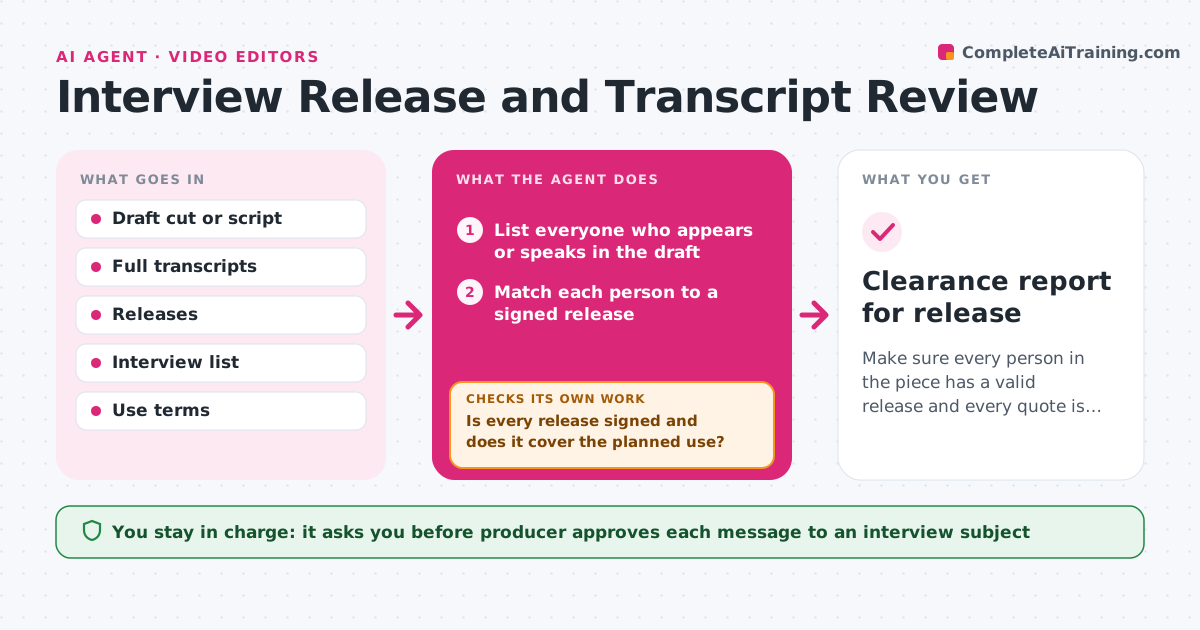
Make sure every person in the piece has a valid release and every quote is accurate and correctly attributed.
What it does
A piece is almost ready to publish when someone asks whether the second interviewee ever signed a release. This agent starts with the draft cut and the list of interviews. It matches each person on screen or in audio with a signed release and checks that the release covers the use, such as web, broadcast and the dates. Then it compares every quote in the draft with the full transcript, checks the speaker name and looks for changes in meaning, such as a dropped negative or a joined pair of sentences. It reports each problem. For quotes that changed meaning or releases that are missing, it drafts a review request to the subject. After replies arrive, it checks again. The producer approves the release of the piece. Edge case: the release is signed but expired, so it counts as missing.
How it works
Follow the arrows from top to bottom. The orange dashed arrow is the loop: when a check fails, the agent goes back and tries again.
Read the steps as a list
- Draft cut ready for review
- List everyone who appears or speaks in the draft
- Match each person to a signed release
- Is every release signed and does it cover the planned use?If not: mark as missing and request a signature or a corrected release. Back to step 3.
- Compare each quote in the draft with the full transcript
- Check speaker names and changes in meaning
- Draft a review request for each flagged quote
- Producer approves messages to subjectsThe agent waits here for your OK.
- Record replies and update the cut notes
- Is every flagged quote confirmed or corrected?If not: send a reminder draft or propose a different quote. Back to step 5.
- Clearance report for release
How it decides
A release is valid only if it is signed, names the person and covers the planned use and dates. A quote is accurate if the words and meaning match the transcript.
- Treat an expired or unsigned release as missing
- Flag any edit that removes a negation, a condition or a date
- Flag a quote built from two separate answers
- Block final approval while any release is missing
Make it yours
Every agent is a starting point. You choose these settings for your own situation.
- Release terms that must be covered (web, broadcast, social)
- Which edits count as a change in meaning
- Reminder wait time (default 3 days)
- Where releases are stored
- Quote accuracy level for flagging (strict or loose)
What keeps you in control
It always asks you first
- Producer approves each message to an interview subject
- Producer approves release of the piece
Hard limits
- Never send a message to a subject without approval
- Never change a quote to fit the cut
It stops when
- Done: all releases valid and all quotes confirmed
- Stop: a subject refuses and the quote must be cut
Set it up
We guide you through the set-up, step by step
Members get the full set-up guide for this agent. No technical skills needed: you copy, paste and upload.
- One set of instructions to paste into your AI, with the clicks for ChatGPT, Claude, Microsoft 365 Copilot, Gemini and Grok
- The agent then walks you through connecting your own data, one source at a time
- A downloadable copy with the flow chart, the rules and the full guide