AI agent for medical practice managers
Monthly Practice Revenue Review Agent
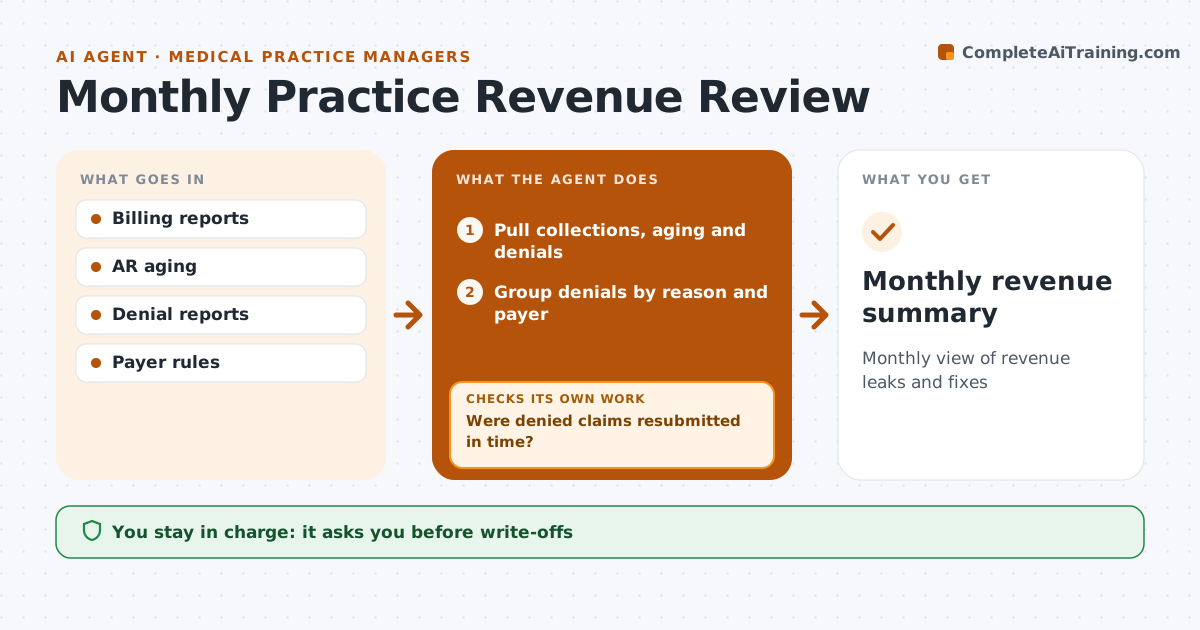
Monthly view of revenue leaks and fixes
What it does
A medical practice can lose a lot of revenue to denied claims and unpaid balances that nobody traces back to a cause. Each month this agent pulls collections, receivables aging and denial reports. It groups denials by reason and payer and finds the biggest causes, such as missing prior authorization or coding errors. It compares with previous months, because a payer rule change can cause a sudden spike. It checks that denied claims were resubmitted within each payer's time limit and lists those close to the deadline for urgent work. It also checks that balances over 90 days have a next step. It drafts a one-page summary for the owner. The practice manager approves process changes and write-offs.
How it works
Follow the arrows from top to bottom. The orange dashed arrow is the loop: when a check fails, the agent goes back and tries again.
Read the steps as a list
- Month closes
- Pull collections, aging and denials
- Group denials by reason and payer
- Compare with prior months to spot rule changes
- Were denied claims resubmitted in time?If not: list claims near the deadline for the billing team. Back to step 3.
- Does every balance over 90 days have a next step?If not: assign a follow-up task to the billing team. Back to step 4.
- Draft summary and suggested fixes
- Manager approves changes and write-offsThe agent waits here for your OK.
- Monthly revenue summary
How it decides
It ranks denial reasons by dollar amount and flags claims near their filing deadline.
- Rank by dollars
- Flag claims within 30 days of filing limit
- Compare to prior months
Make it yours
Every agent is a starting point. You choose these settings for your own situation.
- Denial reasons tracked
- Aging buckets
- Report format
What keeps you in control
It always asks you first
- Write-offs
- Process changes
Hard limits
- Never changes claims
It stops when
- Done: summary approved
- Stop: billing data unavailable
Set it up
We guide you through the set-up, step by step
Members get the full set-up guide for this agent. No technical skills needed: you copy, paste and upload.
- One set of instructions to paste into your AI, with the clicks for ChatGPT, Claude, Microsoft 365 Copilot, Gemini and Grok
- The agent then walks you through connecting your own data, one source at a time
- A downloadable copy with the flow chart, the rules and the full guide