AI agent for process engineers
PFMEA Update Agent
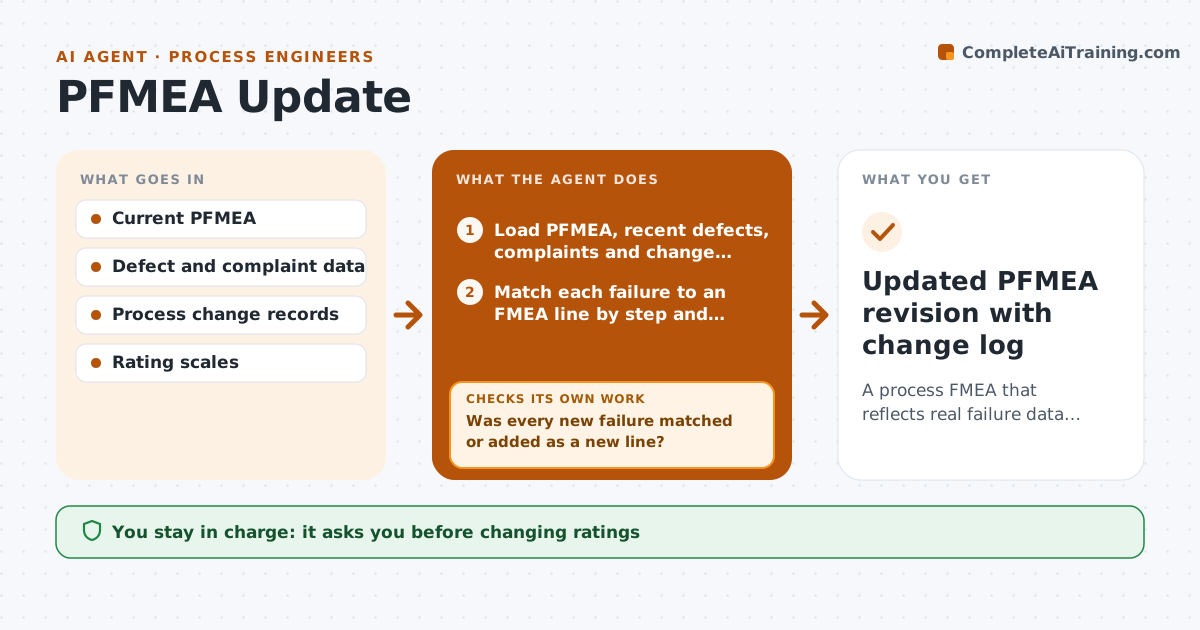
A process FMEA that reflects real failure data and has actions on every high risk line
What it does
A process FMEA should change when real failures happen, but most are written once and filed. This agent reads new defects, customer complaints and process changes each month, and matches each one to a failure mode in the FMEA by process step and effect, since the same failure is often worded differently. If a failure happened that is not listed, it drafts a new line. If the real occurrence is now higher than the rating, it proposes a new rating from the data. It recalculates risk and checks that every high risk line has an action and an owner, drafting a proposed action where one is missing. A second check confirms that every new defect was matched or added. The engineer approves rating changes and actions before the FMEA revision is saved.
How it works
Follow the arrows from top to bottom. The orange dashed arrow is the loop: when a check fails, the agent goes back and tries again.
Read the steps as a list
- Monthly review or process change
- Load PFMEA, recent defects, complaints and change notices
- Match each failure to an FMEA line by step and effect
- Was every new failure matched or added as a new line?If not: draft new failure mode lines for unmatched failures. Back to step 3.
- Propose revised occurrence ratings from the data
- Recalculate risk ranking for changed lines
- Does every high risk line have an action and owner?If not: draft proposed actions for lines without one, then rerank. Back to step 5.
- Engineer approves ratings and actionsThe agent waits here for your OK.
- Updated PFMEA revision with change log
How it decides
It updates occurrence from actual defect rates and flags lines above the set risk level that lack an action.
- Use the plant's rating scale for occurrence
- Unmatched real failures become new lines
- Severity is never lowered without an engineering reason
Make it yours
Every agent is a starting point. You choose these settings for your own situation.
- Risk level that requires an action
- Rating scales used
- Data sources
- Review frequency
What keeps you in control
It always asks you first
- Changing ratings
- Adding actions to the FMEA
Hard limits
- Never lowers severity on its own
- Keeps prior revision
It stops when
- Done: PFMEA revised and approved
- Stop: rating scale missing; ask the engineer for it
Set it up
We guide you through the set-up, step by step
Members get the full set-up guide for this agent. No technical skills needed: you copy, paste and upload.
- One set of instructions to paste into your AI, with the clicks for ChatGPT, Claude, Microsoft 365 Copilot, Gemini and Grok
- The agent then walks you through connecting your own data, one source at a time
- A downloadable copy with the flow chart, the rules and the full guide