AI agent for information security analysts
Phishing Simulation Coordination Agent
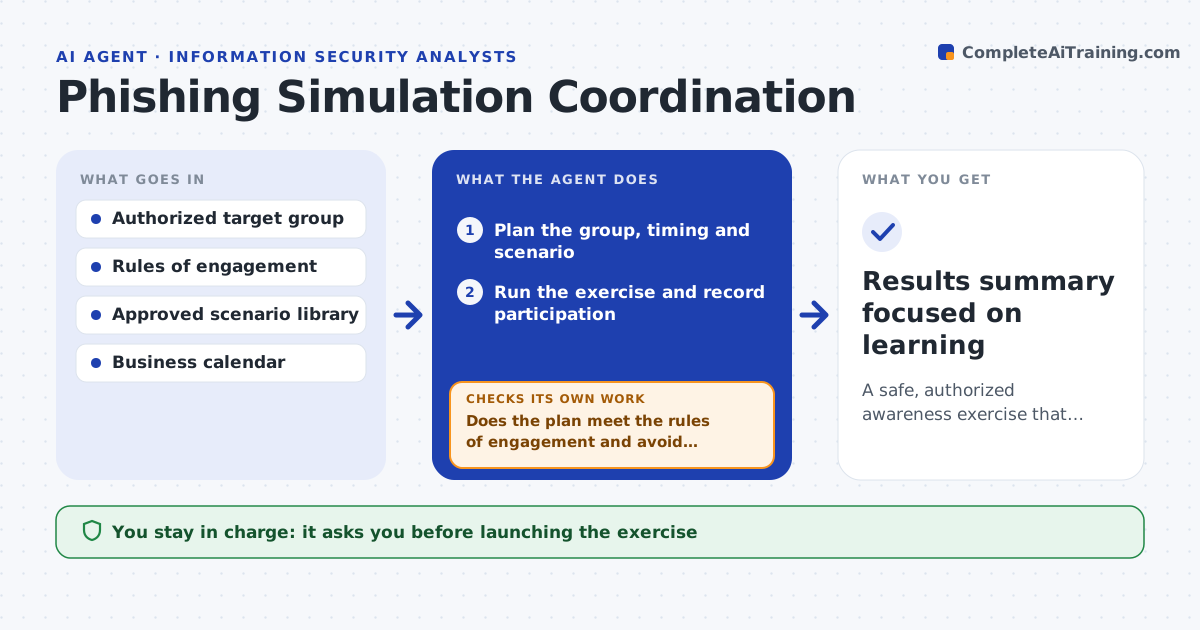
A safe, authorized awareness exercise that measures and improves staff resilience
What it does
Phishing awareness exercises must teach staff without disrupting real work, and only on authorized groups. For an approved exercise this agent prepares the plan: the target group from the authorized list, a schedule that avoids sensitive business periods and a scenario from an approved library. Before anything runs, it checks the plan against the rules of engagement, such as excluded people, allowed timing and how closely a scenario may imitate real internal systems. If the plan breaks a rule, it adjusts it and checks again. During the exercise it tracks who interacted and measures results. Everyone who took part is routed to awareness follow-up, never singled out. It drafts a results summary focused on learning, not blame. You approve the launch and the follow-up. Edge case: a scenario too close to a real internal portal is swapped.
How it works
Follow the arrows from top to bottom. The orange dashed arrow is the loop: when a check fails, the agent goes back and tries again.
Read the steps as a list
- Awareness exercise approved
- Plan the group, timing and scenario
- Does the plan meet the rules of engagement and avoid sensitive periods?If not: adjust the group, timing or scenario and recheck. Back to step 2.
- Lead approves launching the exerciseThe agent waits here for your OK.
- Run the exercise and record participation
- Route participants to awareness follow-up and draft results
- Lead approves the follow-up and summaryThe agent waits here for your OK.
- Results summary focused on learning
How it decides
It runs only within the rules of engagement and routes all participants to learning, never using results to single individuals out.
- Run only within the rules of engagement
- Exclude anyone on the do-not-target list
- Use results for learning, not individual blame
Make it yours
Every agent is a starting point. You choose these settings for your own situation.
- Rules of engagement
- Do-not-target list
- Scenario library
- Follow-up learning content
What keeps you in control
It always asks you first
- Launching the exercise
- The follow-up and results summary
Hard limits
- Only authorized groups, never real credentials harvested for use
- Results never used to punish individuals
It stops when
- Done: exercise run and learning assigned
- Stop: the exercise is not authorized or rules are missing
Set it up
We guide you through the set-up, step by step
Members get the full set-up guide for this agent. No technical skills needed: you copy, paste and upload.
- One set of instructions to paste into your AI, with the clicks for ChatGPT, Claude, Microsoft 365 Copilot, Gemini and Grok
- The agent then walks you through connecting your own data, one source at a time
- A downloadable copy with the flow chart, the rules and the full guide