AI agent for sales and marketings
Post-Event Lead Reconciliation Agent
Get every event lead into the CRM correctly and report results
What it does
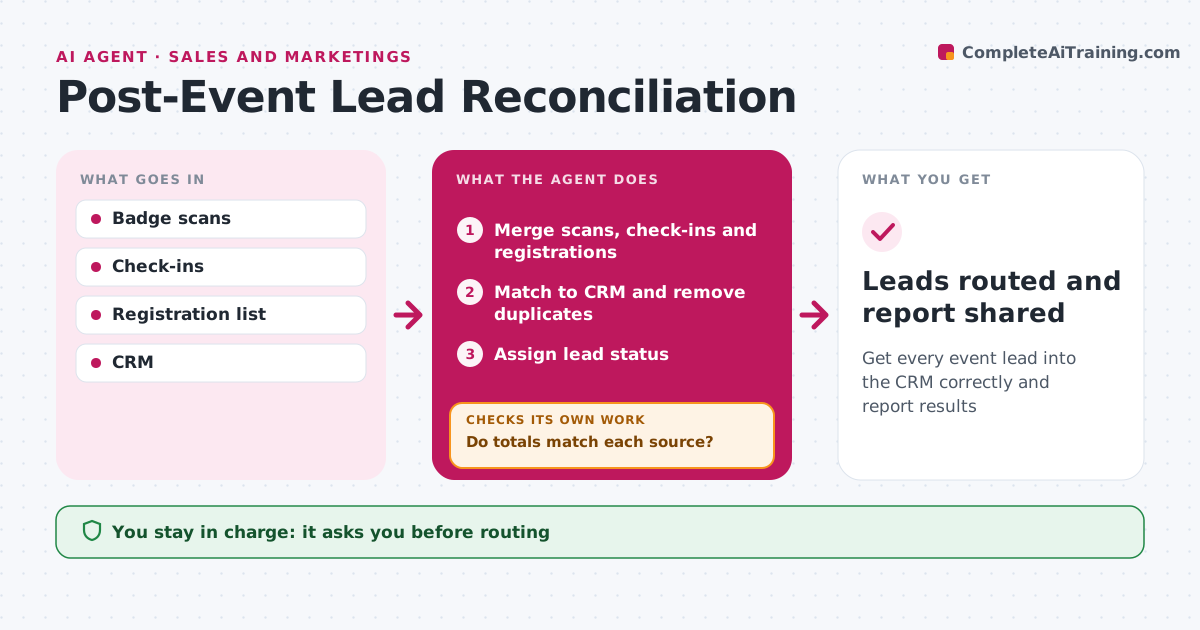
After an event, leads come from badge scans, session check-ins and registration lists, and messy merging means hot leads wait days for a call. When the event ends, this agent merges all sources, matches people to CRM records and removes duplicates by email. It checks that totals match each source; if numbers do not add up, it finds the missing or double-counted records and checks again. It then assigns lead status by activity, so a booth demo counts as a hot lead and a single session visit does not. The event marketer approves routing before hot leads go to sales. The agent then drafts the event report with registrations, attendance, leads and pipeline. Edge case: contacts who did not give consent are not added to marketing lists, though they still appear in the event report.
How it works
Follow the arrows from top to bottom. The orange dashed arrow is the loop: when a check fails, the agent goes back and tries again.
Read the steps as a list
- Event ends
- Merge scans, check-ins and registrations
- Match to CRM and remove duplicates
- Do totals match each source?If not: find missing or duplicate records. Back to step 3.
- Assign lead status
- Event marketer approves routingThe agent waits here for your OK.
- Draft the event report
- Leads routed and report shared
How it decides
Lead status follows activity. Totals must match sources.
- Consent required for marketing lists
- Booth demos are hot leads
- Duplicates merged by email
Make it yours
Every agent is a starting point. You choose these settings for your own situation.
- Lead status rules
- Report format
- Routing rules
What keeps you in control
It always asks you first
- Routing
- Report
Hard limits
- Never adds contacts without consent
- Never deletes CRM records
It stops when
- Done: report shared
- Stop: scan data missing
Set it up
We guide you through the set-up, step by step
Members get the full set-up guide for this agent. No technical skills needed: you copy, paste and upload.
- One set of instructions to paste into your AI, with the clicks for ChatGPT, Claude, Microsoft 365 Copilot, Gemini and Grok
- The agent then walks you through connecting your own data, one source at a time
- A downloadable copy with the flow chart, the rules and the full guide