AI agent for full-stack developers
Pull Request Review Prep Agent
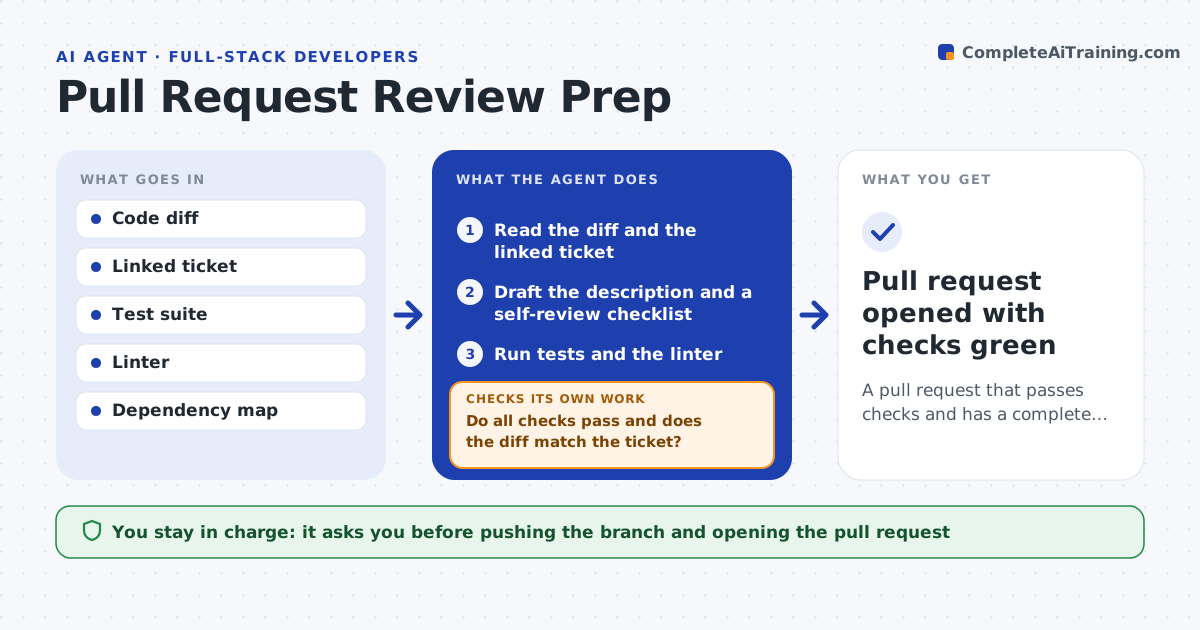
A pull request that passes checks and has a complete description before a human reviews it
What it does
Pull requests bounce back and forth when the description is thin and obvious issues are caught late by reviewers. This agent reads the code changes against the base branch and drafts a clear description of what changed and why. It then runs a self-review: it checks the diff for missing tests, leftover debug code, unhandled errors and changes that do not match the linked ticket. It runs the existing tests and linter and reads the results. If a check fails or a gap is found, it lists the fix and waits so you can address it, then checks again before reviewers see anything. You approve the final description and the push. Edge case: a change that touches a shared module flags the other teams that depend on it so they can review too.
How it works
Follow the arrows from top to bottom. The orange dashed arrow is the loop: when a check fails, the agent goes back and tries again.
Read the steps as a list
- Developer marks branch ready
- Read the diff and the linked ticket
- Draft the description and a self-review checklist
- Run tests and the linter
- Do all checks pass and does the diff match the ticket?If not: list failing checks and out-of-scope changes for the developer, then rerun. Back to step 4.
- Flag affected dependent modules and reviewers
- Developer approves the description and pushesThe agent waits here for your OK.
- Pull request opened with checks green
How it decides
It compares the diff with the ticket scope and the test and lint results, and blocks readiness until every required check passes.
- Block readiness if tests or lint fail
- Flag changes not covered by the ticket
- Request tests when new logic has none
Make it yours
Every agent is a starting point. You choose these settings for your own situation.
- Checks that must pass
- Description template
- Whether to require tests for new logic
- Reviewers to tag by area
What keeps you in control
It always asks you first
- Pushing the branch and opening the pull request
Hard limits
- Never merges code
- Does not push without approval
It stops when
- Done: pull request opened with green checks
- Stop: the branch does not build
Set it up
We guide you through the set-up, step by step
Members get the full set-up guide for this agent. No technical skills needed: you copy, paste and upload.
- One set of instructions to paste into your AI, with the clicks for ChatGPT, Claude, Microsoft 365 Copilot, Gemini and Grok
- The agent then walks you through connecting your own data, one source at a time
- A downloadable copy with the flow chart, the rules and the full guide