AI agent for bloggers
Reader Pulse Survey Cycle Agent
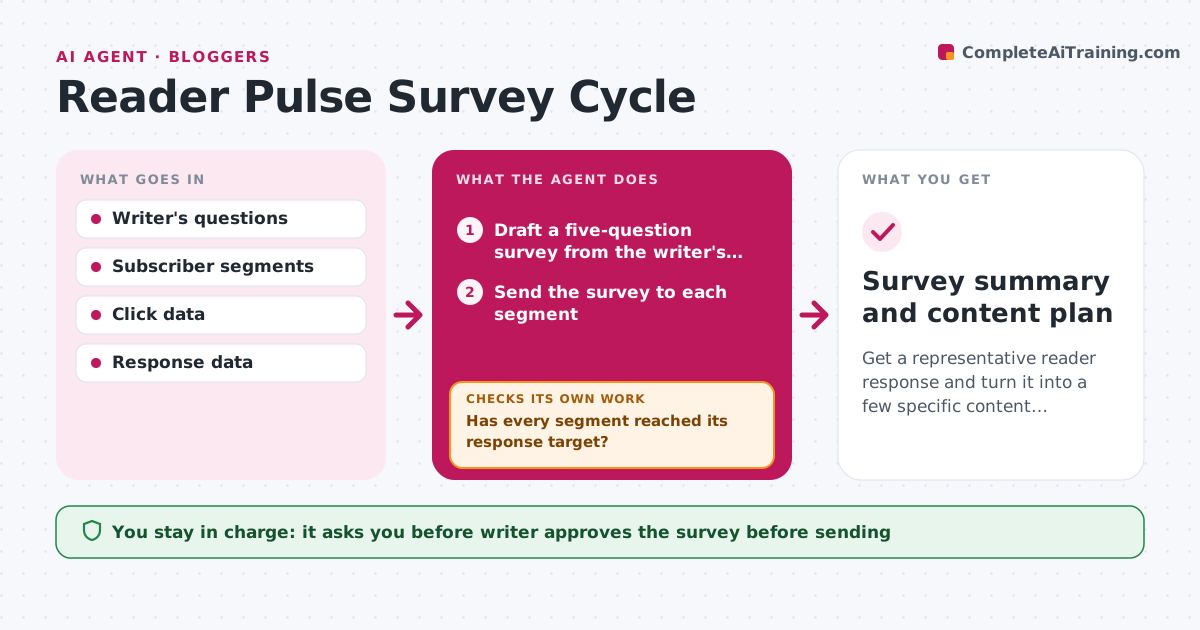
Get a representative reader response and turn it into a few specific content decisions.
What it does
Most reader surveys get a 4 percent response from the same enthusiastic readers, and the results never change what is written. The agent builds a short survey of five questions from the writer's open content questions. It sends it to defined segments, such as new subscribers, long-term readers and paid members, and tracks response by segment. Where a segment is under-represented, it resends to that group with a different subject line and timing. When the survey closes, it groups open answers by theme, counts choices, and compares the results with what the readers actually click on. It then proposes specific content changes, such as a new series or fewer product reviews. Edge case: a few very long answers from one reader skew the themes. The agent weighs by reader, not by word count. The writer approves the survey and any content changes.
How it works
Follow the arrows from top to bottom. The orange dashed arrow is the loop: when a check fails, the agent goes back and tries again.
Read the steps as a list
- Writer starts a survey cycle
- Draft a five-question survey from the writer's open questions
- Writer approves the survey and the segmentsThe agent waits here for your OK.
- Send the survey to each segment
- Track response rates by segment after 3 days
- Has every segment reached its response target?If not: resend to the low segments with a new subject line and send time. Back to step 4.
- Group open answers into themes and count readers per theme
- Compare the themes with click and open data
- Propose content changes and rank them
- Writer approves the changesThe agent waits here for your OK.
- Survey summary and content plan
How it decides
The survey is representative when every segment reaches its response target. Themes are counted by number of readers, and compared with click behavior before changes are proposed.
- Target a response of at least 8 percent per segment
- Resend once after 3 days to segments under target
- Count each reader once per theme
- Propose a change only when a theme is backed by clicks or 15 percent of responses
Make it yours
Every agent is a starting point. You choose these settings for your own situation.
- Segments and response targets
- Number of questions (default 5)
- Resend rules
- Survey length of time open (default 7 days)
- Summary format
What keeps you in control
It always asks you first
- Writer approves the survey before sending
- Writer approves content changes
Hard limits
- Never email anyone who has unsubscribed
- Keep individual answers private
It stops when
- Done: summary delivered and changes decided
- Stop: response stays under 2 percent after a resend, report that the sample is too small
Set it up
We guide you through the set-up, step by step
Members get the full set-up guide for this agent. No technical skills needed: you copy, paste and upload.
- One set of instructions to paste into your AI, with the clicks for ChatGPT, Claude, Microsoft 365 Copilot, Gemini and Grok
- The agent then walks you through connecting your own data, one source at a time
- A downloadable copy with the flow chart, the rules and the full guide