AI agent for electricians
Service Call Triage Agent
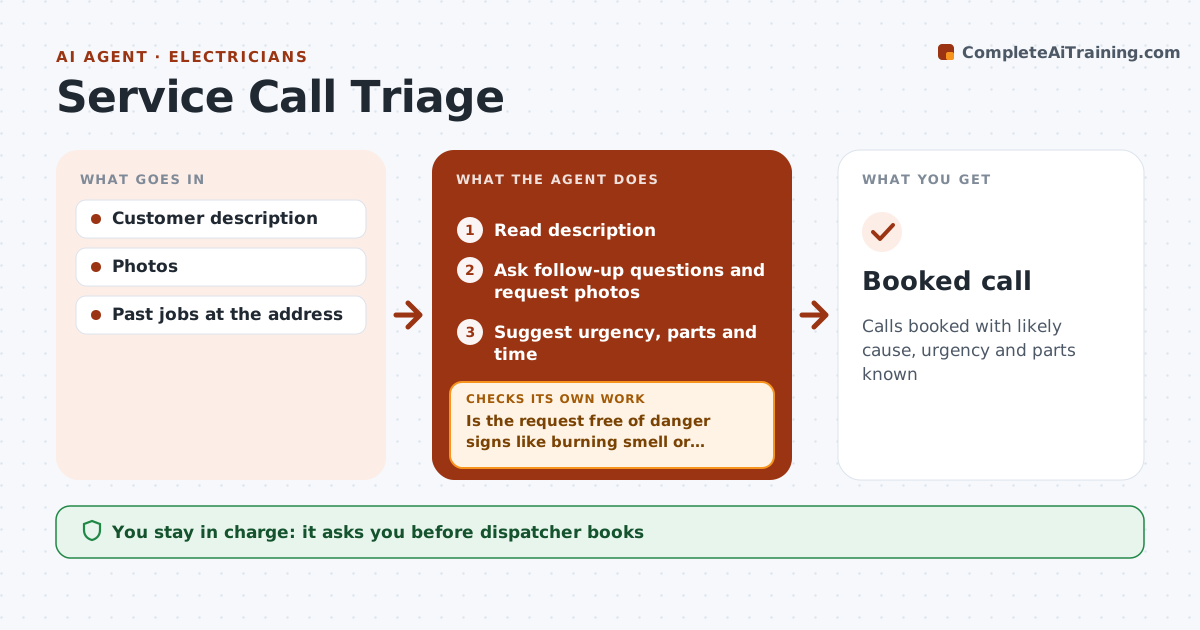
Calls booked with likely cause, urgency and parts known
What it does
Customers describe problems in their own words, and a vague call means a wasted trip or the wrong parts. This agent reads the description and asks follow-up questions by text, such as photos of the panel or the leak. It narrows the likely causes using past jobs. If more than two causes remain, it asks more questions. Danger signs like a burning smell or gas trigger safety instructions and immediate escalation to the tech. It then suggests urgency, parts to bring and appointment length. The tech or dispatcher approves the booking. Edge case: if the customer cannot send photos, it asks simple yes or no questions instead of guessing.
How it works
Follow the arrows from top to bottom. The orange dashed arrow is the loop: when a check fails, the agent goes back and tries again.
Read the steps as a list
- Request arrives
- Read description
- Is the request free of danger signs like burning smell or gas?If not: send safety instructions and escalate to the tech at once. Back to step 2.
- Ask follow-up questions and request photos
- Is the likely cause narrowed to two or fewer?If not: ask more questions. Back to step 4.
- Suggest urgency, parts and time
- Tech or dispatcher booksThe agent waits here for your OK.
- Booked call
How it decides
Causes are narrowed by answers. Danger signs escalate immediately.
- Danger signs escalate
- Two or fewer causes
- Past jobs checked
Make it yours
Every agent is a starting point. You choose these settings for your own situation.
- Question sets
- Urgency rules
- Parts lists
- Booking system
What keeps you in control
It always asks you first
- Dispatcher books
- Tech confirms parts
Hard limits
- Never tells customers to do electrical or gas work
- Escalates danger
It stops when
- Done: booked
- Stop: customer declines
Set it up
We guide you through the set-up, step by step
Members get the full set-up guide for this agent. No technical skills needed: you copy, paste and upload.
- One set of instructions to paste into your AI, with the clicks for ChatGPT, Claude, Microsoft 365 Copilot, Gemini and Grok
- The agent then walks you through connecting your own data, one source at a time
- A downloadable copy with the flow chart, the rules and the full guide