AI agent for film composers
Session Backup Verification Agent
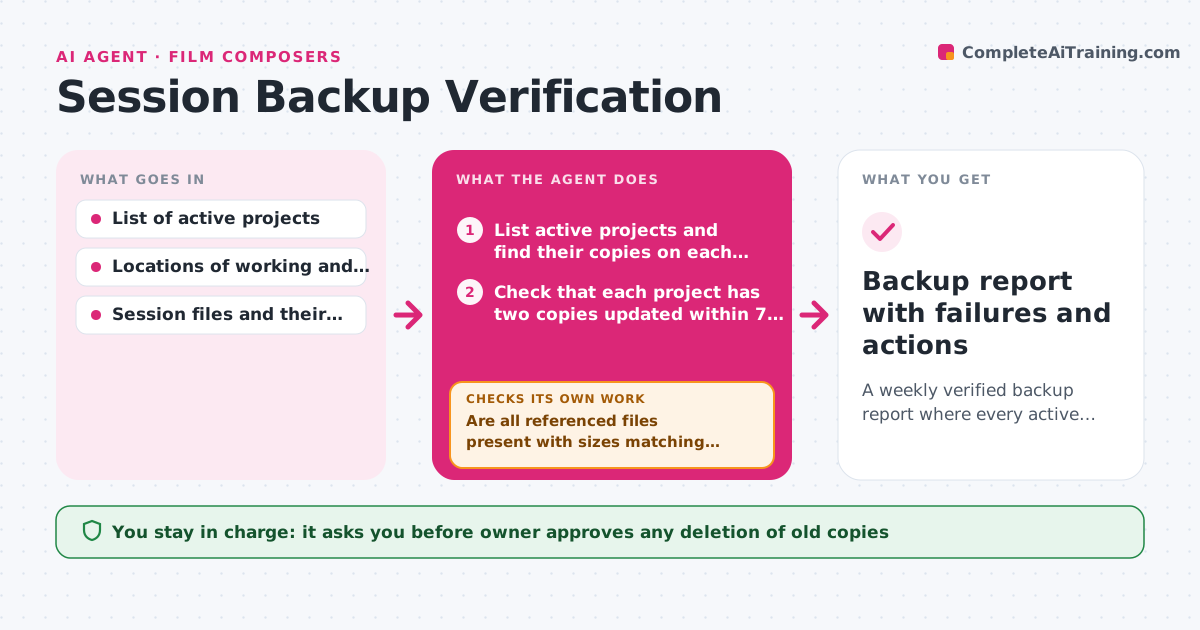
A weekly verified backup report where every active project has at least two restorable copies
What it does
Many studios find out their backup is empty when a drive fails. This agent checks restorability, not just that a backup job ran. Each week it lists the active projects, checks that each has a recent copy on at least two drives, and then opens a sample copy to confirm that all the audio files the session points to are actually present and not zero bytes or corrupted. It reports failures in plain language. For anything missing, it retries the copy from the source drive and checks again, repeating until the copy verifies or the source itself is the problem. It also proposes which old copies could be cleared to free space, and the owner approves any deletion. Edge case: a session whose audio folder moved gets flagged as unrestorable even though the backup job reported success.
How it works
Follow the arrows from top to bottom. The orange dashed arrow is the loop: when a check fails, the agent goes back and tries again.
Read the steps as a list
- Weekly backup check begins
- List active projects and find their copies on each drive
- Check that each project has two copies updated within 7 days
- Open a sample session copy and read its list of referenced audio files
- Are all referenced files present with sizes matching the source?If not: Recopy the missing files from the source drive and read the list again. Back to step 4.
- Log pass or failure for each project
- Do all projects have two verified copies?If not: Retry the copy for failed projects, then recheck the sample. Back to step 3.
- List old copies that could be cleared to free space
- Owner approves any deletion of old copiesThe agent waits here for your OK.
- Backup report with failures and actions
How it decides
A project passes only when two copies exist, both are less than 7 days old, and every file the session references opens with a matching size. Any other result is a failure.
- A copy older than 7 days counts as stale for an active project
- Verify at least one random project per drive each week, plus every project that failed last time
- Never mark a backup verified from the job log alone
- Suggest deleting only copies of closed projects that have two verified archives
Make it yours
Every agent is a starting point. You choose these settings for your own situation.
- Drives and folders to check
- Maximum age of a copy (default 7 days)
- Number of copies required (default 2)
- Day of the weekly check
- Which projects count as active
What keeps you in control
It always asks you first
- Owner approves any deletion of old copies
Hard limits
- Never delete anything without owner approval
- Never write to the source drive except to read
It stops when
- Done: Every active project has two verified restorable copies
- Stop: The source drive reports errors, so the agent stops copying and alerts the owner
Set it up
We guide you through the set-up, step by step
Members get the full set-up guide for this agent. No technical skills needed: you copy, paste and upload.
- One set of instructions to paste into your AI, with the clicks for ChatGPT, Claude, Microsoft 365 Copilot, Gemini and Grok
- The agent then walks you through connecting your own data, one source at a time
- A downloadable copy with the flow chart, the rules and the full guide