AI agent for proofreaders
Speech Fact and Quote Verification Agent
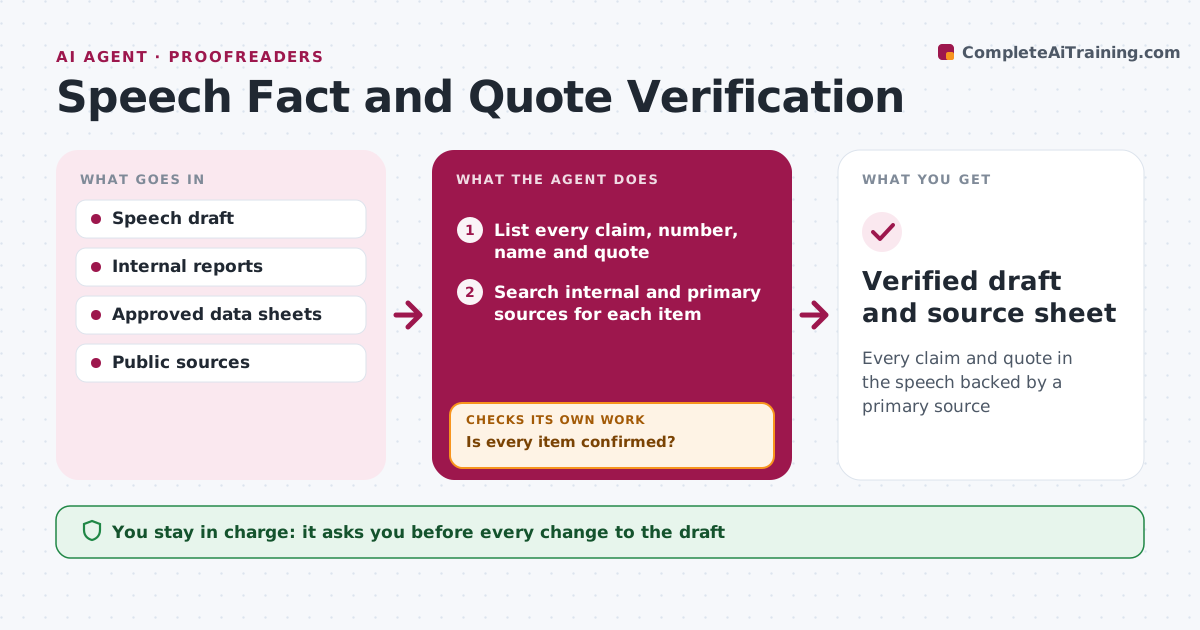
Every claim and quote in the speech backed by a primary source
What it does
One wrong number or misquoted line can overshadow an entire speech. When a draft is ready, this agent lists every factual claim, number, date, name and quote. For each it searches for a primary source: the organization's own reports, official data, or the original speech or book. It marks each claim confirmed, needs update or unsupported. Unsupported items get a second search with different terms, and if still not found, a suggested rewrite. Quotes are checked for exact wording and correct attribution. It drafts a source sheet for the speaker's office so anyone can trace a claim. The speechwriter decides on every change. Edge case: a number that is correct but outdated, such as last year's headcount, is marked needs update with the new figure and its source.
How it works
Follow the arrows from top to bottom. The orange dashed arrow is the loop: when a check fails, the agent goes back and tries again.
Read the steps as a list
- Draft ready for fact check
- List every claim, number, name and quote
- Search internal and primary sources for each item
- Mark items confirmed, needs update or unsupported
- Is every item confirmed?If not: search again with new terms, then suggest a rewrite. Back to step 3.
- Draft source sheet and suggested edits
- Speechwriter accepts or rejects each editThe agent waits here for your OK.
- Verified draft and source sheet
How it decides
Only primary or official sources count as confirmation; secondary articles lead to a primary source search.
- Primary sources only
- Misattributed quotes are removed or reattributed
- Outdated numbers get the latest official figure
Make it yours
Every agent is a starting point. You choose these settings for your own situation.
- Sources treated as primary
- Turnaround time
- Source sheet format
- Who receives the sheet
What keeps you in control
It always asks you first
- Every change to the draft
Hard limits
- Never edits the speech directly
- Never invents sources
It stops when
- Done: all items confirmed or rewritten
- Stop: speech cancelled
Set it up
We guide you through the set-up, step by step
Members get the full set-up guide for this agent. No technical skills needed: you copy, paste and upload.
- One set of instructions to paste into your AI, with the clicks for ChatGPT, Claude, Microsoft 365 Copilot, Gemini and Grok
- The agent then walks you through connecting your own data, one source at a time
- A downloadable copy with the flow chart, the rules and the full guide