AI agent for proofreaders
Style Sheet Maintenance Agent
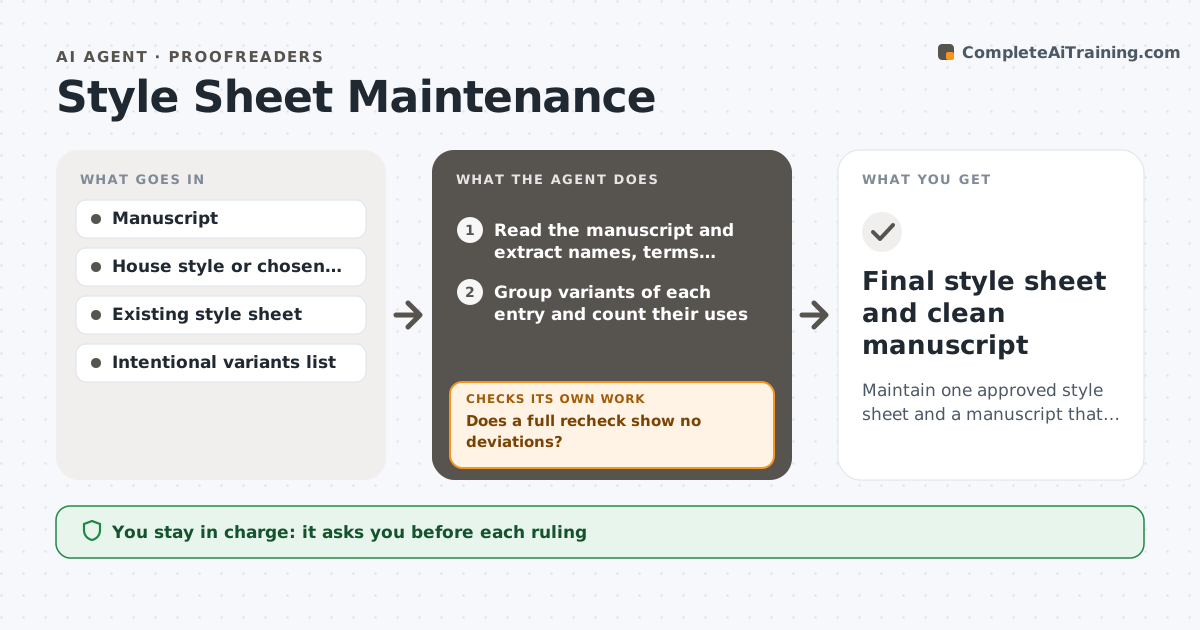
Maintain one approved style sheet and a manuscript that follows it.
What it does
Over a long manuscript, a character becomes Katarina in one chapter and Katerina in another, a place is capitalized differently, and a hyphen comes and goes. Editors keep a style sheet, but it is often built late. This agent reads the manuscript and builds a style sheet from it: names, places, terms, spellings, hyphenation, capitalization, numbers and abbreviations. It finds variants of each entry, lists where each appears, and proposes a ruling based on the house style, a dictionary or the dominant usage. It then checks each chapter against the sheet and lists deviations. When the author or editor makes rulings and edits, it rechecks the full manuscript. It never changes the text. The author approves each ruling. Edge case: a character's dialect spelling is kept if marked as intentional.
How it works
Follow the arrows from top to bottom. The orange dashed arrow is the loop: when a check fails, the agent goes back and tries again.
Read the steps as a list
- New draft submitted
- Read the manuscript and extract names, terms, spellings and formats
- Group variants of each entry and count their uses
- Propose rulings from house style, dictionary and frequency
- Author approves or changes each rulingThe agent waits here for your OK.
- Update the style sheet
- Check every chapter against the sheet
- List deviations with chapter and line
- Author makes the editsThe agent waits here for your OK.
- Does a full recheck show no deviations?If not: list the remaining and newly created deviations. Back to step 7.
- Final style sheet and clean manuscript
How it decides
It proposes the most frequent form unless the house style or dictionary says otherwise, and it never overrides a ruling the author has already made.
- Propose the dictionary form over frequency when they differ
- Keep dialect spellings marked as intentional
- Never override an approved ruling
- Check numbers and hyphenation as separate categories
Make it yours
Every agent is a starting point. You choose these settings for your own situation.
- House style or dictionary
- Categories to track
- Intentional variants list
- Chapter scope
- Deviation report format
What keeps you in control
It always asks you first
- Each ruling
- All edits to the text
Hard limits
- Never edit the manuscript
- Keep a log of all rulings
It stops when
- Done: no deviations remain
- Stop: the author freezes the text
Set it up
We guide you through the set-up, step by step
Members get the full set-up guide for this agent. No technical skills needed: you copy, paste and upload.
- One set of instructions to paste into your AI, with the clicks for ChatGPT, Claude, Microsoft 365 Copilot, Gemini and Grok
- The agent then walks you through connecting your own data, one source at a time
- A downloadable copy with the flow chart, the rules and the full guide