AI agent for information security analysts
Threat Intelligence Relevance Brief Agent
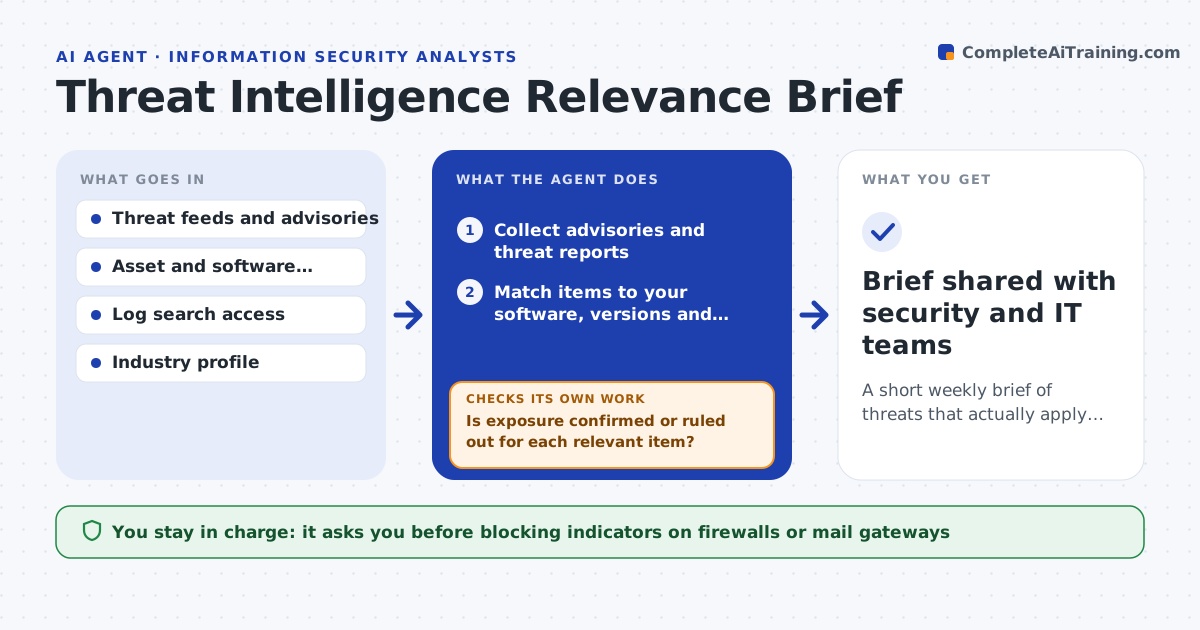
A short weekly brief of threats that actually apply to your environment, with checks done
What it does
Dozens of advisories and threat reports appear every week, and relevant warnings get lost among irrelevant ones. This agent reads your chosen feeds and advisories and matches each item against your asset inventory, software list and industry. For relevant items it searches your logs for the listed indicators to see whether you were touched. If it finds a matching software version but cannot confirm exposure, it asks the system owner a specific question and waits for the answer before ranking. It then drafts a weekly brief: what applies, what was checked, what to do and by when. You approve the brief and any blocking actions. Edge case: an advisory about a product you retired last year is dropped only after the agent confirms no servers still run it.
How it works
Follow the arrows from top to bottom. The orange dashed arrow is the loop: when a check fails, the agent goes back and tries again.
Read the steps as a list
- Weekly brief cycle
- Collect advisories and threat reports
- Match items to your software, versions and industry
- Search logs for listed indicators
- Is exposure confirmed or ruled out for each relevant item?If not: ask the system owner to confirm version and exposure. Back to step 4.
- Draft the brief with actions
- CISO approves the brief and blocking actionsThe agent waits here for your OK.
- Brief shared with security and IT teams
How it decides
An item is relevant when it names software, versions or tactics present in your inventory or targets your industry.
- Relevant only when it matches inventory or industry
- Hits on indicators are raised as incidents at once
- Keep each brief to the top items with actions
Make it yours
Every agent is a starting point. You choose these settings for your own situation.
- Feeds to read
- Industry and region profile
- Brief length and day
- Who receives the brief
What keeps you in control
It always asks you first
- Blocking indicators on firewalls or mail gateways
- Sending the brief beyond the security team
Hard limits
- Does not block anything without approval
- Shares indicators only with approved teams
It stops when
- Done: brief published
- Stop: inventory too out of date to match
Set it up
We guide you through the set-up, step by step
Members get the full set-up guide for this agent. No technical skills needed: you copy, paste and upload.
- One set of instructions to paste into your AI, with the clicks for ChatGPT, Claude, Microsoft 365 Copilot, Gemini and Grok
- The agent then walks you through connecting your own data, one source at a time
- A downloadable copy with the flow chart, the rules and the full guide