AI agent for vp of marketings
Trade Show and Event ROI Agent
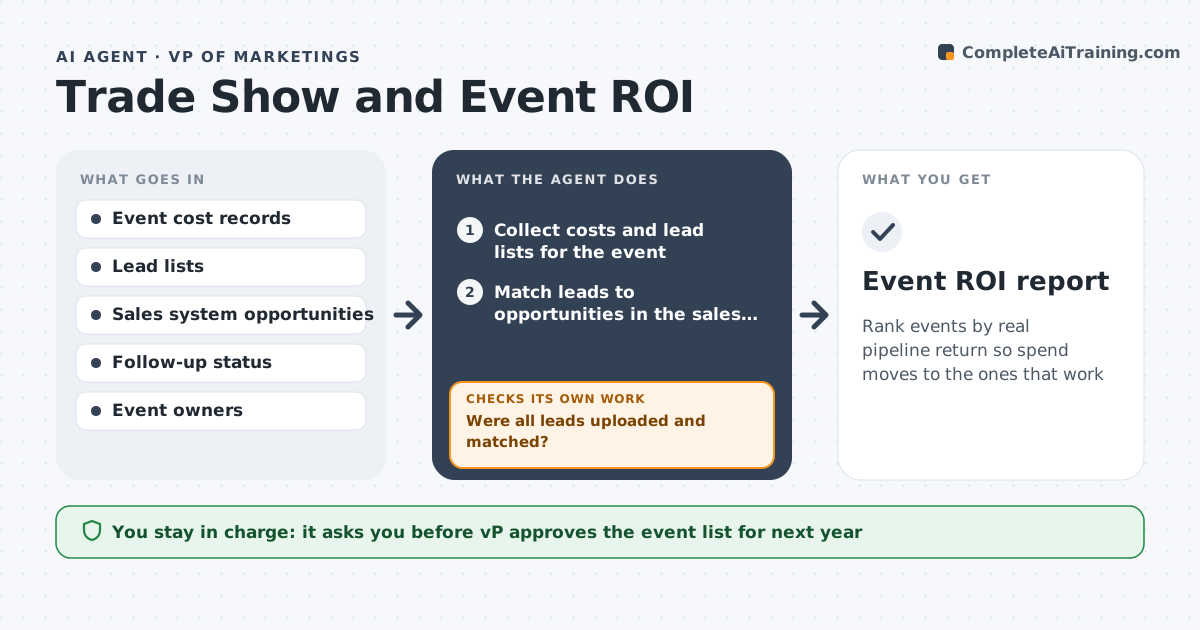
Rank events by real pipeline return so spend moves to the ones that work
What it does
The team attends fifteen events a year and nobody can say which ones led to deals. This agent collects costs for each event, such as booth, travel and staff time, along with the leads captured and their follow-up status. It matches leads to the sales system to see which became opportunities and how much pipeline and revenue they carry. It checks follow-up speed, flagging leads not contacted within five days. If data is missing, for example a lead list that was never uploaded, it asks the event owner and recalculates. It ranks events by cost per opportunity and return, and flags weak ones for review. The VP approves next year's event list. Edge case: an event with few leads but one very large deal is shown with both numbers.
How it works
Follow the arrows from top to bottom. The orange dashed arrow is the loop: when a check fails, the agent goes back and tries again.
Read the steps as a list
- 30 days after an event
- Collect costs and lead lists for the event
- Match leads to opportunities in the sales system
- Were all leads uploaded and matched?If not: Ask the event owner for missing lists and rematch. Back to step 2.
- Check follow-up speed and status
- Calculate cost per opportunity and pipeline per dollar
- Is the result consistent with the previous period's method?If not: Recompute using the standard method and note the difference. Back to step 6.
- Rank events and flag weak ones
- VP approves next year's event listThe agent waits here for your OK.
- Event ROI report
How it decides
It ranks events by pipeline per dollar and cost per opportunity, using only leads that were matched to the sales system.
- Count only leads matched to the sales system
- Flag follow-up later than 5 days
- Flag events below 1x pipeline per dollar for review
- Show both lead count and large-deal impact
Make it yours
Every agent is a starting point. You choose these settings for your own situation.
- Follow-up threshold (default 5 days)
- ROI flag level (default under 1x pipeline per dollar)
- Review lag after the event (default 30 days)
- Costs included (default booth, travel, staff, swag)
What keeps you in control
It always asks you first
- VP approves the event list for next year
Hard limits
- Never commit event spend
- Never change sales records
- Show the data behind every rank
It stops when
- Done: ROI report approved and event list decided
- Stop: Sales data is unavailable, so hand to the VP
Set it up
We guide you through the set-up, step by step
Members get the full set-up guide for this agent. No technical skills needed: you copy, paste and upload.
- One set of instructions to paste into your AI, with the clicks for ChatGPT, Claude, Microsoft 365 Copilot, Gemini and Grok
- The agent then walks you through connecting your own data, one source at a time
- A downloadable copy with the flow chart, the rules and the full guide