AI agent for secondary school teachers
Unit Plan Standards Coverage Agent
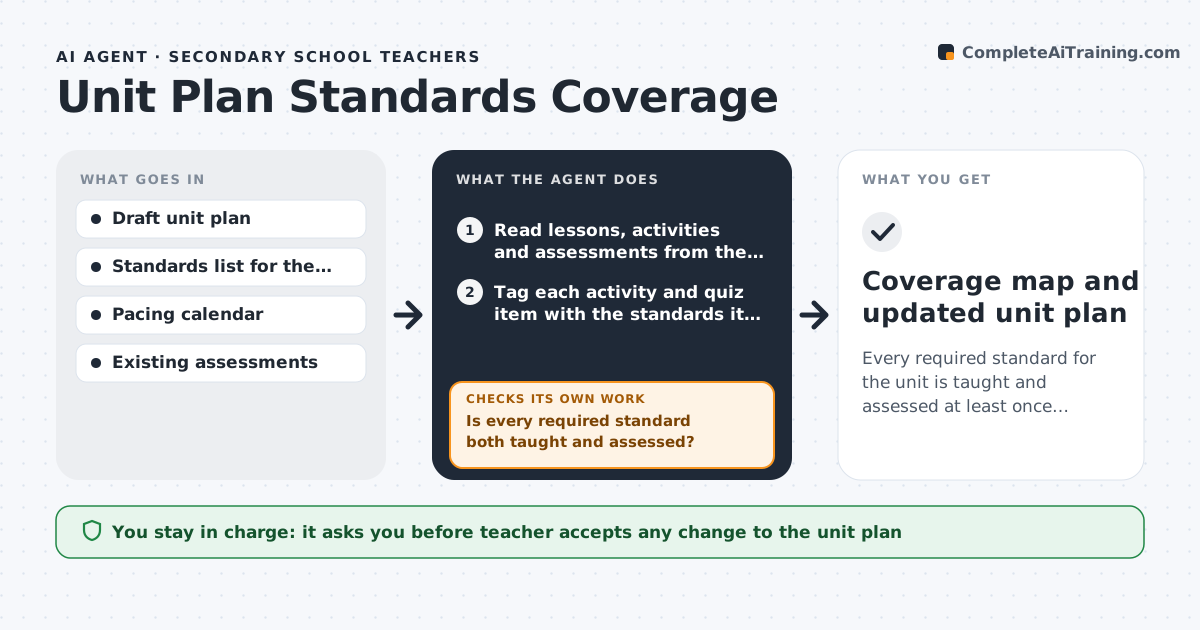
Every required standard for the unit is taught and assessed at least once, confirmed by a coverage map
What it does
Teachers plan units lesson by lesson, and it is easy to cover one standard three times and miss another. This agent reads the teacher's draft unit plan and the district standards list. It tags each activity and assessment with the standards it actually practices and builds a coverage map. A standard counts only when it is both taught and assessed. If a required standard is missing, it drafts a short lesson outline or quiz item to close the gap and maps again. It flags standards taught three or more times as trim candidates and checks the plan still fits the pacing calendar. It never changes the plan itself; the teacher picks which suggestions to keep. Edge case: a lesson title promises a standard but the activities do not practice it, so the agent marks it named but not taught.
How it works
Follow the arrows from top to bottom. The orange dashed arrow is the loop: when a check fails, the agent goes back and tries again.
Read the steps as a list
- Teacher uploads a draft unit plan
- Read lessons, activities and assessments from the plan
- Tag each activity and quiz item with the standards it practices
- Build a coverage map of standards by lesson and assessment
- Is every required standard both taught and assessed?If not: draft a lesson outline or quiz item for each gap, add it as a suggestion, then re-tag. Back to step 3.
- Does the plan still fit the pacing calendar?If not: mark the lowest-priority repeated lessons as candidates to trim and rebuild the map. Back to step 4.
- Teacher accepts or rejects each suggested changeThe agent waits here for your OK.
- Coverage map and updated unit plan
How it decides
It counts a standard as covered only when at least one activity practices it and at least one assessment item checks it. Lessons that only name a standard do not count.
- A standard is covered only when it is both practiced and assessed
- Standards taught three or more times are flagged as candidates to trim
- Suggestions match the grade level reading and math level in the standards
Make it yours
Every agent is a starting point. You choose these settings for your own situation.
- Which standards framework to use (state, Common Core, IB)
- Minimum times a standard must be assessed (default 1)
- Whether to suggest lessons, quiz items, or both
- Pacing calendar source
What keeps you in control
It always asks you first
- Teacher accepts any change to the unit plan
Hard limits
- Never edits the teacher's plan without approval
- Does not invent standards that are not in the supplied list
It stops when
- Done: every required standard is taught and assessed and the plan fits the calendar
- Stop: the standards list is missing or the plan has no assessments to map
Set it up
We guide you through the set-up, step by step
Members get the full set-up guide for this agent. No technical skills needed: you copy, paste and upload.
- One set of instructions to paste into your AI, with the clicks for ChatGPT, Claude, Microsoft 365 Copilot, Gemini and Grok
- The agent then walks you through connecting your own data, one source at a time
- A downloadable copy with the flow chart, the rules and the full guide