AI agent for product managers
Usability Test Coordination Agent
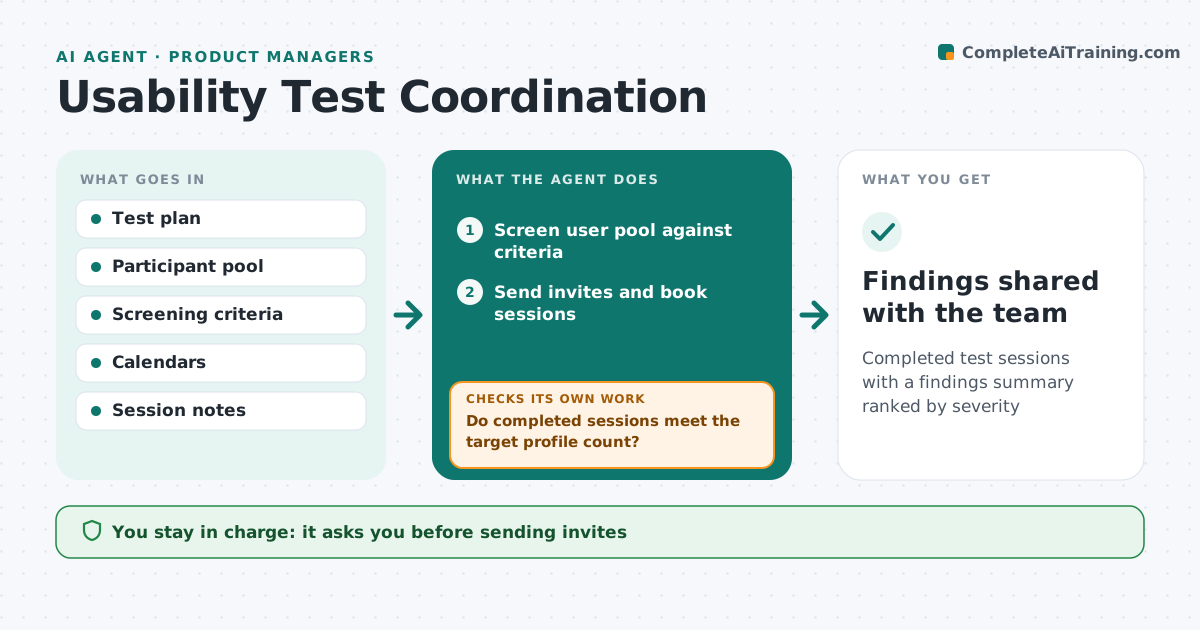
Completed test sessions with a findings summary ranked by severity
What it does
Usability testing slips because recruiting, scheduling and note synthesis take too long. This agent takes the test plan, screens a pool of users against the criteria, drafts invitations and books sessions in open calendar slots. After sessions, it reads notes or transcripts and lists issues per task with how many participants hit each. It checks that enough participants matched the target profile, and recruits more if not. A participant who works for a customer partner is excluded from results. It rates issues by severity and drafts findings. The product manager approves invitations, incentives and the findings.
How it works
Follow the arrows from top to bottom. The orange dashed arrow is the loop: when a check fails, the agent goes back and tries again.
Read the steps as a list
- Test plan approved
- Screen user pool against criteria
- Product manager approves invitations and incentivesThe agent waits here for your OK.
- Send invites and book sessions
- Do completed sessions meet the target profile count?If not: screen and invite more participants. Back to step 2.
- List issues per task with counts and severity
- Draft findings summary
- Findings shared with the team
How it decides
It ranks issues by how many participants hit them and how badly they blocked the task.
- Five matching participants per segment minimum
- Severity based on task failure, not opinion
- Excluded participants noted with reason
Make it yours
Every agent is a starting point. You choose these settings for your own situation.
- Screening criteria
- Participants per segment
- Incentive rules
- Summary format
What keeps you in control
It always asks you first
- Sending invites
- Paying incentives
Hard limits
- Recordings stored only where consented
- No personal data in the summary
It stops when
- Done: findings shared
- Stop: no matching participants after two recruiting rounds
Set it up
We guide you through the set-up, step by step
Members get the full set-up guide for this agent. No technical skills needed: you copy, paste and upload.
- One set of instructions to paste into your AI, with the clicks for ChatGPT, Claude, Microsoft 365 Copilot, Gemini and Grok
- The agent then walks you through connecting your own data, one source at a time
- A downloadable copy with the flow chart, the rules and the full guide