AI agent for plant managers
Weekly OEE Loss Review Agent
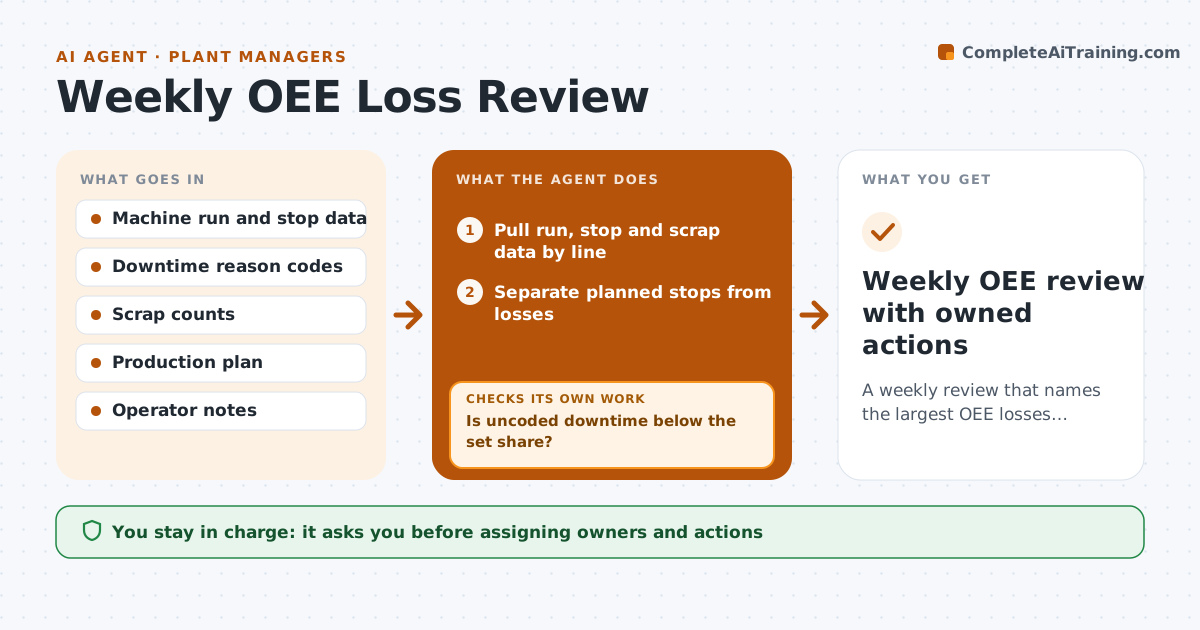
A weekly review that names the largest OEE losses, their causes and an owner for each
What it does
Plants track OEE but often spend the weekly meeting arguing about the number instead of fixing the losses. When the week closes, this agent pulls run, stop and scrap data by line and separates planned stops, such as changeovers and breaks, from real losses. It then checks how much downtime is uncoded. If more than 15 percent is uncoded, it sends shift leads a list of stops to code and pulls the data again before going further. It ranks losses by minutes lost and pulls reason codes and operator notes for the top ones to find the real cause. It drafts a one-page review with the top three losses per line, likely causes and suggested owners. The plant manager assigns owners and actions. Edge case: a planned changeover recorded as downtime would inflate losses, so planned stops are removed first.
How it works
Follow the arrows from top to bottom. The orange dashed arrow is the loop: when a check fails, the agent goes back and tries again.
Read the steps as a list
- Week closes
- Pull run, stop and scrap data by line
- Separate planned stops from losses
- Is uncoded downtime below the set share?If not: send shift leads a list of uncoded stops to code, then pull data again. Back to step 2.
- Rank losses and pull reason codes and notes
- Draft one-page review with top losses and causes
- Plant manager assigns owners and actionsThe agent waits here for your OK.
- Weekly OEE review with owned actions
How it decides
It ranks losses by minutes lost after removing planned stops and only reports causes when coded downtime covers enough of the total.
- Planned changeovers and breaks are not losses
- Report only the top three losses per line
- Uncoded downtime above 15% blocks the cause analysis
Make it yours
Every agent is a starting point. You choose these settings for your own situation.
- Uncoded downtime limit (default 15%)
- Lines included
- Which stops count as planned
- Day and time of the review
What keeps you in control
It always asks you first
- Assigning owners and actions
Hard limits
- Never edits machine data
- Reports figures as measured, without rounding up
It stops when
- Done: review approved with owners
- Stop: data source unavailable; send last complete week instead
Set it up
We guide you through the set-up, step by step
Members get the full set-up guide for this agent. No technical skills needed: you copy, paste and upload.
- One set of instructions to paste into your AI, with the clicks for ChatGPT, Claude, Microsoft 365 Copilot, Gemini and Grok
- The agent then walks you through connecting your own data, one source at a time
- A downloadable copy with the flow chart, the rules and the full guide