AI tool
Alai
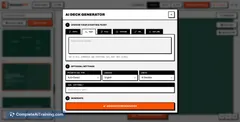
Alai turns ideas into polished decks fast. Get four premium options per slide, a responsive canvas, context-aware AI, and customizable visuals-no manual formatting.

About Alai
Alai is an AI-powered presentation tool that helps users create high-quality slide decks quickly. It generates multiple layout options per slide and provides a responsive canvas so edits stay consistent without manual pixel adjustments.
Review

Alai focuses on a design-first workflow that gives non-designers access to polished presentation elements while keeping customization straightforward. Its context-aware AI evaluates the whole deck, helping maintain visual and narrative consistency across slides.
Key Features
- Four distinct, high-quality options generated for each slide to jumpstart design choices
- Responsive canvas that automatically adjusts layouts as you add or move content
- Rich, presentation-focused visual elements that are customizable without pixel pushing
- Context-aware AI that understands the full deck to keep edits and new content consistent
- Planned export to PowerPoint and upcoming import/brand-guideline features to ease workflow integration
Pricing and Value
Alai is available with a free tier at launch and is offering a launch discount of 50% off for two months (use coupon code PH50). The value proposition centers on saving time and reducing manual layout work by providing strong starting designs and streamlining iteration, which can be particularly valuable for users who need presentable decks quickly without hiring a designer.
Pros
- Multiple ready-made slide options per slide reduce the need to start from scratch
- Responsive canvas removes a lot of manual alignment and spacing work
- Context-aware edits help keep tone and design consistent across the entire deck
- Visual elements feel presentation-focused rather than generic document blocks
- Launch-friendly pricing and an introductory discount make it low-risk to try
Cons
- Some advanced data-visualization types (for example, scatter plots with regression lines) are not supported yet
- Export and import integrations are still being rolled out, so current interoperability is limited
- Brand guideline import and automated onboarding for existing slide libraries are still in progress
Alai is best suited for people who want polished presentations quickly-students, startup founders, product teams, and non-designers who still want control over final visuals. If you frequently build decks and want to reduce layout time while keeping the ability to tweak designs, Alai is worth trying.
Jobs Alai suits
We checked Alai against 500+ jobs; these get the most out of it.
Alternatives to Alai
Other tools that do the same main job. Our AI compared Alai with similar tools and kept the ones you could use instead.