AI tool
Hansel
Hansel is a privacy-focused Mac app that records your workday and lets you ask questions about it, such as "What did I do today?" Activity data is stored locally and encrypted by default. It is built for people managing complex work across many to...

About Hansel
Hansel is a macOS time tracking and work history tool that records your activity locally and lets you ask questions about your workday. It builds a private history from your chats, screenshots, browser tabs, and other activity, then answers queries like "What did I do today?" The tool launched this week and is currently free.
Review

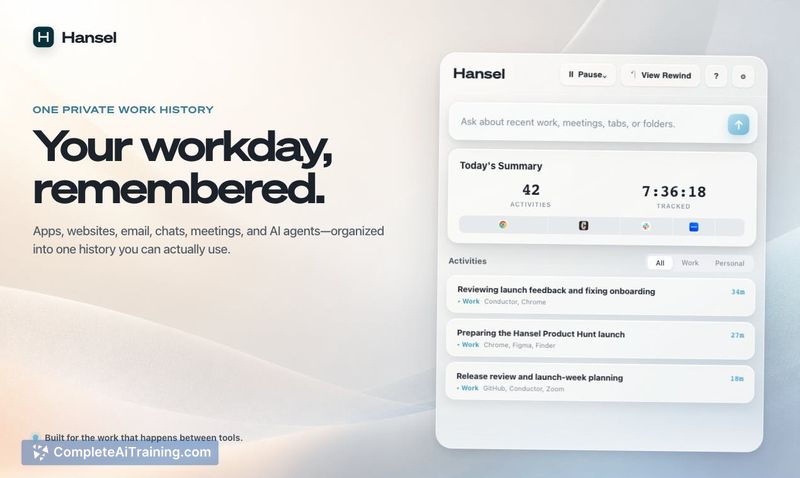
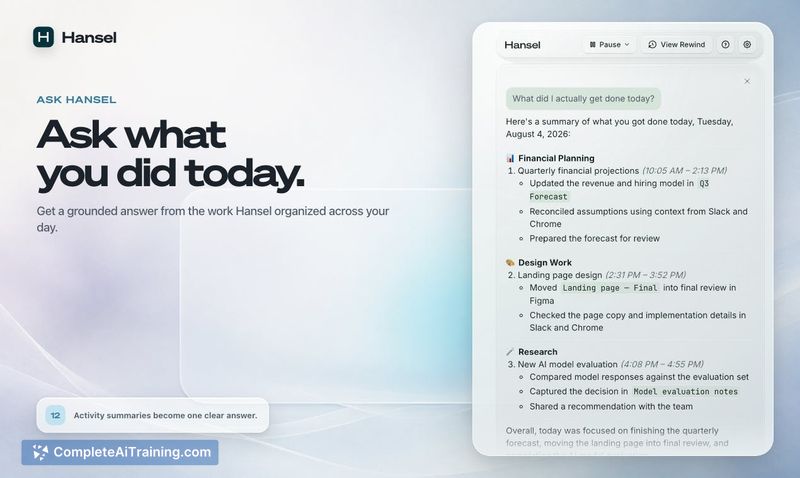


Hansel addresses a specific problem: work scattered across many tools and platforms makes it hard to reconstruct what you actually accomplished. The product records activity locally and uses AI to answer questions about that history. It launched on Product Hunt this week and is in its early stages.
Key Features
- Local-first storage: Activity history, chats, screenshots, and recordings stay on your Mac by default.
- Encryption with macOS Keychain: Encryption keys live in your Mac's Keychain, and the maker states there is no admin or export path that bypasses user keys.
- AI Q&A over your work history: Ask questions about your workday, including "What did I do today?"
- Zero-data-retention AI providers: AI requests go only to providers with zero-data-retention policies.
- Automatic capture: Hansel records activity without requiring manual logging, covering tabs, email, chats, and meetings.
Pricing and Value
The product is listed as free on its launch page. No paid tiers or future pricing details are defined at this time. The value proposition is tied to the privacy architecture: data stays on-device and encrypted, with AI processing limited to providers that don't retain data.
Pros
- Privacy is built into the architecture rather than being a policy promise; data can't be read without keys from the macOS Keychain.
- Works across many activity types, including tabs, chats, screenshots, and recordings, without manual input.
- Answers natural language questions about past work, which reduces time spent digging through folders and apps.
- Currently free to use.
Cons
- Mac-only at launch, so Windows and Linux users can't use it.
- Still early-stage; the maker is actively soliciting feedback and the tool's accuracy across complex workflows isn't independently verified yet.
- Not suited for people who want a team-level or web-based dashboard, since there's no admin view or remote access by design.
Hansel fits professionals who juggle many tools and need a reliable record of their workday without manual tracking. It's also a reasonable choice for anyone concerned about employer surveillance, since the local encryption model makes remote monitoring impossible by design. Early adopters on macOS who do complex, multi-tool work will get the most from it right now; those needing cross-platform support or team features should wait for future releases.
Jobs Hansel suits
We checked Hansel against 500+ jobs; these get the most out of it.
Alternatives to Hansel
Other tools that do the same main job. Our AI compared Hansel with similar tools and kept the ones you could use instead.