
MCP server · Browser automation
Slideshot MCP server
by 06ketan
Turn HTML your AI writes into slide images, PDFs, and PowerPoint files in one step.
Slideshot is a small helper that takes a web page your AI wrote and turns it into finished slide files. You get pictures, a PDF, or a PowerPoint deck you can post or present. It is handy if you make carousels for LinkedIn or Instagram, or quick pitch decks, but do not want to fiddle with design tools.
What is an MCP server? The 30-second version
On its own, your AI can only chat. An MCP server is a small helper program that gives your AI a new skill or a connection to another tool. This one connects your AI to Slideshot, a slide maker that runs on your computer. So when you ask for slides, your AI can actually build the files instead of just describing them.
What this MCP server does
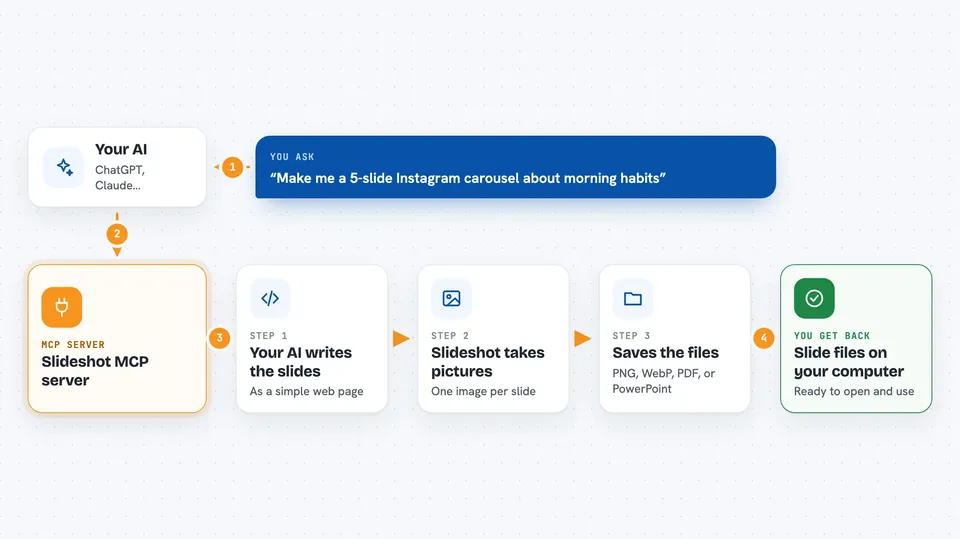
You ask your AI to make slides, and it writes the slide content as a simple web page. Slideshot then opens that page in a hidden browser and takes a picture of each slide. It saves those pictures as PNG, WebP, or PDF files, or packs them into a PowerPoint file. When it is done, you get the files in a folder on your computer, ready to use.
 Click to zoom
What you can do with it
- Turn a written idea into slide images
- Export slides as PNG, WebP, PDF, or PowerPoint
- Pick from seven ready-made styles like Instagram or pitch deck
- Get a prompt template to help your AI write nicer slides
- Check that the slide maker is working before you start
- Make carousels for social posts in one go
Try asking your AI
- “Make me a 5-slide Instagram carousel about morning habits, in the bold vibrant style”
- “Turn this text into a pitch deck and save it as a PDF”
- “Create slides about our quarterly numbers and export them as PNG images”
- “Give me the prompt template for the editorial theme”
What it gives back to you
You get slide files saved to a folder on your computer, usually in a folder called slides. In the chat, your AI tells you where the files are and what formats were made. If something went wrong, it tells you that too. You can then open the images or PDF and use them right away.
Before you start
What you need
- Node.js installed on your computer (the free program that runs small tools like this)
- An AI app that supports MCP servers, like Cursor or Claude Desktop
- A folder where the slide files can be saved
Good to know
It runs a hidden browser on your computer and saves files to a folder you choose, so be careful if you point it at private pages or an important folder.
Install it with your AI
Add Slideshot MCP server to your AI, no technical skills needed
You don't install anything by hand. You copy one prompt, paste it into an AI that can work on your computer, and it checks, installs and connects the server for you, asking you when it needs something.
Sign in to get the install prompt
Members get a ready-made prompt that lets the Claude desktop app check Slideshot MCP server, install it and connect it for them, step by step. You don't need any technical skills: you copy, paste and answer a few questions. Your connected AI can also find and install any of the 4,361 MCP servers here for you.
Who it's for
People who make social media carousels, quick pitch decks, or simple infographics and want their AI to produce the finished files.


