MCP server · API
1MCP MCP server
by 1mcp-app
Connect many MCP helpers through one program so your AI has a single tidy place to work from.
1MCP is a helper program that sits in front of all your other AI helper programs and gathers them into one. Instead of setting up each AI tool separately, you set them up once here. It is handy if you use more than one AI assistant and want them to share the same set of helpers.
What is an MCP server? The 30-second version
On its own, your AI can only chat with you. An MCP server is a small helper program that gives your AI a new skill or a connection to an app, so it can look things up or do things for you. This one, 1MCP, is a helper that gathers other helpers. You point it at the MCP servers you already use, and it runs them all behind one door so your AI can reach them together.
What this MCP server does
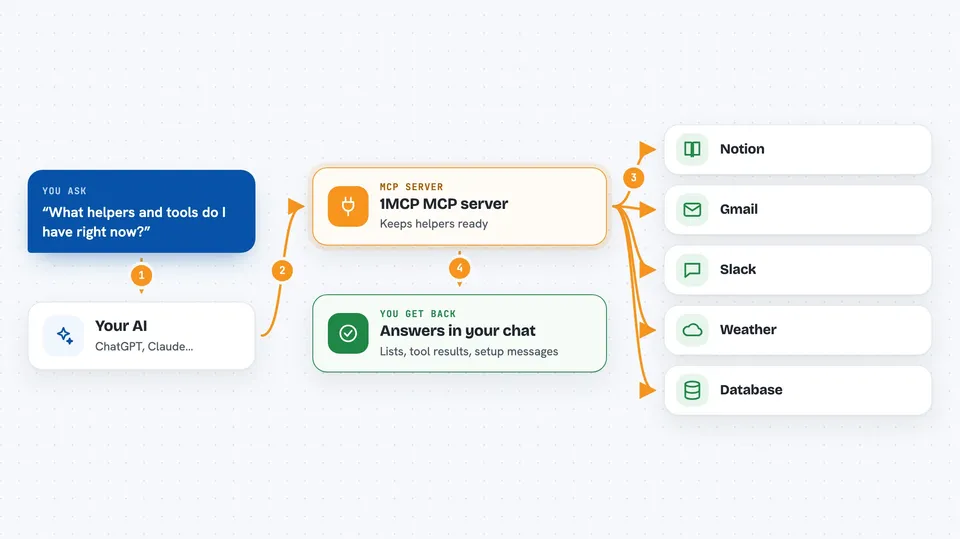
You install 1MCP and tell it which other MCP helpers you want to use. Then you start it running, and it keeps all those helpers ready in the background. When you ask your AI something, the AI asks 1MCP, and 1MCP passes the request to the right helper. The helper does the work and sends the answer back through 1MCP to your AI, which shows it to you. You end up with one setup instead of many.
 Click to zoom
What you can do with it
- Add an MCP helper to your collection with one short command
- Start one runtime that serves all your helpers at once
- Connect your AI assistant to the runtime with a setup command
- Ask the runtime what helpers and tools are available
- Look at the details of one helper or one tool before using it
- Run a single tool with the exact settings you give it
- Keep the same helper list across different AI assistants
Try asking your AI
- “What MCP helpers do I have available right now?”
- “Show me the tools inside the context7 helper.”
- “Run the query-docs tool in context7 with these settings.”
- “Set up my Claude assistant to use this runtime in this project folder.”
What it gives back to you
You get back plain text answers in your chat, like a list of helpers, a list of tools inside one helper, or the result of a tool you ran. When you run a tool, the answer it produces comes back to you the same way a normal reply would. Setup commands also print short messages telling you whether the connection worked.
Before you start
What you need
- A computer where you can run commands in a terminal
- Node.js installed (the free program that runs JavaScript tools)
- At least one other MCP server you want to gather
Good to know
It gathers other helpers, so anything those helpers can do or change, your AI can do through 1MCP too.
Install it with your AI
Add 1MCP MCP server to your AI, no technical skills needed
You don't install anything by hand. You copy one prompt, paste it into an AI that can work on your computer, and it checks, installs and connects the server for you, asking you when it needs something.
Sign in to get the install prompt
Members get a ready-made prompt that lets the Claude desktop app check 1MCP MCP server, install it and connect it for them, step by step. You don't need any technical skills: you copy, paste and answer a few questions. Your connected AI can also find and install any of the 4,361 MCP servers here for you.
Who it's for
People who use more than one AI assistant or MCP helper and want a single tidy setup instead of many separate ones.