MCP server · API · official
MCP Queen MCP server
by mcpqueen · official
Lets your AI look up grades and evidence about other MCP servers before you connect to them.
MCP Queen is a public service that checks other MCP servers and publishes dated notes about how they behave. It is handy if you are curious about a new AI helper and want to see what someone else already found out about it. You can use it straight from the web, no account needed.
What is an MCP server? The 30-second version
On its own, your AI can only chat with you. An MCP server is a small helper program that gives your AI a new skill or a connection to an app or service. This one connects your AI to MCP Queen, a public registry that watches other MCP servers and writes down what it sees. So when you ask about a server, your AI can go ask MCP Queen and bring back the answer.
What this MCP server does
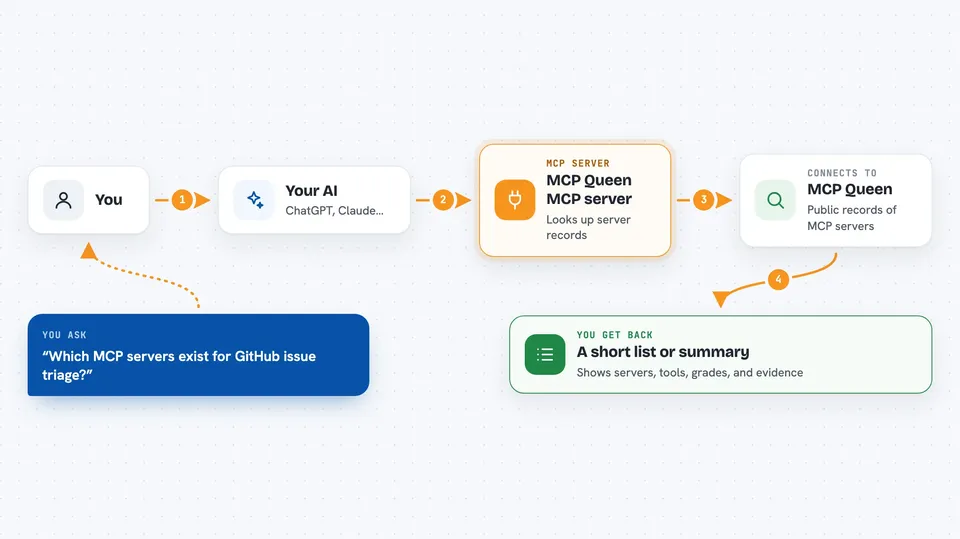
You ask your AI something like which MCP servers exist for a certain job. Your AI sends that question to MCP Queen through this helper. MCP Queen looks through its public records of servers, tools, grades and trust receipts, and sends back what it has. Your AI then shows you a short list or a summary in the chat. Everything here is read-only, so nothing on your computer or in your accounts gets changed.
 Click to zoom
What you can do with it
- Search for MCP servers by keyword or topic
- Search for individual tools offered by those servers
- See the published grade for a specific server
- Read a Trust Receipt with dated observations
- Look up evidence behind a grade
- Send feedback that goes into a review queue
Try asking your AI
- “Which MCP servers exist for GitHub issue triage?”
- “Show me the grade for the Notion MCP server.”
- “What tools does that server offer?”
- “Is there any trust evidence about this server I should read first?”
What it gives back to you
You get back lists of servers or tools, short summaries, grades with dates, and Trust Receipts with the observations behind them. It all shows up as normal text in your chat, so you can read it like any other answer. Nothing is installed or changed on your side.
Before you start
What you need
- An AI app that can connect to MCP servers, like Claude Code or the Claude desktop app
- Nothing else for the hosted web address, since it needs no account
Good to know
A grade here is not a security or privacy certificate, and a server with no evidence is simply unaudited, not proven safe.
Install it with your AI
Add MCP Queen MCP server to your AI, no technical skills needed
You don't install anything by hand. You copy one prompt, paste it into an AI that can work on your computer, and it checks, installs and connects the server for you, asking you when it needs something.
Sign in to get the install prompt
Members get a ready-made prompt that lets the Claude desktop app check MCP Queen MCP server, install it and connect it for them, step by step. You don't need any technical skills: you copy, paste and answer a few questions. Your connected AI can also find and install any of the 4,361 MCP servers here for you.
Who it's for
People who are curious about MCP servers and want a quick, dated check before connecting one to their AI.