
MCP server · Social media
LinkedIn MCP server
by abhineet34
Let your AI write, publish, edit and delete LinkedIn posts, and look up profile and company details for you.
This is a small helper program that connects your AI assistant to your LinkedIn account. Once it is set up, you can ask your AI to draft a post and publish it, upload an image, or fix a typo in something you already posted. It is handy for anyone who posts on LinkedIn regularly and would rather not switch between tabs and copy-paste text.
What is an MCP server? The 30-second version
On its own, your AI can only chat with you. An MCP server is a small helper program that gives your AI a new skill or a connection to an app or service. This one connects your AI to LinkedIn, so when you ask it to publish a post or look something up, it can actually do that for you. You install it once on your own computer, and after that you just talk to your AI like normal.
What this MCP server does
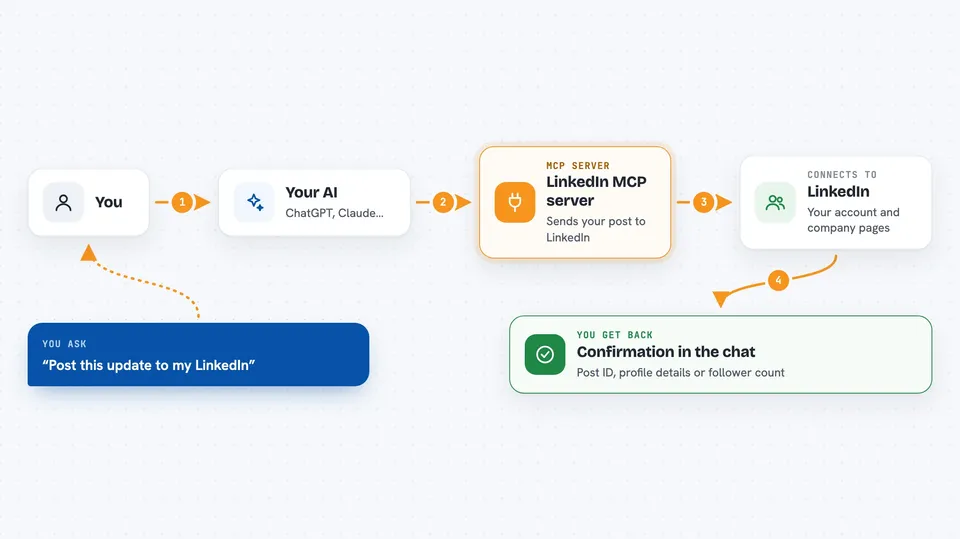
You ask your AI in plain words, for example to draft a post about your latest project. The AI writes the text, then uses this helper program to send it to LinkedIn through your account. The helper talks to LinkedIn on your behalf and reports back what happened. You get a short confirmation in the chat, usually with a link or ID for the new post. The same flow works for editing, deleting, uploading an image, or looking up your profile.
 Click to zoom
What you can do with it
- Publish a text, image, or article post to your LinkedIn feed
- Upload an image and attach it to a post in one go
- Edit the text or visibility of a post you already published
- Delete one of your LinkedIn posts
- Fetch your own profile details, like your name, email, and photo
- Look up a company page on LinkedIn by name or ID
- Check how many followers a company page has
Try asking your AI
- “Draft a LinkedIn post announcing my new project and publish it”
- “Share this article on LinkedIn with a short intro: https://example.com/my-article”
- “Edit my latest post to add a link to the docs”
- “Delete my last LinkedIn post”
What it gives back to you
You get answers in the chat, in normal sentences. For a new post, the AI tells you it was published and shows the post ID. For your profile, it lists your name, email, photo, and your LinkedIn ID. For a company lookup, it gives you the page details and the follower count as a number. Edits and deletes come back as a short confirmation.
Before you start
What you need
- Node.js version 18 or newer installed on your computer
- The Claude desktop app (or another AI app that supports MCP)
- A LinkedIn access token (a long code you generate once from LinkedIn's developer site; the README walks you through it)
- A LinkedIn Company Page, even a nearly empty one, because LinkedIn requires it before you can create a developer app
Good to know
It can publish, edit, and delete real posts on your LinkedIn account, so read the draft before you say yes, and remember your access token expires after 60 days.
Install it with your AI
Add LinkedIn MCP server to your AI, no technical skills needed
You don't install anything by hand. You copy one prompt, paste it into an AI that can work on your computer, and it checks, installs and connects the server for you, asking you when it needs something.
Sign in to get the install prompt
Members get a ready-made prompt that lets the Claude desktop app check LinkedIn MCP server, install it and connect it for them, step by step. You don't need any technical skills: you copy, paste and answer a few questions. Your connected AI can also find and install any of the 4,609 MCP servers here for you.
Who it's for
People who post on LinkedIn often, like founders, marketers, consultants, and job seekers who want to draft and publish without leaving their AI chat.




