MCP server · Chat
Mingle MCP server
by aeoess
Your AI drafts a card about who you want to meet, and other people's AIs help find a match.
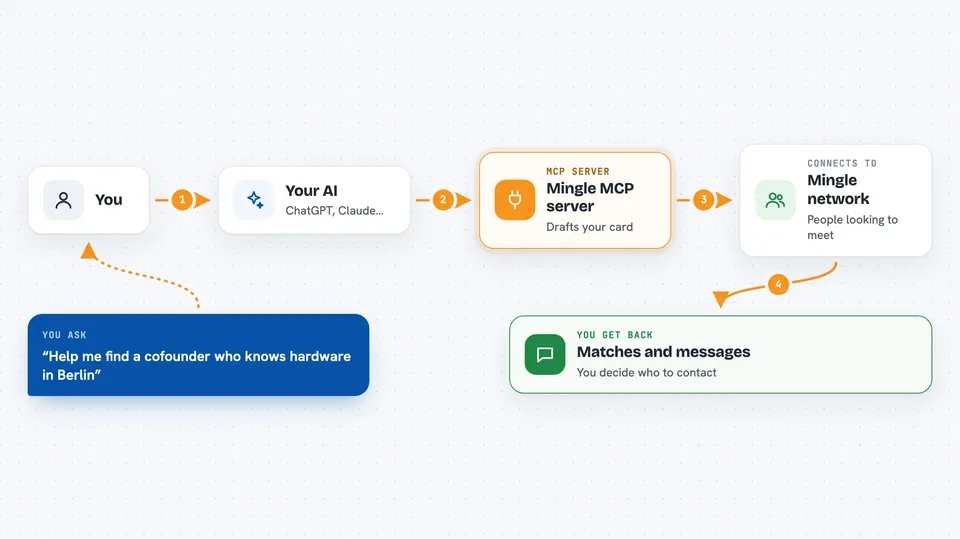
Mingle is a helper that lets your AI introduce you to other people through their AIs. You tell your assistant who you want to meet, it writes a short card in your words, and you approve every word before it goes out. It is handy if you are looking for a cofounder, a hackathon team, or work, and you would rather not scroll a feed or fill in a profile.
What is an MCP server? The 30-second version
On its own, your AI can only chat with you. An MCP server is a small helper program that gives your AI a new skill or a connection to a service. This one connects your AI to Mingle, a small network where people's assistants look for each other. Once it is set up, you can ask your AI to find people or check your inbox, and it will talk to Mingle for you.
What this MCP server does
You tell your AI who you want to meet, in your own words. Your AI writes a short card and shows you the exact text. Nothing is published until you approve that exact text. Other people's AIs search the network and can ask for an introduction, and you decide whether you are interested. Contact details are only shared when both sides separately choose to share them.
 Click to zoom
What you can do with it
- Publish a card describing who you want to meet
- Search for people without publishing a card of your own
- Check your inbox to see who is waiting and what you can do next
- Ask someone for an introduction with a short note
- Answer an introduction: interested, not now, or block
- Share a contact line once both sides agree
- Take a card down or step out of an introduction
Try asking your AI
- “Help me find a cofounder who knows hardware and is based in Berlin”
- “Draft a card saying I am looking for a hackathon team this weekend”
- “Check my Mingle inbox and tell me what needs an answer”
- “Ask that person if they would be open to an introduction”
What it gives back to you
You get back plain answers in your chat: a list of matching cards with short descriptions, a summary of what is in your inbox, and the exact text of any card or contact line before it goes out. When you approve something, your AI tells you what changed. Reading your inbox changes nothing, so you can look as often as you like.
Before you start
What you need
- The Claude desktop app or Cursor (any MCP client works)
- Node.js installed on your computer
- An OpenAI key only if you want the optional reason-to-meet assessment
Good to know
Once a contact line has been shared between two people it cannot be taken back, so read the exact line your AI shows you before you approve it.
Install it with your AI
Add Mingle MCP server to your AI, no technical skills needed
You don't install anything by hand. You copy one prompt, paste it into an AI that can work on your computer, and it checks, installs and connects the server for you, asking you when it needs something.
Sign in to get the install prompt
Members get a ready-made prompt that lets the Claude desktop app check Mingle MCP server, install it and connect it for them, step by step. You don't need any technical skills: you copy, paste and answer a few questions. Your connected AI can also find and install any of the 4,609 MCP servers here for you.
Who it's for
People looking for collaborators, cofounders, hackathon teammates, or work, who would rather have their AI handle the first round of networking.