
MCP server · Developer tools
iOS Agent Skill MCP server
Helps your AI build, review and test iPhone apps using Apple docs and Xcode tools.
This is a helper for people who want their AI to work on iPhone and iPad apps. It gives your AI Apple reference material, Swift code guidance and tools to build and check apps on your Mac. It is handy if you already use Xcode and want your AI to do more than just chat about code.
What is an MCP server? The 30-second version
On its own, your AI can only talk. An MCP server is a small helper program that gives your AI a new skill or a connection to an app or service. This one connects your AI to Apple development tools on your Mac, like Xcode and the simulator, plus a local library of Apple guides and Swift source. When you ask for something, your AI uses this helper to look things up or run commands for you.
What this MCP server does
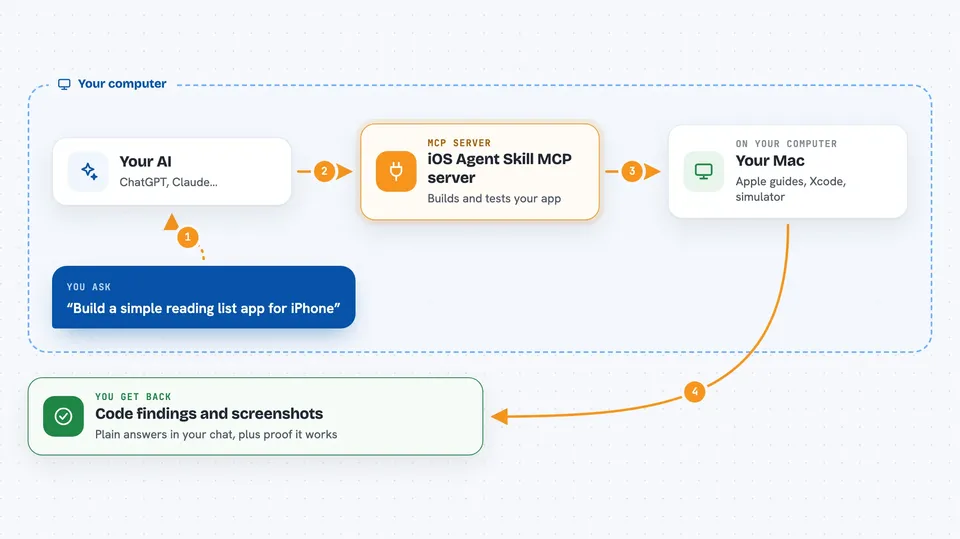
You ask your AI to build or review an iPhone app. Your AI talks to this helper, which searches local Apple guides and Swift code, writes a starter project, or runs Xcode commands. The helper can build the app, run tests, launch it in the simulator and take screenshots. Then your AI shows you the results, like code findings, screenshots or a summary of what it did.
 Click to zoom
What you can do with it
- Start a new Swift app from a short description
- Review your Swift code for common problems
- Search Apple guides and Swift source locally
- Build and run your app in the simulator
- Take screenshots as proof it works
- Generate app colors and an app icon
- Prepare a draft for a local release
Try asking your AI
- “Build a SwiftUI reading list with local storage, search and empty states. Reuse the local source library. Build it, run the tests and capture simulator screenshots.”
- “Review my existing iOS project at /Users/me/MyApp for concurrency and SwiftUI issues before I make changes.”
- “Generate a light, dark and high-contrast color set plus a 1024px app icon for my app called TrailNotes.”
- “Check my launch screen setup and tell me if anything looks wrong.”
What it gives back to you
You get back plain answers in your chat: lists of code findings with file locations, a summary of what was built or tested, and sometimes screenshots from the simulator. If it made changes, it tells you what it changed. It can also show a preview of a report before you decide to share it.
Before you start
What you need
- Node.js 20 or newer
- A Mac with Xcode installed to build and run apps
- The Claude desktop app, Claude Code, or another supported client
- XcodeGen if you want it to generate an Xcode project
Good to know
It can build and change files in your project and run commands on your Mac, so point it at the right folder and review what it does before you accept changes.
Install it with your AI
Add iOS Agent Skill MCP server to your AI, no technical skills needed
You don't install anything by hand. You copy one prompt, paste it into an AI that can work on your computer, and it checks, installs and connects the server for you, asking you when it needs something.
Sign in to get the install prompt
Members get a ready-made prompt that lets the Claude desktop app check iOS Agent Skill MCP server, install it and connect it for them, step by step. You don't need any technical skills: you copy, paste and answer a few questions. Your connected AI can also find and install any of the 4,361 MCP servers here for you.
Who it's for
iOS developers and anyone learning to build iPhone or iPad apps with an AI coding assistant.


