
MCP server · Security
AgentWard MCP server
by agentward-ai
Adds a security guard between your AI and its tools, so risky actions get blocked or need your approval.
AgentWard is a security helper for your AI assistant. It sits between your AI and the tools it uses, checks every action against rules you set, and blocks or pauses anything dangerous. It is handy if you let your AI read files, send emails, or run commands and want a safety net.
What is an MCP server? The 30-second version
On its own, your AI can only chat and call the tools it already has. An MCP server is a small helper program that gives your AI a new skill or a connection to something. AgentWard is a special kind of helper: it stands between your AI and its other tools, checking each request before it goes through. You set the rules once, and AgentWard enforces them every time your AI tries to do something.
What this MCP server does
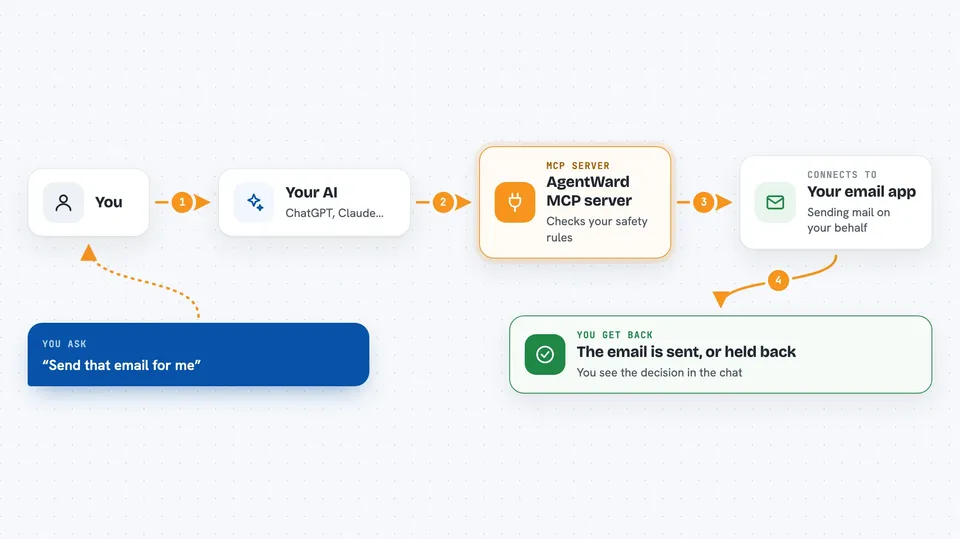
You ask your AI to do something, like read a file or send an email. Your AI sends that request through AgentWard instead of straight to the tool. AgentWard looks at your written rules and decides: allow it, block it, or ask you first. If it is allowed, the tool runs and you get the result. If it is blocked or waiting for approval, you see that in the chat and nothing happens until you say so.
 Click to zoom
What you can do with it
- Block dangerous commands like deleting files or running shell commands
- Require your approval before sensitive actions like sending email
- Limit which folders or websites a tool is allowed to touch
- Scan your existing AI tools and show a risk report
- Generate a starter set of safety rules based on what it finds
- Keep a log of every action your AI tried to take
- Check your rules against compliance frameworks like HIPAA or GDPR
Try asking your AI
- “Scan my AI tools and tell me which ones look risky”
- “Create a policy that blocks shell commands and asks me before sending email”
- “Show me the audit log of everything my AI did today”
- “Check my policy against HIPAA and tell me what is missing”
What it gives back to you
You get plain answers in the chat: a risk summary, a list of tools and their risk levels, a suggested policy file, or a report of what was blocked and allowed. The audit log shows a running list of every action with a timestamp and a decision. Reports can also be saved as files, like a markdown report or an HTML page.
Before you start
What you need
- Python installed on your computer
- At least one AI tool with MCP servers set up, like Claude Desktop, Cursor, VS Code, or Windsurf
- A terminal where you can type commands
Good to know
AgentWard can block or pause your AI's actions, so if something stops working, check whether your own policy is the reason.
Install it with your AI
Add AgentWard MCP server to your AI, no technical skills needed
You don't install anything by hand. You copy one prompt, paste it into an AI that can work on your computer, and it checks, installs and connects the server for you, asking you when it needs something.
Sign in to get the install prompt
Members get a ready-made prompt that lets the Claude desktop app check AgentWard MCP server, install it and connect it for them, step by step. You don't need any technical skills: you copy, paste and answer a few questions. Your connected AI can also find and install any of the 4,609 MCP servers here for you.
Who it's for
Anyone who lets an AI assistant use tools like files, email, or shell commands and wants a safety layer, especially in workplaces with compliance rules.



