
MCP server · Developer tools
Huawei AppGallery MCP server
by AgiMaulana
Let your AI upload app files, edit store listings, and submit your app for review on Huawei AppGallery.
This is a helper that connects your AI assistant to Huawei AppGallery Connect, the place where Android apps are published for Huawei phones. Once it is set up, you can ask your AI in plain words to update your store listing, upload a new app file, or send your app off for review. It is handy for app developers and small teams who publish to AppGallery and would rather not click through the web console every time.
What is an MCP server? The 30-second version
On its own, your AI can only chat. An MCP server is a small helper program that gives your AI one new skill or one new connection. This helper connects your AI to Huawei AppGallery Connect, so when you ask it to change your app description or upload a new build, it can actually go and do that for you. You still talk to your AI the same way. The helper just handles the behind-the-scenes work with Huawei.
What this MCP server does
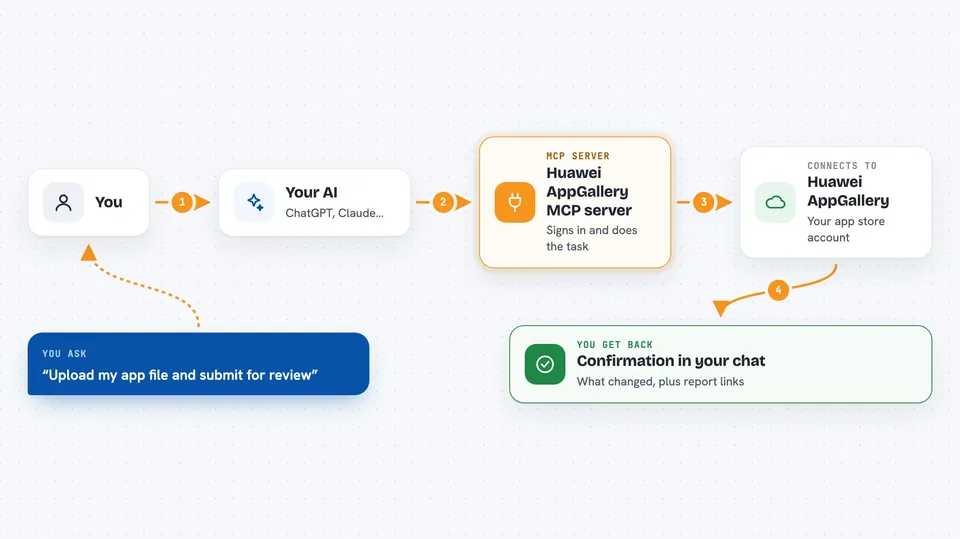
You tell your AI what you want, like uploading a new version of your app or changing the release notes. Your AI passes that request to this helper program. The helper signs in to Huawei AppGallery Connect with your credentials and carries out the action, such as attaching your app file to the draft or updating a language listing. Then it hands the result back to your AI, and your AI tells you what happened in the chat.
 Click to zoom
What you can do with it
- Look up your app's current store details, like name, description, category, and ratings
- Update your app description, support contacts, and other store information
- Add or change store listings for a specific language
- Upload an APK or AAB file and attach it to your app draft
- Submit your app for full release, phased release, scheduled release, or open testing
- Change a phased rollout, like moving it forward, rolling it back, or stopping it
- Get links to your download and installation reports
Try asking your AI
- “Show me the current store listing for my app.”
- “Upload /path/to/app-release.aab and submit it for a full release.”
- “Submit the app for a phased release to 20 percent of users.”
- “Update the English release notes to say bug fixes and performance improvements.”
What it gives back to you
You get answers in your chat, like a summary of your current app details, a confirmation that a file was uploaded, or a message that your app was submitted for review. When you ask for a report, it gives you a download link you can open in your browser. For changes it made, it tells you what it updated so you can double-check.
Before you start
What you need
- A Huawei AppGallery Connect account with the App manager role
- Connect API credentials (a Client ID and Client Secret) from AppGallery Connect
- Python installed if you set it up manually, or an MCP client that can add it from the registry
Good to know
This helper can change your live store listing and submit your app for review, so double-check what your AI is about to do before you say yes.
Install it with your AI
Add Huawei AppGallery MCP server to your AI, no technical skills needed
You don't install anything by hand. You copy one prompt, paste it into an AI that can work on your computer, and it checks, installs and connects the server for you, asking you when it needs something.
Sign in to get the install prompt
Members get a ready-made prompt that lets the Claude desktop app check Huawei AppGallery MCP server, install it and connect it for them, step by step. You don't need any technical skills: you copy, paste and answer a few questions. Your connected AI can also find and install any of the 4,609 MCP servers here for you.
Who it's for
Android app developers and small teams who publish or update apps on Huawei AppGallery and want to do it by chatting instead of clicking through the web console.



