
MCP server · Notes
ZipMem MCP server
by ahmetakyurt
Give your coding AI a long-term memory file so it remembers your project across sessions.
ZipMem is a small helper that gives your coding AI a lasting memory for one project. It saves the important parts of your work, like the design decisions and the lessons learned, into a single file on your own computer. It is handy if you use a terminal coding assistant and you are tired of re-explaining your project every time you start a new session.
What is an MCP server? The 30-second version
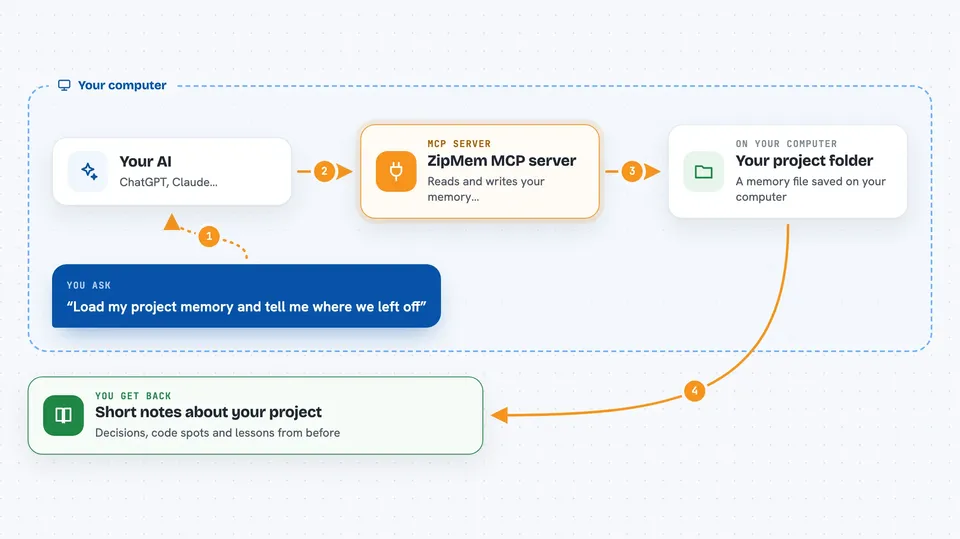
On its own, your AI can only chat about what is in front of it right now. An MCP server is a small helper program that gives your AI a new skill or a connection to something else. This one connects your AI to a memory file stored in your project folder, called ZipMem. Once it is set up, your AI can look up what happened before and write down what matters now, so you do not have to repeat yourself.
What this MCP server does
You set ZipMem up once inside a project folder. From then on, when you start a session, your AI reads the memory file and gets back the key context in a few words. While you work, it can quietly save small checkpoints so nothing is lost if the window closes. When you say you are done, it writes a tidy summary into the memory file, keeping the big picture and dropping the noise. Next time, it picks up where you left off.
 Click to zoom
What you can do with it
- Remember your project's design decisions across sessions
- Recall lessons learned from past bugs and fixes
- Keep a short list of code locations instead of pasting whole files
- Save progress automatically at milestones so a crash does not wipe it
- Show a status summary of what is stored in memory
- Recover context after an abrupt exit or a closed terminal
- Work fully offline with no cloud account or API key
Try asking your AI
- “Load my project memory and tell me where we left off”
- “Save and compact this session, we are done for today”
- “Checkpoint this progress before I try the next change”
- “What lessons have we learned about the payment flow in this project”
What it gives back to you
You get back short, readable notes: a list of blueprints, code anchors, and lessons from earlier sessions. The AI shows these in the chat as plain text, so you can see what it remembered. When it saves, it replies with a one-line confirmation that the memory was updated. If a previous session ended suddenly, you also see a small recovery banner telling you what changed.
Before you start
What you need
- Node.js version 18 or newer installed on your computer
- A terminal coding assistant that supports MCP, such as Claude Code
- A project folder where you want the memory to live
Good to know
It writes to a memory file inside your project folder, so check that the folder is the right one before you rely on it.
Install it with your AI
Add ZipMem MCP server to your AI, no technical skills needed
You don't install anything by hand. You copy one prompt, paste it into an AI that can work on your computer, and it checks, installs and connects the server for you, asking you when it needs something.
Sign in to get the install prompt
Members get a ready-made prompt that lets the Claude desktop app check ZipMem MCP server, install it and connect it for them, step by step. You don't need any technical skills: you copy, paste and answer a few questions. Your connected AI can also find and install any of the 4,361 MCP servers here for you.
Who it's for
Developers and anyone who uses a terminal coding assistant on long projects and wants it to remember context between sessions.


