
MCP server · Developer tools
Primitiv MCP server
by AI-by-design
Lets your AI read your project's design rules so it reuses your real components instead of inventing new ones.
Primitiv is a helper that gathers your design rules from your code, Figma, and Storybook into one place, then lets your AI read them. It is handy if you work on a product with a design system and you are tired of your AI suggesting buttons and colors that do not match what your team already uses. It runs on your own computer, so your code stays with you.
What is an MCP server? The 30-second version
On its own, your AI can only chat with you. An MCP server is a small helper program that gives your AI a new skill or a connection to something, and here it connects your AI to your project's design rules. Primitiv reads your code, Figma, and Storybook, works out the real rules, and then answers your AI when it asks what components, tokens, and patterns exist. So when you ask for a new screen, your AI can look up what already exists instead of making something up.
What this MCP server does
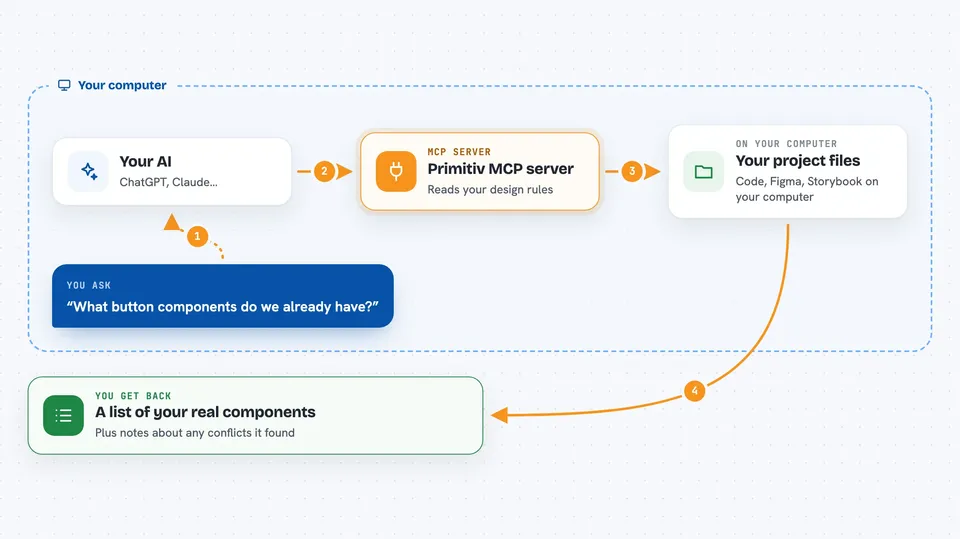
You ask your AI to build or change something in your project. Your AI asks Primitiv what components, tokens, and rules your project already has. Primitiv looks at your code, Figma, and Storybook, and hands back the current picture, including any places where those sources disagree. Your AI then uses that to write code that fits your product, and it can flag conflicts it noticed. Everything is read-only, so Primitiv never changes your files.
 Click to zoom
What you can do with it
- Look up which components and tokens already exist in your project
- Check whether a component name or prop value is allowed before using it
- See where your code, Figma, and Storybook disagree about a design rule
- Spot hardcoded values that should have used a token instead
- Read the reasoning behind a design decision when it is recorded
- Run a check in your build pipeline to catch design drift early
What it gives back to you
You get answers in plain chat: lists of components, tokens, and rules, plus short notes about any conflicts or drift it found. If you ask about a specific component, it can show the allowed values and where it is used. It does not change anything, so nothing in your project is edited behind your back.
Before you start
What you need
- Node.js installed on your computer
- A project with code, and ideally Figma or Storybook, that Primitiv can scan
- An AI tool that supports MCP, like Claude Desktop or a compatible editor
Good to know
Primitiv is read-only and does not change your files, but it does read your project's code, so be mindful if your code contains secrets or private material.
Install it with your AI
Add Primitiv MCP server to your AI, no technical skills needed
You don't install anything by hand. You copy one prompt, paste it into an AI that can work on your computer, and it checks, installs and connects the server for you, asking you when it needs something.
Sign in to get the install prompt
Members get a ready-made prompt that lets the Claude desktop app check Primitiv MCP server, install it and connect it for them, step by step. You don't need any technical skills: you copy, paste and answer a few questions. Your connected AI can also find and install any of the 4,609 MCP servers here for you.
Who it's for
Designers, front-end developers, and product teams who work with a design system and want their AI to stay on-brand.



