MCP server · Developer tools
Remote OpenClaw MCP server
Let your AI search a big directory of MCP servers, skills and plugins and hand you install commands.

This is a small helper that lets your AI search the Remote OpenClaw directory for you. That directory lists thousands of MCP servers, agent skills and plugins. It is handy if you keep hearing about tools you could add to your AI but do not want to open a browser and dig around every time.
What is an MCP server? The 30-second version
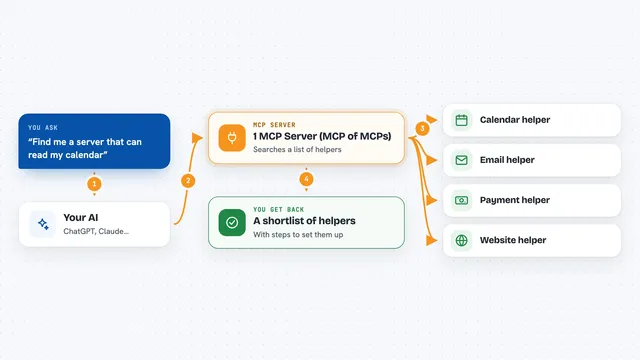
On its own, your AI can only chat with you. An MCP server is a small helper program that gives your AI a new skill or a connection to an app or service. This one connects your AI to the Remote OpenClaw directory. So when you ask for a tool, your AI can look it up there and bring the answer back into the chat.
What this MCP server does
You ask your AI something like find me an MCP server for Postgres. Your AI passes that question to this helper. The helper searches the Remote OpenClaw directory and gets the matching results. Then your AI shows you the names, short descriptions, links and install commands in the chat. You never have to leave your editor or open a browser tab.
 Click to zoom
What you can do with it
- Search for an MCP server that fits a task you have in mind
- Search for a reusable agent skill and get its install command
- Search for plugins and marketplace packages
- See names, descriptions, links and popularity for each result
- Get results ranked by stars or installs so the popular ones show up first
- Do all of this from inside your editor without opening a browser
Try asking your AI
- “Find me an MCP server for Postgres.”
- “Search Remote OpenClaw for a PDF skill.”
- “What plugins are there for testing?”
- “Show me MCP servers for scraping websites.”
What it gives back to you
You get a list of matching results right in the chat. Each one comes with its name, a short description, a link, and how popular it is. For skills you also get the install command. Your AI can then help you pick one or set it up.
Before you start
What you need
- An MCP client that supports MCP servers, like Claude Code, Cursor or Windsurf
- Node.js installed on your computer so the npx command can run
- No API key needed
Good to know
It only searches a public directory and reads results, so it does not change anything on your computer, but the install commands it returns come from that directory and are worth a quick look before you run them.
Install it with your AI
Add Remote OpenClaw MCP server to your AI, no technical skills needed
You don't install anything by hand. You copy one prompt, paste it into an AI that can work on your computer, and it checks, installs and connects the server for you, asking you when it needs something.
Sign in to get the install prompt
Members get a ready-made prompt that lets the Claude desktop app check Remote OpenClaw MCP server, install it and connect it for them, step by step. You don't need any technical skills: you copy, paste and answer a few questions. Your connected AI can also find and install any of the 4,609 MCP servers here for you.
Who it's for
People who use an AI coding or writing assistant and want to find new tools, skills and plugins without leaving their editor.