
MCP server · Developer tools
Nutanix AIops MCP server
by AIops-tools
Lets your AI look up and manage Nutanix Prism Central clusters, VMs, storage and alerts for you.
This is a helper that connects your AI assistant to Nutanix Prism Central, the control panel for Nutanix clusters and virtual machines. Once it is set up, you can ask your AI in plain words to check cluster health, list VMs, or take a snapshot, and it goes and does that for you. It is handy for IT admins and infrastructure teams who already work with Nutanix every day.
What is an MCP server? The 30-second version
On its own, your AI can only chat. It cannot see your Nutanix setup or change anything there. An MCP server is a small helper program that gives your AI a new skill, and here that skill is talking to Nutanix Prism Central. You install this helper once, connect it with your Nutanix account, and from then on your AI can look things up or make changes in Prism Central when you ask.
What this MCP server does
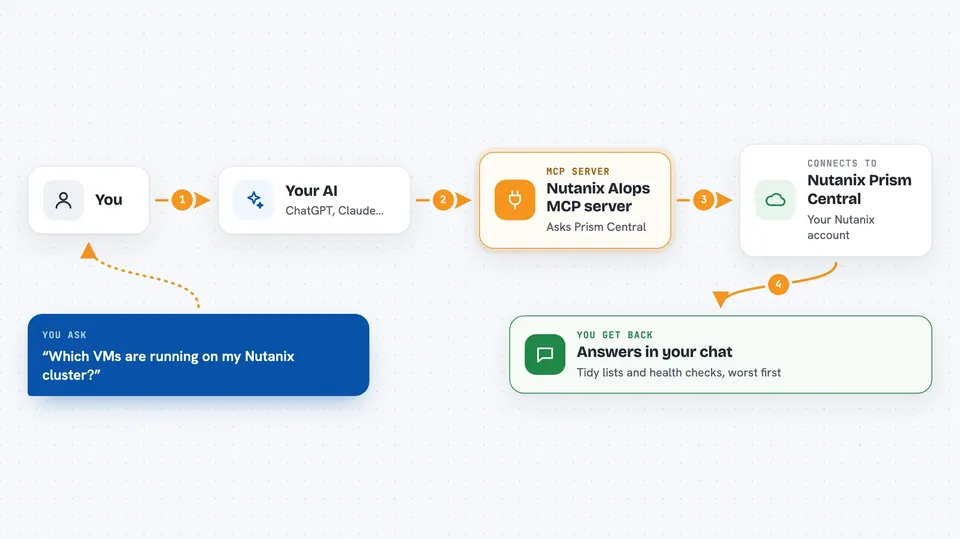
You type a request to your AI, like asking which VMs are running or whether any storage is nearly full. Your AI passes that request to this helper program. The helper logs into Prism Central using your Nutanix account and asks it the right question. Prism Central sends back the answer, and the helper hands it to your AI, which explains it to you in the chat. For changes, like powering a VM on or taking a snapshot, the helper does the same thing but tells Prism Central to make the change, and it writes down what it did.
 Click to zoom
What you can do with it
- List clusters, hosts and virtual machines, including both AHV and ESXi guests
- Check cluster health and get a worst-first report on anything that looks wrong
- Power a VM on, off, reboot it, or shut it down cleanly from inside the guest
- Create, update, clone or delete virtual machines
- Take snapshots and restore a VM from one
- See active alerts, group them by severity, and acknowledge or resolve them
- Check storage and capacity to see how much room is left
Try asking your AI
- “List all VMs on my Nutanix cluster and tell me which ones are powered off”
- “Run a cluster health check and show me the worst problems first”
- “Take a snapshot of the VM called web-prod-01 before I patch it”
- “Show me any unacknowledged critical alerts from the last day”
What it gives back to you
You get answers in the chat, not raw files. Lists come back as tidy tables or bullet points, like all your VMs with their power state and host. Health checks come back as a ranked list of findings, worst first, with the number or state that triggered each one. When the helper makes a change, it tells you what it did, and it records the action in an audit log on your machine.
Before you start
What you need
- A Nutanix Prism Central account with REST API rights, not just web login access
- The hostname or IP address of your Prism Central and the port (usually 9440)
- The username and password for that account
- Python and the uv tool installed, or the nutanix-aiops package installed with pipx
Good to know
It can make real changes to your Nutanix setup, including deleting VMs and restoring snapshots, so check with your team before letting your AI run those actions.
Install it with your AI
Add Nutanix AIops MCP server to your AI, no technical skills needed
You don't install anything by hand. You copy one prompt, paste it into an AI that can work on your computer, and it checks, installs and connects the server for you, asking you when it needs something.
Sign in to get the install prompt
Members get a ready-made prompt that lets the Claude desktop app check Nutanix AIops MCP server, install it and connect it for them, step by step. You don't need any technical skills: you copy, paste and answer a few questions. Your connected AI can also find and install any of the 4,609 MCP servers here for you.
Who it's for
IT admins, infrastructure engineers and support teams who manage Nutanix clusters and want to ask their AI for quick answers or routine changes.



