MCP server · Coding
FlowProof MCP server
by ajibadedapo
Let your AI run bioinformatics pipelines and hand back results with a verifiable recipe and checksums.
FlowProof is a helper that lets your AI assistant run bioinformatics pipelines for you, like read quality checks or variant calling. Every run comes with a small record showing exactly which pipeline version, tools, and settings were used, plus checksums of the files. It is handy for researchers and lab scientists who want results they can actually check and reproduce.
What is an MCP server? The 30-second version
On its own, your AI can only chat. An MCP server is a small helper program that gives your AI a new skill or a connection to another tool. FlowProof is that helper for bioinformatics pipelines: once it is connected, your AI can start a pipeline run, check its status, and pull back the results and provenance record for you. You just ask in plain words, and FlowProof does the technical work behind the scenes.
What this MCP server does
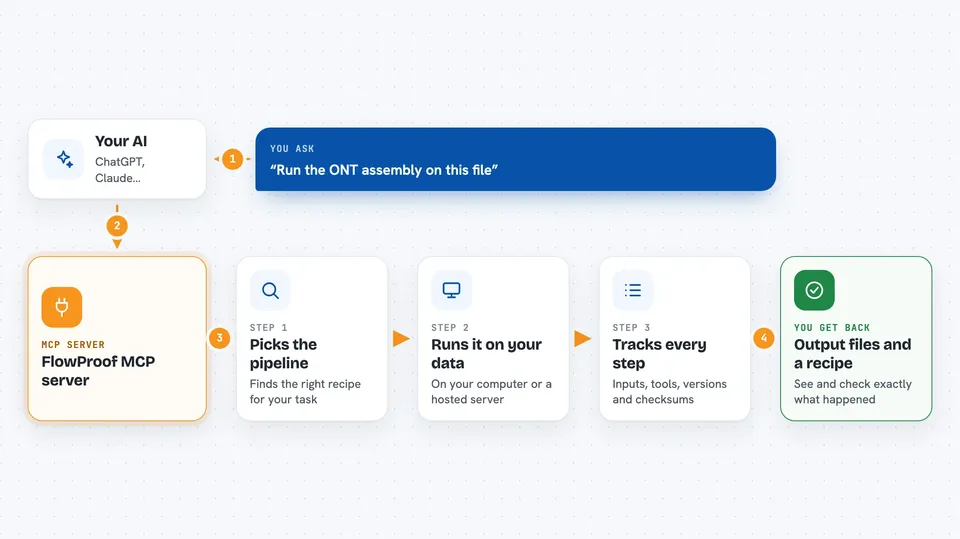
You ask your AI something like run the ONT assembly on this file. Your AI passes that request to FlowProof. FlowProof looks up the pipeline, runs it either on your own computer or on a hosted server, and keeps track of every input, output, tool version, and checksum along the way. When the run finishes, FlowProof hands back a list of output files and a provenance record so you can see and verify exactly what happened.
 Click to zoom
What you can do with it
- List the pipelines FlowProof knows about
- Describe what inputs and settings a pipeline needs
- Run a pipeline on a file you have, or on a bundled sample
- Check whether a run is still going or finished
- Get the list of output files with their checksums
- Fetch the provenance record for a finished run
- Reproduce a previous run byte for byte using its record
Try asking your AI
- “List the FlowProof pipelines”
- “Describe the rnaseq pipeline”
- “Run ont-read-stats with no input”
- “Show me the provenance for my last run”
What it gives back to you
You get answers in the chat: a list of pipelines, a description of a pipeline's inputs and outputs, a run id when you start something, a status update, and a manifest of output files with their checksums. For finished runs you also get the provenance record, which lists the pipeline version, container images, tool versions, parameters, and SHA-256 checksums of every input and output. It reads like a short report you can save or share.
Before you start
What you need
- Python and the uv tool installed on your computer if you run it locally
- Nextflow and Docker installed if you want to run real pipelines (the built-in sample works without them)
- A bearer token from the FlowProof cloud service if you use the hosted version
Good to know
Pipelines can be heavy on your computer and may take a long time or use a lot of disk space, so check before running big jobs on your own machine.
Install it with your AI
Add FlowProof MCP server to your AI, no technical skills needed
You don't install anything by hand. You copy one prompt, paste it into an AI that can work on your computer, and it checks, installs and connects the server for you, asking you when it needs something.
Sign in to get the install prompt
Members get a ready-made prompt that lets the Claude desktop app check FlowProof MCP server, install it and connect it for them, step by step. You don't need any technical skills: you copy, paste and answer a few questions. Your connected AI can also find and install any of the 4,361 MCP servers here for you.
Who it's for
Bioinformaticians, lab scientists, and research groups who want AI help running pipelines while keeping results reproducible and checkable.