MCP server · Security
MCP AI SOC Sher
by akramIOT
Ask your AI security questions in plain words and it turns them into database queries.
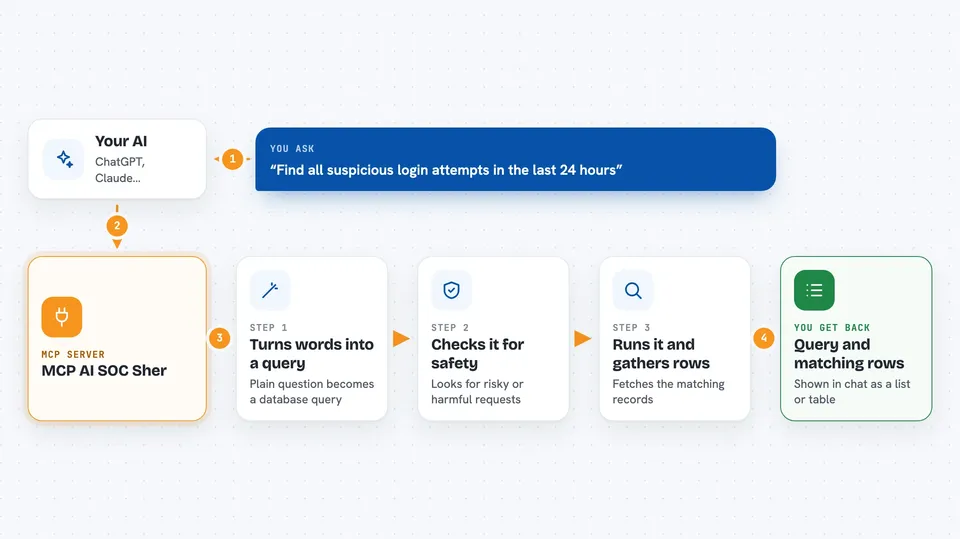
This is a helper that lets your AI turn plain English questions about security into database queries. It is made for people who watch over computer systems and want to check logs or look for suspicious activity without writing SQL themselves. If you work in a security team or just want to keep an eye on your systems, this is for you.
What is an MCP server? The 30-second version
On its own, your AI can only chat. An MCP server is a small helper program that gives your AI a new skill or a connection to an app or service. This one connects your AI to databases like SQLite or Snowflake, so it can look things up for you. When you ask a question, the AI uses this helper to talk to the database and bring back answers.
What this MCP server does
You type a question like 'find all suspicious login attempts in the last 24 hours'. The AI sends that to this helper. The helper turns your words into a proper database query, checks it for safety, runs it, and sends the results back. You get the query it wrote and the rows it found, all in the chat.
 Click to zoom
What you can do with it
- Turn plain English questions into database queries
- Check queries for security risks before running them
- Connect to SQLite or Snowflake databases
- Monitor access to sensitive tables
- Detect possible SQL injection attempts
- Stream results back as they are found
Try asking your AI
- “Find all suspicious login attempts in the last 24 hours”
- “Show me users who accessed the payroll table yesterday”
- “List failed logins from outside the office network this week”
- “Which accounts have not logged in for 90 days”
What it gives back to you
You get back the SQL query it wrote and the rows it found from the database. If you asked for a summary, it can show that too. The results appear in the chat as a list or table. It also tells you if it found any security concerns in the query.
Before you start
What you need
- An OpenAI API key (a kind of password for AI services; you get one from OpenAI)
- A database connection string (like sqlite:///your_database.db or a Snowflake connection)
- Python installed on your computer
Good to know
It can run queries against your database, so make sure the database account it uses only has the access it needs.
Install it with your AI
Add MCP AI SOC Sher to your AI, no technical skills needed
You don't install anything by hand. You copy one prompt, paste it into an AI that can work on your computer, and it checks, installs and connects the server for you, asking you when it needs something.
Sign in to get the install prompt
Members get a ready-made prompt that lets the Claude desktop app check MCP AI SOC Sher, install it and connect it for them, step by step. You don't need any technical skills: you copy, paste and answer a few questions. Your connected AI can also find and install any of the 4,361 MCP servers here for you.
Who it's for
Security analysts, IT staff, and anyone who needs to check database logs or find suspicious activity without writing SQL.